PC 용 Steel Profiles
- 카테고리: Reference
- 최근 업데이트: 2026-10-20
- 현재 버전: 6.0.3
- 파일 크기: 28.10 MB
- 개발자: Matteo Rossi
- 호환성: 필요 Windows XP, Windows Vista, Windows 7, Windows 8, Windows 8.1 and Windows 10, Windows 11






PC에서 Steel Profiles 용 호환 APK 다운로드
| 다운로드 | 개발자 | 평점 | 점수 | 현재 버전 | 성인 랭킹 |
|---|---|---|---|---|---|
| ↓ PC용 APK 다운로드 | Matteo Rossi | 1 | 5 | 6.0.3 | 4+ |
에뮬레이터의 중요성은 컴퓨터에서 안드로이드 환경을 흉내 내고 안드로이드 폰을 구입하지 않고도 안드로이드 앱을 설치하고 실행하는 것을 매우 쉽게 만들어주는 것입니다. 누가 당신이 두 세계를 즐길 수 없다고 말합니까? 우선 아래에있는 에뮬레이터 앱을 다운로드 할 수 있습니다.
A. Nox App . OR
B. Bluestacks App .
Bluestacks는 매우 대중적이므로 개인적으로 "B"옵션을 사용하는 것이 좋습니다. 문제가 발생하면 Google 또는 Naver.com에서 좋은 해결책을 찾을 수 있습니다.
Bluestacks.exe 또는 Nox.exe를 성공적으로 다운로드 한 경우 컴퓨터의 다운로드 폴더 또는 다운로드 한 파일을 일반적으로 저장하는 곳으로 이동하십시오.
찾으면 클릭하여 응용 프로그램을 설치하십시오. PC에서 설치 프로세스를 시작해야합니다.
다음을 클릭하여 EULA 라이센스 계약에 동의하십시오.
응용 프로그램을 설치하려면 화면 지시문을 따르십시오.
위 사항을 올바르게 수행하면 소프트웨어가 성공적으로 설치됩니다.
이제 설치 한 에뮬레이터 애플리케이션을 열고 검색 창을 찾으십시오. 지금 입력하십시오. - Steel Profiles 앱을 쉽게 볼 수 있습니다. 그것을 클릭하십시오. 응용 프로그램 창이 열리고 에뮬레이터 소프트웨어에 응용 프로그램이 표시됩니다. 설치 버튼을 누르면 응용 프로그램이 다운로드되기 시작합니다. 이제 우리는 모두 끝났습니다.
그런 다음 "모든 앱"아이콘이 표시됩니다.
클릭하면 설치된 모든 응용 프로그램이 포함 된 페이지로 이동합니다.
당신은 Steel Profiles 상. 그것을 클릭하고 응용 프로그램 사용을 시작하십시오.
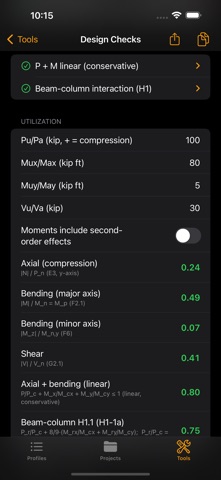
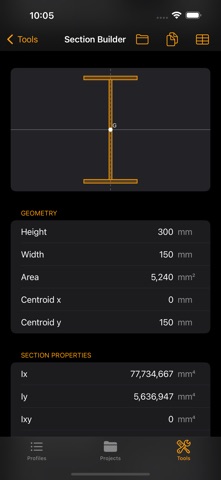
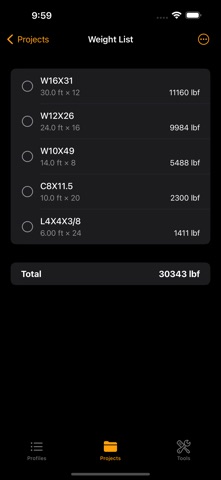
Steel Profiles is the steel section reference for structural engineers, fabricators, detailers and contractors. Look up nearly 10,000 sections from six international standards, check them to Eurocode 3 or AISC 360, and keep your take-offs in sync across iPhone, iPad and Mac. NEW IN 6.0 - Design checks to EN 1993-1-1 and AISC 360-22: classification, axial force, bending, shear, flexural and lateral-torsional buckling, beam-column interaction, with every formula shown - Section Builder: welded I and box sections, built-up channels, tees and angles, plated beams, with full properties - Bolts: metric M8 to M64 and imperial 1/2" to 1 1/2", with shear, tension, bearing and slip resistance - Steel grades: EN 10025, EN 10210/10219, ASTM, CSA, AS/NZS and JIS, with strengths by thickness - iCloud sync of favorites, projects and saved sections - Bulb flats (HP) to EN 10067 - PDF and CSV export, imperial fractions and smarter search (HEA 200, HEA200, W10x49) SECTION PROPERTIES - Complete geometric and structural properties with descriptions and a cross-section drawing - Filters by area, weight, moment of inertia, section moduli and radii of gyration - Favorites, Spotlight search and Siri TOOLS - Equivalent Finder: the closest section in another standard, optionally from the same shape family - Comparator: up to three sections side by side - Weight lists organized in projects and folders, exported to CSV - Unit converter for engineering units LIBRARIES USA: AISC 16 and AISC 16 SI (16th Edition), AISC 14 and AISC 14 SI (14th Edition) Canada: CISC 92 Europe: IPE, HE (HEA, HEB, HEM, HEAA), HD, HL, HP, IPN, UPE, UPN, angles, tees, bulb flats, hot-finished and cold-formed hollow sections United Kingdom: UB, UC, UBP, J, PFC, T, angles, hollow sections Australia / New Zealand: AS/NZS FREE AND PAID The free download includes dimensions for every library, the weight calculator, Section Builder, bolts, steel grades, the unit converter and iCloud sync. Unlock a library to see its full properties and run design checks on its sections, or get All Libraries for everything. Results are design aids for preliminary sizing and must be verified by a qualified engineer.