PC 용 AirDisk: File Transfer
- 카테고리: Productivity
- 최근 업데이트: 2026-10-29
- 현재 버전: 7.12.7
- 파일 크기: 56.54 MB
- 개발자: Felix Yew
- 호환성: 필요 Windows XP, Windows Vista, Windows 7, Windows 8, Windows 8.1 and Windows 10, Windows 11



PC에서 AirDisk: File Transfer 용 호환 APK 다운로드
| 다운로드 | 개발자 | 평점 | 점수 | 현재 버전 | 성인 랭킹 |
|---|---|---|---|---|---|
| ↓ PC용 APK 다운로드 | Felix Yew | 1 | 5 | 7.12.7 | 4+ |
에뮬레이터의 중요성은 컴퓨터에서 안드로이드 환경을 흉내 내고 안드로이드 폰을 구입하지 않고도 안드로이드 앱을 설치하고 실행하는 것을 매우 쉽게 만들어주는 것입니다. 누가 당신이 두 세계를 즐길 수 없다고 말합니까? 우선 아래에있는 에뮬레이터 앱을 다운로드 할 수 있습니다.
A. Nox App . OR
B. Bluestacks App .
Bluestacks는 매우 대중적이므로 개인적으로 "B"옵션을 사용하는 것이 좋습니다. 문제가 발생하면 Google 또는 Naver.com에서 좋은 해결책을 찾을 수 있습니다.
Bluestacks.exe 또는 Nox.exe를 성공적으로 다운로드 한 경우 컴퓨터의 다운로드 폴더 또는 다운로드 한 파일을 일반적으로 저장하는 곳으로 이동하십시오.
찾으면 클릭하여 응용 프로그램을 설치하십시오. PC에서 설치 프로세스를 시작해야합니다.
다음을 클릭하여 EULA 라이센스 계약에 동의하십시오.
응용 프로그램을 설치하려면 화면 지시문을 따르십시오.
위 사항을 올바르게 수행하면 소프트웨어가 성공적으로 설치됩니다.
이제 설치 한 에뮬레이터 애플리케이션을 열고 검색 창을 찾으십시오. 지금 입력하십시오. - AirDisk: File Transfer 앱을 쉽게 볼 수 있습니다. 그것을 클릭하십시오. 응용 프로그램 창이 열리고 에뮬레이터 소프트웨어에 응용 프로그램이 표시됩니다. 설치 버튼을 누르면 응용 프로그램이 다운로드되기 시작합니다. 이제 우리는 모두 끝났습니다.
그런 다음 "모든 앱"아이콘이 표시됩니다.
클릭하면 설치된 모든 응용 프로그램이 포함 된 페이지로 이동합니다.
당신은 AirDisk: File Transfer 상. 그것을 클릭하고 응용 프로그램 사용을 시작하십시오.
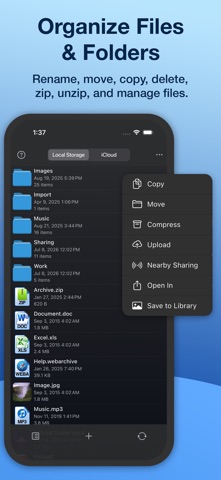
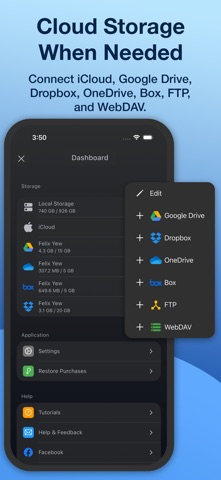
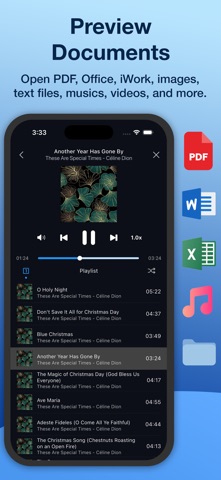
AirDisk is a wireless file transfer and file manager app that helps you move photos, videos, folders, documents, music, and archives between your phone, tablet, and computer. Use local WiFi transfer to access your phone files from a computer browser. Open AirDisk, connect your computer to the same WiFi network, enter the browser address shown in the app, and start uploading or downloading files. No cable, no iTunes, no desktop software, and no cloud upload required for local WiFi transfer. AirDisk is useful when you want to: • Transfer photos from iPhone or iPad to Windows PC • Move videos from phone to computer • Send documents from computer to phone • Transfer files over WiFi using a browser • Access phone files without installing desktop software • Organize folders, media, documents, and archives • Manage files locally on your mobile device • Use cloud storage when needed Key features: Wireless WiFi File Transfer Transfer files between your phone and computer over the same local WiFi network. Use your computer browser to upload, download, and manage files. Photo and Video Transfer Move photos and videos from your phone to your computer without using a cable. This is helpful for backing up camera roll media, moving large videos, or freeing up phone storage. Browser-Based Transfer Access your files from a Mac, Windows PC, Chromebook, or other computer with a web browser. No desktop companion app is required for local WiFi transfer. File Manager Create folders, rename files, move files, copy files, delete files, organize folders, and manage your local storage from one place. Document Viewer Preview common document formats including PDF, Microsoft Office files, Apple iWork files, images, text files, and more. Archive Tools Zip, unzip, and manage archive files directly inside the app. Music and Video Player Play music and videos stored in AirDisk with built-in media player support. Cloud Storage Support Connect to iCloud, Google Drive, Dropbox, OneDrive, Box, FTP, and WebDAV when you want to access or manage cloud files. Privacy and Local Transfer For local WiFi transfer, your files are transferred through your local network instead of requiring cloud upload. Your phone and computer must be connected to the same WiFi network, and AirDisk should stay open while transferring files. AirDisk is designed for people who want a practical way to transfer files wirelessly, manage documents, move photos and videos, and access phone files from a computer browser. Discover how AirDisk simplifies file management and boosts productivity. • Learn more: https://airdisk.app • Terms of Service: https://airdisk.app/terms-of-service • Privacy Policy: https://airdisk.app/privacy-policy