
PC 용 Card Mate Pro- credit cards
- 카테고리: Lifestyle
- 최근 업데이트: 2021-02-22
- 현재 버전: 3.4.7
- 파일 크기: 40.68 MB
- 개발자: Qiwen Zhang
- 호환성: 필요 Windows XP, Windows Vista, Windows 7, Windows 8, Windows 8.1 and Windows 10, Windows 11



PC에서 Card Mate Pro- credit cards 용 호환 APK 다운로드
| 다운로드 | 개발자 | 평점 | 점수 | 현재 버전 | 성인 랭킹 |
|---|---|---|---|---|---|
| ↓ PC용 APK 다운로드 | Qiwen Zhang | 3 | 4.33333 | 3.4.7 | 4+ |
호환되는 PC 앱 또는 대안 확인
| 소프트웨어 | 다운로드 | 평점 | 개발자 |
|---|---|---|---|
| Card Mate Pro- credit cards |
PC 앱 받기 | 4.33333/5 3 리뷰 4.33333 |
Qiwen Zhang |
에뮬레이터의 중요성은 컴퓨터에서 안드로이드 환경을 흉내 내고 안드로이드 폰을 구입하지 않고도 안드로이드 앱을 설치하고 실행하는 것을 매우 쉽게 만들어주는 것입니다. 누가 당신이 두 세계를 즐길 수 없다고 말합니까? 우선 아래에있는 에뮬레이터 앱을 다운로드 할 수 있습니다.
A. Nox App . OR
B. Bluestacks App .
Bluestacks는 매우 대중적이므로 개인적으로 "B"옵션을 사용하는 것이 좋습니다. 문제가 발생하면 Google 또는 Naver.com에서 좋은 해결책을 찾을 수 있습니다.
Bluestacks.exe 또는 Nox.exe를 성공적으로 다운로드 한 경우 컴퓨터의 다운로드 폴더 또는 다운로드 한 파일을 일반적으로 저장하는 곳으로 이동하십시오.
찾으면 클릭하여 응용 프로그램을 설치하십시오. PC에서 설치 프로세스를 시작해야합니다.
다음을 클릭하여 EULA 라이센스 계약에 동의하십시오.
응용 프로그램을 설치하려면 화면 지시문을 따르십시오.
위 사항을 올바르게 수행하면 소프트웨어가 성공적으로 설치됩니다.
이제 설치 한 에뮬레이터 애플리케이션을 열고 검색 창을 찾으십시오. 지금 입력하십시오. - Card Mate Pro- credit cards 앱을 쉽게 볼 수 있습니다. 그것을 클릭하십시오. 응용 프로그램 창이 열리고 에뮬레이터 소프트웨어에 응용 프로그램이 표시됩니다. 설치 버튼을 누르면 응용 프로그램이 다운로드되기 시작합니다. 이제 우리는 모두 끝났습니다.
그런 다음 "모든 앱"아이콘이 표시됩니다.
클릭하면 설치된 모든 응용 프로그램이 포함 된 페이지로 이동합니다.
당신은 Card Mate Pro- credit cards 상. 그것을 클릭하고 응용 프로그램 사용을 시작하십시오.
Mac OS 에서 Card Mate Pro- credit cards 다운로드
| 다운로드 | 개발자 | 점수 | 현재 버전 | 성인 랭킹 |
|---|---|---|---|---|
| ₩3,900 - Mac 에서 다운로드 | Qiwen Zhang | 4.33333 |
3.4.7 | 4+ |
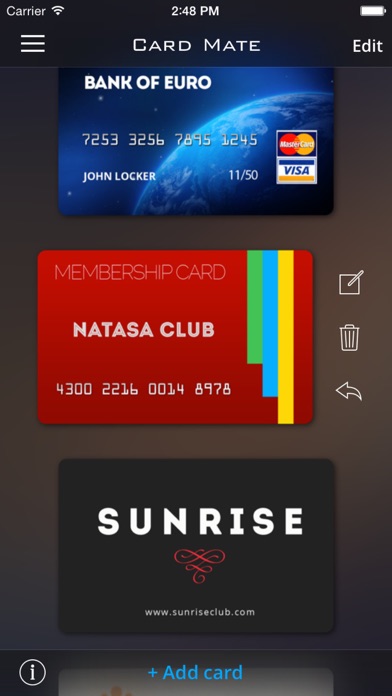
Too many cards filled in your wallet? Don't know which card should put in your wallet? Or were you in a need of your credit card details while on the go without your wallet? Do you think it's not safe to carry all your cards in your real wallet? This is where Card Mate as a secure card manager comes handy. * Card Mate can auto scan and save your card images, and you can store plenty of addition information with these card images. Scan card process is very simple and quick. Card Mate can store your Credit Cards, Bank Cards, ID Cards, and any other type of cards. * All your cards images and information were encrypted using Industrial-strength encryption algorithm, and saved in the local storage of your iOS devices. There is NO server, and Nothing will be upload or send to the server, or any other place. * You can set an access password to protect all your information, nobody can see or access your cards without this password. Support both Dot-lock and password PIN pad, use more secure pattern lock or 4 digits password as your like. * Support card category, classify and manage your cards more effectively in category, including add category, edit category, delete category, drag to reorder category. * Beautiful look and convenient operation, swipe to show/hide menu, tap to show/hide card information and copy to pasteboard, double tap to preview card images. All information in one place, access your card information anytime and any place. * More advanced and user-friendly operation, drag cards to sort in any order, drag categories to sort in any order, drag to delete cards, drag to add cards to category, and two fingers swipe up to close card images preview.