
PC 용 StressTracker: AI Stress Check
- 카테고리: Health & Fitness
- 최근 업데이트: 2026-09-21
- 현재 버전: 6.25.0
- 파일 크기: 111.81 MB
- 개발자: 赞美 陈
- 호환성: 필요 Windows XP, Windows Vista, Windows 7, Windows 8, Windows 8.1 and Windows 10, Windows 11


PC에서 StressTracker: AI Stress Check 용 호환 APK 다운로드
| 다운로드 | 개발자 | 평점 | 점수 | 현재 버전 | 성인 랭킹 |
|---|---|---|---|---|---|
| ↓ PC용 APK 다운로드 | 赞美 陈 | 5 | 5 | 6.25.0 | 12+ |
에뮬레이터의 중요성은 컴퓨터에서 안드로이드 환경을 흉내 내고 안드로이드 폰을 구입하지 않고도 안드로이드 앱을 설치하고 실행하는 것을 매우 쉽게 만들어주는 것입니다. 누가 당신이 두 세계를 즐길 수 없다고 말합니까? 우선 아래에있는 에뮬레이터 앱을 다운로드 할 수 있습니다.
A. Nox App . OR
B. Bluestacks App .
Bluestacks는 매우 대중적이므로 개인적으로 "B"옵션을 사용하는 것이 좋습니다. 문제가 발생하면 Google 또는 Naver.com에서 좋은 해결책을 찾을 수 있습니다.
Bluestacks.exe 또는 Nox.exe를 성공적으로 다운로드 한 경우 컴퓨터의 다운로드 폴더 또는 다운로드 한 파일을 일반적으로 저장하는 곳으로 이동하십시오.
찾으면 클릭하여 응용 프로그램을 설치하십시오. PC에서 설치 프로세스를 시작해야합니다.
다음을 클릭하여 EULA 라이센스 계약에 동의하십시오.
응용 프로그램을 설치하려면 화면 지시문을 따르십시오.
위 사항을 올바르게 수행하면 소프트웨어가 성공적으로 설치됩니다.
이제 설치 한 에뮬레이터 애플리케이션을 열고 검색 창을 찾으십시오. 지금 입력하십시오. - StressTracker: AI Stress Check 앱을 쉽게 볼 수 있습니다. 그것을 클릭하십시오. 응용 프로그램 창이 열리고 에뮬레이터 소프트웨어에 응용 프로그램이 표시됩니다. 설치 버튼을 누르면 응용 프로그램이 다운로드되기 시작합니다. 이제 우리는 모두 끝났습니다.
그런 다음 "모든 앱"아이콘이 표시됩니다.
클릭하면 설치된 모든 응용 프로그램이 포함 된 페이지로 이동합니다.
당신은 StressTracker: AI Stress Check 상. 그것을 클릭하고 응용 프로그램 사용을 시작하십시오.
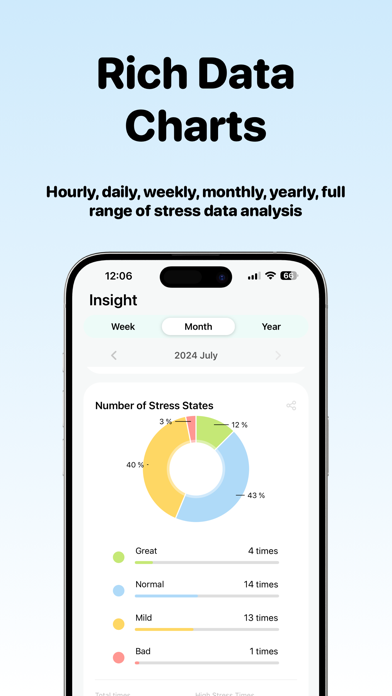
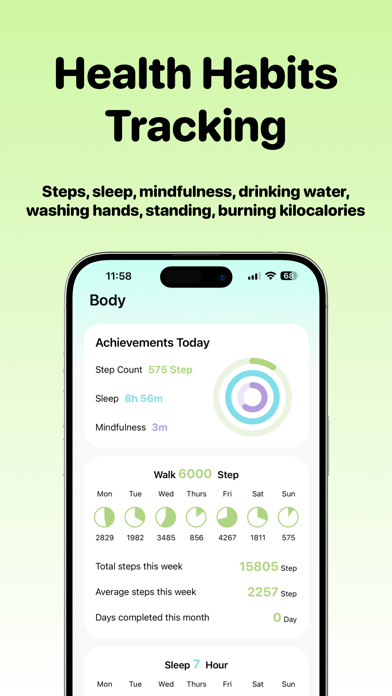
------------Designed for Apple Watch Users Stress Self-Assessment Tailored for Apple Watch Users: It analyzes your heart data and displays your current psychological stress levels, as well as your mental, emotional, and physical states. With your watch, it's a great tool for stress self-assessment, monitoring, and recording, as well as detecting stress. ------------Measure Psychological Stress Anytime When wearing your Apple Watch, it automatically generates HRV (heart rate variability) data. The Stress Self-Assessment App analyzes HRV data, combined with resting heart rate, age, and other factors, to provide a comprehensive stress assessment level. This process requires no intervention, but you can also use mindfulness apps or ECG apps on your watch for quick psychological stress tests and monitoring, obtaining HRV values and psychological stress status. ------------Multi-Dimensional Full-Cycle Data We provide multi-dimensional, full-cycle psychological stress data charts, allowing you to intuitively understand changes in stress trends and psychological pressure over longer periods. This includes weekly, monthly, and yearly stress trend charts, stress frequency statistics, stress period statistics, stress scatter plots, and more. We offer comprehensive psychological stress data charts to help you clarify the root causes of stress, manage emotions, and improve mental health. ------------Intelligent Psychological Stress Reminders With stress reminders, you can timely perceive changes in your psychological stress status. When new HRV data is generated, the Stress Self-Assessment App automatically sends a notification to your watch or phone, reminding you to pay attention to your psychological stress status and maintain good physical health. ------------Automatic Health Check-Ins Leveraging powerful Apple Health integration, we combine seven health habits including steps, sleep duration, mindfulness duration, hydration, hand washing, standing time, and energy burn. This helps you easily understand these data points, promoting robust physical health and a pleasant inner state. ------------Privacy and Security We understand your personal health data is sensitive. Stress Self-Assessment only directly reads data on your device via the Apple HealthKit API, and all your data is stored locally. ------------------------------------------------------------ Advanced Membership Subscription Explanation: By becoming an advanced member of Stress Self-Assessment, you unlock all paid features, enjoy free updates for future advanced functionalities, and a commitment to ad-free service. Upon Purchase Confirmation and Payment: Your subscription will be automatically renewed via your iTunes account. Apple iTunes will charge you within 24 hours prior to the end of the current period, extending the subscription period upon successful payment. To cancel the renewal, manage auto-renewal in iTunes/Apple ID settings at least 24 hours before the current period ends. During the trial period, if not canceled, your iTunes account will be charged and the trial period unused will be forfeited upon subscription purchase. This service allows you the choice to cancel, and if not canceled, it will automatically renew for the next billing period. User Agreement: https://fish.iibear.com/policy/ Privacy Policy: https://fish.iibear.com/private/ Disclaimer: Data and statements from the Stress Self-Assessment App do not constitute medical advice, diagnosis, or treatment for any individual or patient case. They should not replace professional medical advice, diagnosis, or treatment. If you experience any discomfort, whether physical or psychological, seeking timely medical attention is recommended.


