PC 용 Tanning App
- 카테고리: Weather
- 최근 업데이트: 2026-10-06
- 현재 버전: 3.5.7
- 파일 크기: 85.89 MB
- 개발자: Brilliant Apps Sweden AB
- 호환성: 필요 Windows XP, Windows Vista, Windows 7, Windows 8, Windows 8.1 and Windows 10, Windows 11




PC에서 Tanning App 용 호환 APK 다운로드
| 다운로드 | 개발자 | 평점 | 점수 | 현재 버전 | 성인 랭킹 |
|---|---|---|---|---|---|
| ↓ PC용 APK 다운로드 | Brilliant Apps Sweden AB | 2 | 5 | 3.5.7 | 4+ |
에뮬레이터의 중요성은 컴퓨터에서 안드로이드 환경을 흉내 내고 안드로이드 폰을 구입하지 않고도 안드로이드 앱을 설치하고 실행하는 것을 매우 쉽게 만들어주는 것입니다. 누가 당신이 두 세계를 즐길 수 없다고 말합니까? 우선 아래에있는 에뮬레이터 앱을 다운로드 할 수 있습니다.
A. Nox App . OR
B. Bluestacks App .
Bluestacks는 매우 대중적이므로 개인적으로 "B"옵션을 사용하는 것이 좋습니다. 문제가 발생하면 Google 또는 Naver.com에서 좋은 해결책을 찾을 수 있습니다.
Bluestacks.exe 또는 Nox.exe를 성공적으로 다운로드 한 경우 컴퓨터의 다운로드 폴더 또는 다운로드 한 파일을 일반적으로 저장하는 곳으로 이동하십시오.
찾으면 클릭하여 응용 프로그램을 설치하십시오. PC에서 설치 프로세스를 시작해야합니다.
다음을 클릭하여 EULA 라이센스 계약에 동의하십시오.
응용 프로그램을 설치하려면 화면 지시문을 따르십시오.
위 사항을 올바르게 수행하면 소프트웨어가 성공적으로 설치됩니다.
이제 설치 한 에뮬레이터 애플리케이션을 열고 검색 창을 찾으십시오. 지금 입력하십시오. - Tanning App 앱을 쉽게 볼 수 있습니다. 그것을 클릭하십시오. 응용 프로그램 창이 열리고 에뮬레이터 소프트웨어에 응용 프로그램이 표시됩니다. 설치 버튼을 누르면 응용 프로그램이 다운로드되기 시작합니다. 이제 우리는 모두 끝났습니다.
그런 다음 "모든 앱"아이콘이 표시됩니다.
클릭하면 설치된 모든 응용 프로그램이 포함 된 페이지로 이동합니다.
당신은 Tanning App 상. 그것을 클릭하고 응용 프로그램 사용을 시작하십시오.
Mac OS 에서 Tanning App 다운로드
| 다운로드 | 개발자 | 점수 | 현재 버전 | 성인 랭킹 |
|---|---|---|---|---|
| 무료 - Mac 에서 다운로드 | Brilliant Apps Sweden AB | 5 |
3.5.7 | 4+ |
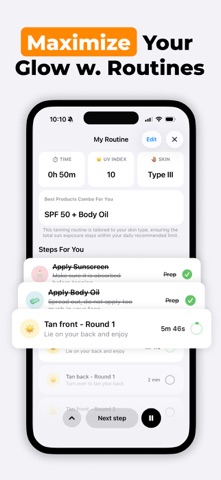
SunSafe provides accurate UV Index updates to help you plan your outdoor activities safely. Get a 10-day UV forecast, real-time UV levels, and maximum UV alerts to avoid unexpected sunburns. Personalized Sun Safety for Your Skin Stay protected with customized sunburn risk calculations based on your skin type. Get smart sunscreen reminders, real-time UV exposure tracking, and expert-backed sun safety tips to reduce sun damage. Always consult a healthcare professional before making medical decisions. Achieve the Perfect Tan Without the Risk SunSafe offers personalized tanning routines tailored to your skin type. Follow step-by-step guidance to get an even, long-lasting tan while avoiding overexposure. Burn prevention alerts ensure you never stay in the sun too long. Monitor Vitamin D & Sun Exposure Track your daily sun exposure with Live Activity monitoring and Vitamin D tracking. SunSafe helps you balance healthy sun exposure while preventing damage, ensuring you get the benefits of the sun safely. Widgets & Smart Alerts for Instant Updates Access UV data instantly with home screen widgets, lock screen widgets and custom notifications. Set alerts for high UV conditions, reminders to reapply sunscreen, and stay informed without needing to open the app. Global UV Index – Track Anywhere Monitor UV exposure worldwide with accurate, location-based UV data. Track multiple locations to stay protected whether at home or traveling. Download SunSafe & Stay Protected Prevent sunburns, track your sun exposure, and maintain a healthy balance between sun safety and Vitamin D intake. Download SunSafe today and enjoy the sun with confidence. Some features, such as UV exposure tracking and personalized tanning guidance, require a subscription (SunSafe Pro). Subscription Information SunSafe offers auto-renewable subscriptions. A 7-day free trial is available for new users. After the trial, the subscription will automatically renew at $7.99/month or $39.99/year unless canceled at least 24 hours before the end of the trial period. Payment will be charged to your Apple ID at confirmation of purchase. Subscriptions automatically renew unless canceled at least 24 hours before the end of the current period. You can manage or cancel your subscription in your Apple ID account settings. Terms of Use - https://www.brilliantapps.se/about Privacy Policy - https://www.brilliantapps.se/about#privacy-policy