
PC 용 Official Newcastle United App
- 카테고리: Sports
- 최근 업데이트: 2026-07-22
- 현재 버전: 1.16.0
- 파일 크기: 61.55 MB
- 개발자: Newcastle United
- 호환성: 필요 Windows XP, Windows Vista, Windows 7, Windows 8, Windows 8.1 and Windows 10, Windows 11





PC에서 Official Newcastle United App 용 호환 APK 다운로드
| 다운로드 | 개발자 | 평점 | 점수 | 현재 버전 | 성인 랭킹 |
|---|---|---|---|---|---|
| ↓ PC용 APK 다운로드 | Newcastle United | 3 | 5 | 1.16.0 | 4+ |
호환되는 PC 앱 또는 대안 확인
| 소프트웨어 | 다운로드 | 평점 | 개발자 |
|---|---|---|---|
| Official Newcastle United App |
PC 앱 받기 | 5/5 3 리뷰 5 |
Newcastle United |
에뮬레이터의 중요성은 컴퓨터에서 안드로이드 환경을 흉내 내고 안드로이드 폰을 구입하지 않고도 안드로이드 앱을 설치하고 실행하는 것을 매우 쉽게 만들어주는 것입니다. 누가 당신이 두 세계를 즐길 수 없다고 말합니까? 우선 아래에있는 에뮬레이터 앱을 다운로드 할 수 있습니다.
A. Nox App . OR
B. Bluestacks App .
Bluestacks는 매우 대중적이므로 개인적으로 "B"옵션을 사용하는 것이 좋습니다. 문제가 발생하면 Google 또는 Naver.com에서 좋은 해결책을 찾을 수 있습니다.
Bluestacks.exe 또는 Nox.exe를 성공적으로 다운로드 한 경우 컴퓨터의 다운로드 폴더 또는 다운로드 한 파일을 일반적으로 저장하는 곳으로 이동하십시오.
찾으면 클릭하여 응용 프로그램을 설치하십시오. PC에서 설치 프로세스를 시작해야합니다.
다음을 클릭하여 EULA 라이센스 계약에 동의하십시오.
응용 프로그램을 설치하려면 화면 지시문을 따르십시오.
위 사항을 올바르게 수행하면 소프트웨어가 성공적으로 설치됩니다.
이제 설치 한 에뮬레이터 애플리케이션을 열고 검색 창을 찾으십시오. 지금 입력하십시오. - Official Newcastle United App 앱을 쉽게 볼 수 있습니다. 그것을 클릭하십시오. 응용 프로그램 창이 열리고 에뮬레이터 소프트웨어에 응용 프로그램이 표시됩니다. 설치 버튼을 누르면 응용 프로그램이 다운로드되기 시작합니다. 이제 우리는 모두 끝났습니다.
그런 다음 "모든 앱"아이콘이 표시됩니다.
클릭하면 설치된 모든 응용 프로그램이 포함 된 페이지로 이동합니다.
당신은 Official Newcastle United App 상. 그것을 클릭하고 응용 프로그램 사용을 시작하십시오.
Mac OS 에서 Official Newcastle United App 다운로드
| 다운로드 | 개발자 | 점수 | 현재 버전 | 성인 랭킹 |
|---|---|---|---|---|
| 무료 - Mac 에서 다운로드 | Newcastle United | 5 |
1.16.0 | 4+ |
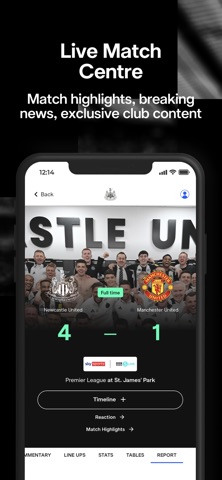
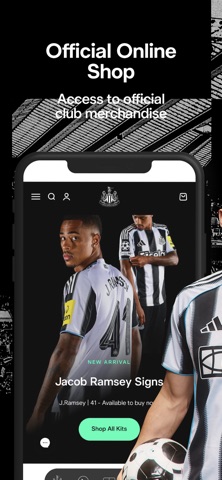
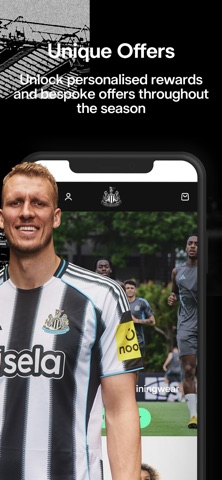
The official Newcastle United app is your personal club hub in your pocket, giving you everything you need to show your support, from anywhere in the world. Whether you’re at St. James’ Park or on the sofa, you can stay in the know with the official mobile app. Download the official app to gain access to: Live Match Centre: Enjoy every moment of every game, wherever you are. Get real-time updates, live scores and in-depth match stats. Follow all the action with play-by-play commentary. Never miss a goal or breaking action ever again. Exclusive Content: Unlock unparalleled access to Newcastle United. Enjoy behind-the-scenes footage, player interviews, and tactical breakdowns. Dive deeper with unique articles and archive footage. Get closer to your club on the move. Interactive Experiences: Engage with fellow fans and show your support. Participate in polls, quizzes and predict match outcomes. Share your thoughts and reactions in real-time and come back for the results. With our mobile app we want you to feel more connected to the club and your community. Tickets & Club Shop: Enter ballots and secure your matchday tickets via the app. Browse and buy the latest merchandise and official club gear, with exclusive app-only discounts and early access to new collections. You can find everything you need to support your club in style, right at your fingertips. 24/7 Club Access: With the official Newcastle United mobile app, you have access to your club around the clock, even when you’re on the move. By opting in to push notifications you will also receive breaking news and match updates as it breaks, to ensure you’re always in the know.


