
PC 용 Recipebookmarks
- 카테고리: Food & Drink
- 최근 업데이트: 2019-04-23
- 현재 버전: 1.12.1
- 파일 크기: 37.41 MB
- 개발자: Springboard Inc.
- 호환성: 필요 Windows XP, Windows Vista, Windows 7, Windows 8, Windows 8.1 and Windows 10, Windows 11


PC에서 Recipebookmarks 용 호환 APK 다운로드
| 다운로드 | 개발자 | 평점 | 점수 | 현재 버전 | 성인 랭킹 |
|---|---|---|---|---|---|
| ↓ PC용 APK 다운로드 | Springboard Inc. | 1 | 5 | 1.12.1 | 4+ |
에뮬레이터의 중요성은 컴퓨터에서 안드로이드 환경을 흉내 내고 안드로이드 폰을 구입하지 않고도 안드로이드 앱을 설치하고 실행하는 것을 매우 쉽게 만들어주는 것입니다. 누가 당신이 두 세계를 즐길 수 없다고 말합니까? 우선 아래에있는 에뮬레이터 앱을 다운로드 할 수 있습니다.
A. Nox App . OR
B. Bluestacks App .
Bluestacks는 매우 대중적이므로 개인적으로 "B"옵션을 사용하는 것이 좋습니다. 문제가 발생하면 Google 또는 Naver.com에서 좋은 해결책을 찾을 수 있습니다.
Bluestacks.exe 또는 Nox.exe를 성공적으로 다운로드 한 경우 컴퓨터의 다운로드 폴더 또는 다운로드 한 파일을 일반적으로 저장하는 곳으로 이동하십시오.
찾으면 클릭하여 응용 프로그램을 설치하십시오. PC에서 설치 프로세스를 시작해야합니다.
다음을 클릭하여 EULA 라이센스 계약에 동의하십시오.
응용 프로그램을 설치하려면 화면 지시문을 따르십시오.
위 사항을 올바르게 수행하면 소프트웨어가 성공적으로 설치됩니다.
이제 설치 한 에뮬레이터 애플리케이션을 열고 검색 창을 찾으십시오. 지금 입력하십시오. - Recipebookmarks 앱을 쉽게 볼 수 있습니다. 그것을 클릭하십시오. 응용 프로그램 창이 열리고 에뮬레이터 소프트웨어에 응용 프로그램이 표시됩니다. 설치 버튼을 누르면 응용 프로그램이 다운로드되기 시작합니다. 이제 우리는 모두 끝났습니다.
그런 다음 "모든 앱"아이콘이 표시됩니다.
클릭하면 설치된 모든 응용 프로그램이 포함 된 페이지로 이동합니다.
당신은 Recipebookmarks 상. 그것을 클릭하고 응용 프로그램 사용을 시작하십시오.
Mac OS 에서 Recipebookmarks 다운로드
| 다운로드 | 개발자 | 점수 | 현재 버전 | 성인 랭킹 |
|---|---|---|---|---|
| 무료 - Mac 에서 다운로드 | Springboard Inc. | 5 |
1.12.1 | 4+ |
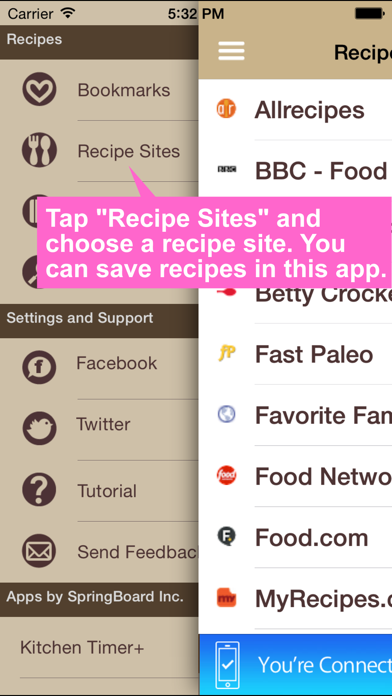
Recipebookmarks is an application that bookmarks your favorite recipes you found on websites, and allows you to store, organize, search and view them. Key features: * Bookmark and save your favorite recipes Popular recipe websites are already listed on Recipebookmarks. Recipe websites that you would like to view can be opened from this list, and your favorite recipes can be saved by pressing the bookmark button on Recipebookmarks. The recipe websites bookmarked in Recipebookmarks can be viewed directly within Recipebookmarks. You do not need to go through the trouble of searching for it again from Safari, or looking for it in the bookmark list every time you cook. * Add ingredients and memo notes to organizing recipes Recipes are saved and organized within Recipebookmarks with their name, pictures, ingredients and your comments. When you add bookmark recipes from major recipe websites the application will automatically acquire the picture and ingredients, saving you the trouble to enter or copy the information. * Look for recipes by ingredients or name You can easily search for your recipes bookmarked in Recipebookmarks. Searching for them by ingredients, your own memo notes or name of dish makes it easy to find a recipe even if you have saved many of them. * Share your favorite recipes on Facebook and Twitter By linking your Facebook or Twitter accounts with iOS, you can share your favorite recipes with your friends from Recipebookmarks. The recipes will be sent to social network services at the time you add bookmark them. Let's share your favorite recipes with your friends! ● About "Hide Ads" Subscriptions Subscription fee 50 Yen (US$0.49) / Month When you purchase the "Hide Ads" option, the banner and video ads in this application will no longer be displayed. ※ Please note that ads contained within the recipe web pages of the websites added to "Bookmarks" and ads contained in the websites in the list of "recipe websites" are not managed by this application. Hence, hiding these ads is not possible. Help (cancellation method, terms of service, and so forth ) ● Transfer of "hide ads" feature to new device hardware Upon transfer of the application to new device hardware, it is possible to also transfer the previously purchased "hide ads" feature free of charge. On your iPhone or iPad device, log in to "iTunes and AppStore" using the same Apple ID as used when you originally purchased the "hide ads" feature. ● Confirmation and cancellation Select "Recommend" at the bottom of the AppStore screen -> Select Apple ID -> Select "Display Apple ID" -> Select Recipe Bookmark from the Administer Subscriptions list. In this display, you can confirm the date of the next automatic renewal. You can also select cancellation of automatic renewals. ● Automatic billing of renewal If automatic renewal is not canceled at least 24 hours before the contract period end date, the contract period will automatically renew. Billing of the automatic renewal will take place within 24 hours after the end of the previous contract period. ● Note ・For billing customers, it is not possible to cancel the service other than the process described above. ・We do not accept cancellations for the present billing month. ・Billing is processed via the customer's iTunes account. ● Terms of use and privacy Privacy Terms of use http://www.springboard.co.jp/eulasbservices.html Privacy Privacy http://www.springboard.co.jp/privacypolicy.html