
PC 용 Kitchen Design App
- 카테고리: Graphics & Design
- 최근 업데이트: 2026-07-19
- 현재 버전: 1.2.29
- 파일 크기: 63.25 MB
- 개발자: Future Plan Co Pty Ltd
- 호환성: 필요 Windows XP, Windows Vista, Windows 7, Windows 8, Windows 8.1 and Windows 10, Windows 11



PC에서 Kitchen Design App 용 호환 APK 다운로드
| 다운로드 | 개발자 | 평점 | 점수 | 현재 버전 | 성인 랭킹 |
|---|---|---|---|---|---|
| ↓ PC용 APK 다운로드 | Future Plan Co Pty Ltd | 2 | 5 | 1.2.29 | 4+ |
에뮬레이터의 중요성은 컴퓨터에서 안드로이드 환경을 흉내 내고 안드로이드 폰을 구입하지 않고도 안드로이드 앱을 설치하고 실행하는 것을 매우 쉽게 만들어주는 것입니다. 누가 당신이 두 세계를 즐길 수 없다고 말합니까? 우선 아래에있는 에뮬레이터 앱을 다운로드 할 수 있습니다.
A. Nox App . OR
B. Bluestacks App .
Bluestacks는 매우 대중적이므로 개인적으로 "B"옵션을 사용하는 것이 좋습니다. 문제가 발생하면 Google 또는 Naver.com에서 좋은 해결책을 찾을 수 있습니다.
Bluestacks.exe 또는 Nox.exe를 성공적으로 다운로드 한 경우 컴퓨터의 다운로드 폴더 또는 다운로드 한 파일을 일반적으로 저장하는 곳으로 이동하십시오.
찾으면 클릭하여 응용 프로그램을 설치하십시오. PC에서 설치 프로세스를 시작해야합니다.
다음을 클릭하여 EULA 라이센스 계약에 동의하십시오.
응용 프로그램을 설치하려면 화면 지시문을 따르십시오.
위 사항을 올바르게 수행하면 소프트웨어가 성공적으로 설치됩니다.
이제 설치 한 에뮬레이터 애플리케이션을 열고 검색 창을 찾으십시오. 지금 입력하십시오. - Kitchen Design App 앱을 쉽게 볼 수 있습니다. 그것을 클릭하십시오. 응용 프로그램 창이 열리고 에뮬레이터 소프트웨어에 응용 프로그램이 표시됩니다. 설치 버튼을 누르면 응용 프로그램이 다운로드되기 시작합니다. 이제 우리는 모두 끝났습니다.
그런 다음 "모든 앱"아이콘이 표시됩니다.
클릭하면 설치된 모든 응용 프로그램이 포함 된 페이지로 이동합니다.
당신은 Kitchen Design App 상. 그것을 클릭하고 응용 프로그램 사용을 시작하십시오.
Mac OS 에서 Kitchen Design App 다운로드
| 다운로드 | 개발자 | 점수 | 현재 버전 | 성인 랭킹 |
|---|---|---|---|---|
| 무료 - Mac 에서 다운로드 | Future Plan Co Pty Ltd | 5 |
1.2.29 | 4+ |
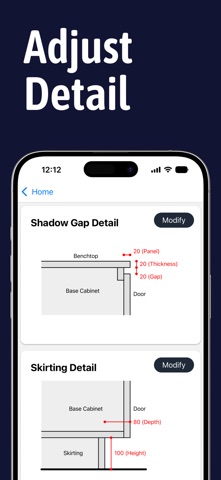
PlanMyKitchen: Your Kitchen Designer Terms of Use: https://www.apple.com/legal/internet-services/itunes/dev/stdeula/ Privacy Policy: https://www.privacypolicies.com/live/0a2af7e2-e93d-4a9e-b9dd-4300c88a10af PlanMyKitchen is the perfect app for anyone looking to design their dream kitchen, whether you're a homeowner, interior designer, or contractor. With intuitive controls, 3D visualization, and professional-level features, it makes kitchen planning easier than ever. Key Features: 1. Easy-to-Use Kitchen Design Design your ideal kitchen effortlessly. Choose from a variety of layouts, styles, and color schemes. Customize everything from cabinets and countertops to flooring and backsplashes to create a cohesive kitchen design. 2. 3D & Detailed Views Visualize your kitchen in real-time 3D or switch to floor plans and elevation views to see measurements and layout details. Adjust dimensions on the go and get a comprehensive look at your project from every angle. 3. Customizable Dimensions Fine-tune measurements for cabinets, countertops, and appliances to perfectly fit your kitchen. Changes are reflected instantly in both 2D and 3D views, ensuring accuracy as you plan. 4. Pre-Designed Color Schemes Choose from ready-made design schemes or create custom color palettes to suit your style. Whether you prefer a modern, classic, or minimalist kitchen, PlanMyKitchen has you covered. 5. Share & Collaborate Easily share your design via links or QR codes to gather feedback or send detailed plans to contractors. Export documents, including floor plans and elevation views, as PDFs for easy collaboration. 6. Real-Time Updates Make design changes and see them reflected instantly across all views. This dynamic system ensures that your kitchen design is always up-to-date and cohesive, eliminating guesswork. 7. Designed for All Skill Levels Whether you’re a first-time renovator or a professional designer, PlanMyKitchen is built to accommodate every skill level, offering simplicity for beginners and depth for experts. Who is PlanMyKitchen for? Homeowners: Take full control of your kitchen project, exploring different layouts and materials to create a space tailored to your needs. Interior Designers: Impress clients with detailed, professional designs that can be shared and adjusted in real-time. Contractors: Use accurate plans and elevation views to ensure smooth execution, reducing mistakes and speeding up the building process. Why Choose PlanMyKitchen? With PlanMyKitchen, you don’t need to be a design expert to create a functional and beautiful kitchen. The app’s powerful tools allow you to visualize, plan, and share your kitchen design, making the renovation process efficient and error-free. Whether it’s a small upgrade or a complete remodel, PlanMyKitchen has everything you need to bring your dream kitchen to life. Start designing with PlanMyKitchen today!


