
PC 용 Disney Cruise Line Navigator
- 카테고리: Travel
- 최근 업데이트: 2026-10-15
- 현재 버전: 5.51.0
- 파일 크기: 259.49 MB
- 개발자: Disney
- 호환성: 필요 Windows XP, Windows Vista, Windows 7, Windows 8, Windows 8.1 and Windows 10, Windows 11




PC에서 Disney Cruise Line Navigator 용 호환 APK 다운로드
| 다운로드 | 개발자 | 평점 | 점수 | 현재 버전 | 성인 랭킹 |
|---|---|---|---|---|---|
| ↓ PC용 APK 다운로드 | Disney | 74 | 4.67568 | 5.51.0 | 4+ |
호환되는 PC 앱 또는 대안 확인
| 소프트웨어 | 다운로드 | 평점 | 개발자 |
|---|---|---|---|
| Disney Cruise Line Navigator |
PC 앱 받기 | 4.67568/5 74 리뷰 4.67568 |
Disney |
에뮬레이터의 중요성은 컴퓨터에서 안드로이드 환경을 흉내 내고 안드로이드 폰을 구입하지 않고도 안드로이드 앱을 설치하고 실행하는 것을 매우 쉽게 만들어주는 것입니다. 누가 당신이 두 세계를 즐길 수 없다고 말합니까? 우선 아래에있는 에뮬레이터 앱을 다운로드 할 수 있습니다.
A. Nox App . OR
B. Bluestacks App .
Bluestacks는 매우 대중적이므로 개인적으로 "B"옵션을 사용하는 것이 좋습니다. 문제가 발생하면 Google 또는 Naver.com에서 좋은 해결책을 찾을 수 있습니다.
Bluestacks.exe 또는 Nox.exe를 성공적으로 다운로드 한 경우 컴퓨터의 다운로드 폴더 또는 다운로드 한 파일을 일반적으로 저장하는 곳으로 이동하십시오.
찾으면 클릭하여 응용 프로그램을 설치하십시오. PC에서 설치 프로세스를 시작해야합니다.
다음을 클릭하여 EULA 라이센스 계약에 동의하십시오.
응용 프로그램을 설치하려면 화면 지시문을 따르십시오.
위 사항을 올바르게 수행하면 소프트웨어가 성공적으로 설치됩니다.
이제 설치 한 에뮬레이터 애플리케이션을 열고 검색 창을 찾으십시오. 지금 입력하십시오. - Disney Cruise Line Navigator 앱을 쉽게 볼 수 있습니다. 그것을 클릭하십시오. 응용 프로그램 창이 열리고 에뮬레이터 소프트웨어에 응용 프로그램이 표시됩니다. 설치 버튼을 누르면 응용 프로그램이 다운로드되기 시작합니다. 이제 우리는 모두 끝났습니다.
그런 다음 "모든 앱"아이콘이 표시됩니다.
클릭하면 설치된 모든 응용 프로그램이 포함 된 페이지로 이동합니다.
당신은 Disney Cruise Line Navigator 상. 그것을 클릭하고 응용 프로그램 사용을 시작하십시오.
Mac OS 에서 Disney Cruise Line Navigator 다운로드
| 다운로드 | 개발자 | 점수 | 현재 버전 | 성인 랭킹 |
|---|---|---|---|---|
| 무료 - Mac 에서 다운로드 | Disney | 4.67568 |
5.51.0 | 4+ |
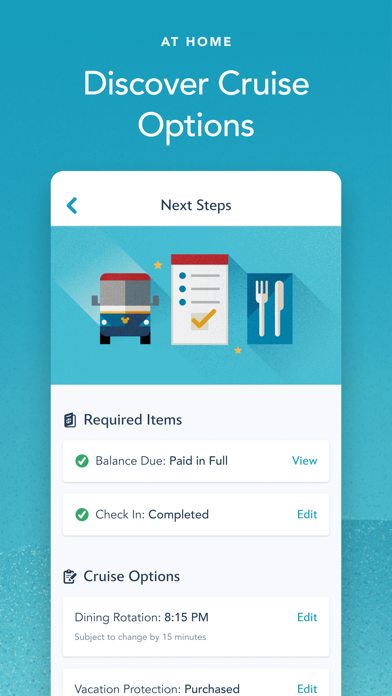
Use the Disney Cruise Line Navigator app before, during and after your voyage—to plan, explore and relive the fun. AT HOME Plan your vacation, make payments, breeze through check-in, reserve onboard activities or make special requests—from dietary preferences to birthday surprises. Get Ready to Cruise • Retrieve your reservation to make payments, review required documents and more. • Use My Online Check-In to fill out your cruise documents and register kids for youth clubs. • Explore activities and entertainment. • Book activities, including Port Adventures, Premium Dining, Onboard Fun, Spa & Fitness and Nursery. • Change your dinner seating assignment. • Add or edit Vacation Protection Plan and Ground Transportation. • View your Air Transportation. • Make Special Requests, including special diets, accommodations for little ones, celebrations and more. ON BOARD THE SHIP With your app in hand, you can explore your ship with Deck Plans, view favorite and booked activities, learn about the ports you’ll visit and use the onboard chat feature. Enhance Your Experience • View onboard activities across your entire voyage. • Plan your day, from shows to shopping. • Review your ports of call and at-sea days. • Read details about activities that interest you. • Check menus before dinner—kids’ menus too—and easily access your dining schedule. • Check out the latest offers and specials. • Save favorite activities in one convenient list. • View booked activities, including Port Adventures, Premium Dining, Onboard Fun, Spa & Fitness and Nursery. • Find Disney Characters throughout the ship. • For assistance, visit our Help Center. Know Where to Go • Explore your ship deck by deck, from bow to stern. • Find locations of the activities you want to do. Stay in Touch • Use onboard chat to stay connected to your family, friends and shipmates. • While aboard your cruise, chat one-to-one or with multiple friends and family members at once. • Use our wide array of Disney emoticons to express yourself as you chat. AFTER YOUR CRUISE View past reservations and more—and transport yourself back to the adventure when you download your purchased photos, available for a limited time. Effortless Access All in One Place • Easily view past reservations, including your stateroom number. • Look back at onboard charges (within 90 days of your cruise). • Explore and book your next cruise. Download the Disney Cruise Line Navigator app today and enjoy it at home or on board. Simply connect to the ship’s Wi-Fi network—complimentary to app users only. Note: To use onboard chat, you are required to provide your full name, stateroom number and birth date. Children should always ask their parent or guardian before using onboard chat. Control access for children with the permissions feature. APP PERMISSIONS Camera & Microphone Access: This app uses your device's camera and microphone for the Disney Uncharted Adventure game experience. Storage Access: This app saves data locally to your device, including chat messages and embarkation information, to ensure a seamless experience even when connectivity is limited. Location Services: This app requires location permission to connect to Wi-Fi networks and enable Bluetooth (BLE) features, such as DisneyBand+ functionality. Your actual location is not tracked or stored. Privacy Policy: https://disneyprivacycenter.com/ Children’s Online Privacy Policy: https://privacy.thewaltdisneycompany.com/en/for-parents/childrens-online-privacy-policy/ Your US State Privacy Rights: https://privacy.thewaltdisneycompany.com/en/current-privacy-policy/your-us-state-privacy-rights/ Terms of Use: https://disneytermsofuse.com Do Not Sell or Share My Personal Information: https://privacy.thewaltdisneycompany.com/en/dnsmi