
PC 용 Daily Planner Todo list - Revo
- 카테고리: Utilities
- 최근 업데이트: 2025-08-18
- 현재 버전: 1.0.7
- 파일 크기: 89.86 MB
- 개발자: Mehroz Sheikh
- 호환성: 필요 Windows XP, Windows Vista, Windows 7, Windows 8, Windows 8.1 and Windows 10, Windows 11



PC에서 Daily Planner Todo list - Revo 용 호환 APK 다운로드
| 다운로드 | 개발자 | 평점 | 점수 | 현재 버전 | 성인 랭킹 |
|---|---|---|---|---|---|
| ↓ PC용 APK 다운로드 | Mehroz Sheikh | 1 | 5 | 1.0.7 | 4+ |
에뮬레이터의 중요성은 컴퓨터에서 안드로이드 환경을 흉내 내고 안드로이드 폰을 구입하지 않고도 안드로이드 앱을 설치하고 실행하는 것을 매우 쉽게 만들어주는 것입니다. 누가 당신이 두 세계를 즐길 수 없다고 말합니까? 우선 아래에있는 에뮬레이터 앱을 다운로드 할 수 있습니다.
A. Nox App . OR
B. Bluestacks App .
Bluestacks는 매우 대중적이므로 개인적으로 "B"옵션을 사용하는 것이 좋습니다. 문제가 발생하면 Google 또는 Naver.com에서 좋은 해결책을 찾을 수 있습니다.
Bluestacks.exe 또는 Nox.exe를 성공적으로 다운로드 한 경우 컴퓨터의 다운로드 폴더 또는 다운로드 한 파일을 일반적으로 저장하는 곳으로 이동하십시오.
찾으면 클릭하여 응용 프로그램을 설치하십시오. PC에서 설치 프로세스를 시작해야합니다.
다음을 클릭하여 EULA 라이센스 계약에 동의하십시오.
응용 프로그램을 설치하려면 화면 지시문을 따르십시오.
위 사항을 올바르게 수행하면 소프트웨어가 성공적으로 설치됩니다.
이제 설치 한 에뮬레이터 애플리케이션을 열고 검색 창을 찾으십시오. 지금 입력하십시오. - Daily Planner Todo list - Revo 앱을 쉽게 볼 수 있습니다. 그것을 클릭하십시오. 응용 프로그램 창이 열리고 에뮬레이터 소프트웨어에 응용 프로그램이 표시됩니다. 설치 버튼을 누르면 응용 프로그램이 다운로드되기 시작합니다. 이제 우리는 모두 끝났습니다.
그런 다음 "모든 앱"아이콘이 표시됩니다.
클릭하면 설치된 모든 응용 프로그램이 포함 된 페이지로 이동합니다.
당신은 Daily Planner Todo list - Revo 상. 그것을 클릭하고 응용 프로그램 사용을 시작하십시오.
Mac OS 에서 Daily Planner Todo list 다운로드
| 다운로드 | 개발자 | 점수 | 현재 버전 | 성인 랭킹 |
|---|---|---|---|---|
| 무료 - Mac 에서 다운로드 | Mehroz Sheikh | 5 |
1.0.7 | 4+ |
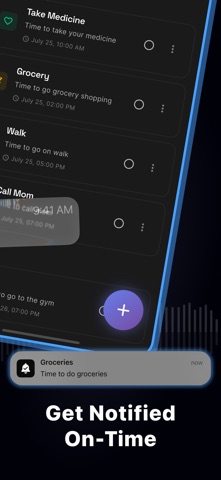
"Daily Planner Todo list - Revo" is a simple, clean app that turns what you say or type into organized tasks and reminders. Just speak or write what you need to do — like “Call Sarah at 5pm tomorrow” — and the app figures out the task and schedules it for you. It works smoothly with Apple’s built-in Reminders app, so your tasks stay updated across iPhone, iPad, and Mac. You can also use the Home Screen widget to see and check off tasks without opening the app. Whether it’s daily chores, work deadlines, or taking your medicine, "Daily Planner Todo list - Revo" helps you stay on track with a clean, no-clutter design. Key Features: Natural Input Just speak or type something like “Doctor appointment Friday at 10am” — the app will create the reminder for you. Auto Reminders No need to set every detail yourself. The app picks up the task and time from your words and schedules it. Syncs with Apple Reminders Your tasks show up instantly in the Apple Reminders app and stay synced across your devices. Siri Shortcuts Use Siri voice commands or one-tap shortcuts to quickly add tasks and reminders. Home Screen Widget Check your tasks at a glance and mark them done without opening the app. Minimal Design The clean and simple layout shows only what matters — your tasks — so you can focus and get things done. - Weekly: $2.99 USD (3 Day Free Trial) - Annual: $19.99 USD - Weekly Family Sharing: $3.99 USD (3 Day Free Trial) - Annual Family Sharing: $29.99 USD Terms of use: https://www.apple.com/legal/internet-services/itunes/dev/stdeula Privacy Policy: https://techrozsolutions.netlify.app/revo/privacy_policy.html


