
PC 용 ARtie Lab: AR Drawing & Sketch
- 카테고리: Graphics & Design
- 최근 업데이트: 2026-05-06
- 현재 버전: 2.6.1
- 파일 크기: 94.85 MB
- 개발자: TenetApps
- 호환성: 필요 Windows XP, Windows Vista, Windows 7, Windows 8, Windows 8.1 and Windows 10, Windows 11




PC에서 ARtie Lab: AR Drawing & Sketch 용 호환 APK 다운로드
| 다운로드 | 개발자 | 평점 | 점수 | 현재 버전 | 성인 랭킹 |
|---|---|---|---|---|---|
| ↓ PC용 APK 다운로드 | TenetApps | 5 | 4.8 | 2.6.1 | 4+ |
에뮬레이터의 중요성은 컴퓨터에서 안드로이드 환경을 흉내 내고 안드로이드 폰을 구입하지 않고도 안드로이드 앱을 설치하고 실행하는 것을 매우 쉽게 만들어주는 것입니다. 누가 당신이 두 세계를 즐길 수 없다고 말합니까? 우선 아래에있는 에뮬레이터 앱을 다운로드 할 수 있습니다.
A. Nox App . OR
B. Bluestacks App .
Bluestacks는 매우 대중적이므로 개인적으로 "B"옵션을 사용하는 것이 좋습니다. 문제가 발생하면 Google 또는 Naver.com에서 좋은 해결책을 찾을 수 있습니다.
Bluestacks.exe 또는 Nox.exe를 성공적으로 다운로드 한 경우 컴퓨터의 다운로드 폴더 또는 다운로드 한 파일을 일반적으로 저장하는 곳으로 이동하십시오.
찾으면 클릭하여 응용 프로그램을 설치하십시오. PC에서 설치 프로세스를 시작해야합니다.
다음을 클릭하여 EULA 라이센스 계약에 동의하십시오.
응용 프로그램을 설치하려면 화면 지시문을 따르십시오.
위 사항을 올바르게 수행하면 소프트웨어가 성공적으로 설치됩니다.
이제 설치 한 에뮬레이터 애플리케이션을 열고 검색 창을 찾으십시오. 지금 입력하십시오. - ARtie Lab: AR Drawing & Sketch 앱을 쉽게 볼 수 있습니다. 그것을 클릭하십시오. 응용 프로그램 창이 열리고 에뮬레이터 소프트웨어에 응용 프로그램이 표시됩니다. 설치 버튼을 누르면 응용 프로그램이 다운로드되기 시작합니다. 이제 우리는 모두 끝났습니다.
그런 다음 "모든 앱"아이콘이 표시됩니다.
클릭하면 설치된 모든 응용 프로그램이 포함 된 페이지로 이동합니다.
당신은 ARtie Lab: AR Drawing & Sketch 상. 그것을 클릭하고 응용 프로그램 사용을 시작하십시오.
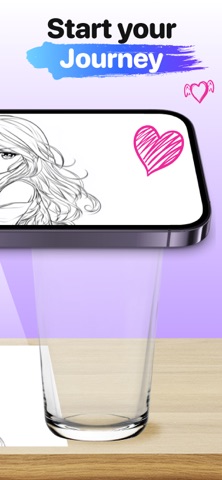
ARtie Lab: AR Drawing & Sketch brings your creativity to life with the power of augmented reality. Whether you’re a beginner or an experienced artist, this innovative drawing app helps you sketch, trace, and paint anything you imagine right on real surfaces. Using your phone’s camera, ARtie Lab projects virtual outlines onto any paper or object, guiding your hand as you draw. Just place your device above the surface, follow the lines, and create stunning sketches step by step. Discover a New Way to Draw Turn your surroundings into a creative workspace. With ARtie Lab, every flat surface becomes your personal canvas. Choose from a wide selection of themed categories like Animals, Cars, Nature, People, and more — or import your own photos to start tracing immediately. Key Features - AR Drawing Made Simple: Project images in augmented reality and follow their outlines with ease. - Import Your Own Images: Upload photos from your gallery to transform them into traceable sketches. - Learn to Draw: Practice your skills with guided outlines and improve your hand coordination naturally. - Creative Categories: Explore a growing library of drawing templates across multiple styles and subjects. - Adjust and Control: Move, resize, or rotate the projected image for the perfect fit. - Flashlight Support: Draw anytime, anywhere — even in low-light conditions. - Save & Share: Capture your finished masterpiece and share it with friends or on social media. Unleash Your Inner Artist ARtie Lab isn’t just another drawing app — it’s your creative companion. Whether you want to learn to draw, trace art, or simply express yourself through sketching, ARtie Lab turns your imagination into real artwork. The app combines technology and creativity, making ar drawing, ar paint, and sketching easier and more inspiring than ever. Why You’ll Love It - Perfect for improving your drawing technique or learning the basics. - Works great for both kids and adults who love art and creativity. - Simple interface and smooth AR projection for a natural experience. - A fun and educational way to explore drawing in augmented reality. Turn your ideas into art, your imagination into sketches, and your creativity into reality. Start your artistic journey today with ARtie Lab: AR Drawing & Sketch — the future of drawing is here. Privacy Policy: https://www.tenetapps.com/privacy-policy-artie-app Terms of Use: https://www.tenetapps.com/terms-of-use-artie-app


