
PC 용 HomeSnap - Smart Home Insights
- 카테고리: Utilities
- 최근 업데이트: 2026-08-06
- 현재 버전: 6.08.01
- 파일 크기: 8.90 MB
- 개발자: LVL35 LLC
- 호환성: 필요 Windows XP, Windows Vista, Windows 7, Windows 8, Windows 8.1 and Windows 10, Windows 11


PC에서 HomeSnap - Smart Home Insights 용 호환 APK 다운로드
| 다운로드 | 개발자 | 평점 | 점수 | 현재 버전 | 성인 랭킹 |
|---|---|---|---|---|---|
| ↓ PC용 APK 다운로드 | LVL35 LLC | 1 | 5 | 6.08.01 | 4+ |
에뮬레이터의 중요성은 컴퓨터에서 안드로이드 환경을 흉내 내고 안드로이드 폰을 구입하지 않고도 안드로이드 앱을 설치하고 실행하는 것을 매우 쉽게 만들어주는 것입니다. 누가 당신이 두 세계를 즐길 수 없다고 말합니까? 우선 아래에있는 에뮬레이터 앱을 다운로드 할 수 있습니다.
A. Nox App . OR
B. Bluestacks App .
Bluestacks는 매우 대중적이므로 개인적으로 "B"옵션을 사용하는 것이 좋습니다. 문제가 발생하면 Google 또는 Naver.com에서 좋은 해결책을 찾을 수 있습니다.
Bluestacks.exe 또는 Nox.exe를 성공적으로 다운로드 한 경우 컴퓨터의 다운로드 폴더 또는 다운로드 한 파일을 일반적으로 저장하는 곳으로 이동하십시오.
찾으면 클릭하여 응용 프로그램을 설치하십시오. PC에서 설치 프로세스를 시작해야합니다.
다음을 클릭하여 EULA 라이센스 계약에 동의하십시오.
응용 프로그램을 설치하려면 화면 지시문을 따르십시오.
위 사항을 올바르게 수행하면 소프트웨어가 성공적으로 설치됩니다.
이제 설치 한 에뮬레이터 애플리케이션을 열고 검색 창을 찾으십시오. 지금 입력하십시오. - HomeSnap - Smart Home Insights 앱을 쉽게 볼 수 있습니다. 그것을 클릭하십시오. 응용 프로그램 창이 열리고 에뮬레이터 소프트웨어에 응용 프로그램이 표시됩니다. 설치 버튼을 누르면 응용 프로그램이 다운로드되기 시작합니다. 이제 우리는 모두 끝났습니다.
그런 다음 "모든 앱"아이콘이 표시됩니다.
클릭하면 설치된 모든 응용 프로그램이 포함 된 페이지로 이동합니다.
당신은 HomeSnap - Smart Home Insights 상. 그것을 클릭하고 응용 프로그램 사용을 시작하십시오.
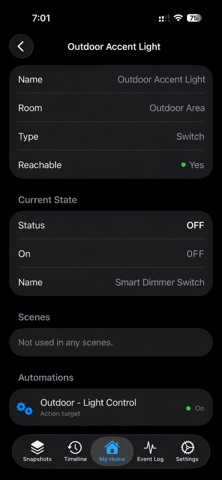
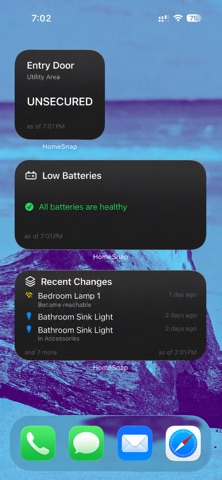
HomeSnap gives you a clear, private view of your HomeKit home: glance at it from a widget, get told the moment something needs attention, ask it questions, and see exactly what changed over time. Read-only. On-device. No accounts. AT A GLANCE Add HomeSnap widgets to your Home Screen, Lock Screen, and StandBy: - Low Batteries: every device running low, most urgent first, with a threshold you set per widget. - Unreachable Devices: anything offline, so you catch a dropped lock or camera fast. - Recent Changes: the latest activity in your home. - Device Status: choose one or more devices and see what they are doing right now. Larger sizes show more. ALERTS Get notified the first time a battery drops below your chosen level, or when a device goes offline. Both are optional, and both appear in your change history. A device's own low-battery warning always counts. Batteries section listing every battery device and its level, most urgent first. SIRI, SHORTCUTS & CONTROLS Say "Take a HomeSnap snapshot," add a one-tap button to Control Center or your Lock Screen, or build a daily automation so a fresh capture is guaranteed. SNAPSHOTS & CHANGES HomeSnap snapshots your entire HomeKit setup once a day (or whenever you want) and compares each capture to the last. You will know exactly when an accessory was added, removed, renamed, or moved; when a room, automation, or scene changed; when a device went offline. Every difference is color-coded, grouped by date, and searchable. LIVE STATUS & EVENT LOG See what each device is doing right now across the app. Turn on the Event Log to capture a live stream of activity: lights, locks, doors, sensors, button presses. Lite mode keeps the signal; Full mode captures everything. Filter, search, and export. Always-On Mode turns an old iPhone or iPad on a charger into a continuous recorder. PRIVATE WEB DASHBOARD Flip on the Local Web Dashboard and open it from any device on your Wi-Fi: live tiles, an activity heatmap, charts, a streaming event feed, and per-room and per-device drill-ins. Served on your LAN only, with an optional password. PRIVACY HomeSnap is strictly read-only. It cannot toggle accessories, run scenes, or change any HomeKit configuration. Your home data stays on your device: no accounts, no cloud sync, no analytics, no tracking. Nothing about you or your home is ever transmitted off your device. Built for anyone who runs a HomeKit home and wants to see, at a glance and over time, how it is doing.


