
PC 용 Brushes for Procreate ™
- 카테고리: Graphics & Design
- 최근 업데이트: 2026-09-11
- 현재 버전: 1.2
- 파일 크기: 42.06 MB
- 개발자: Engin LTD.
- 호환성: 필요 Windows XP, Windows Vista, Windows 7, Windows 8, Windows 8.1 and Windows 10, Windows 11



PC에서 Brushes for Procreate ™ 용 호환 APK 다운로드
| 다운로드 | 개발자 | 평점 | 점수 | 현재 버전 | 성인 랭킹 |
|---|---|---|---|---|---|
| ↓ PC용 APK 다운로드 | Engin LTD. | 6 | 4.83333 | 1.2 | 4+ |
에뮬레이터의 중요성은 컴퓨터에서 안드로이드 환경을 흉내 내고 안드로이드 폰을 구입하지 않고도 안드로이드 앱을 설치하고 실행하는 것을 매우 쉽게 만들어주는 것입니다. 누가 당신이 두 세계를 즐길 수 없다고 말합니까? 우선 아래에있는 에뮬레이터 앱을 다운로드 할 수 있습니다.
A. Nox App . OR
B. Bluestacks App .
Bluestacks는 매우 대중적이므로 개인적으로 "B"옵션을 사용하는 것이 좋습니다. 문제가 발생하면 Google 또는 Naver.com에서 좋은 해결책을 찾을 수 있습니다.
Bluestacks.exe 또는 Nox.exe를 성공적으로 다운로드 한 경우 컴퓨터의 다운로드 폴더 또는 다운로드 한 파일을 일반적으로 저장하는 곳으로 이동하십시오.
찾으면 클릭하여 응용 프로그램을 설치하십시오. PC에서 설치 프로세스를 시작해야합니다.
다음을 클릭하여 EULA 라이센스 계약에 동의하십시오.
응용 프로그램을 설치하려면 화면 지시문을 따르십시오.
위 사항을 올바르게 수행하면 소프트웨어가 성공적으로 설치됩니다.
이제 설치 한 에뮬레이터 애플리케이션을 열고 검색 창을 찾으십시오. 지금 입력하십시오. - Brushes for Procreate ™ 앱을 쉽게 볼 수 있습니다. 그것을 클릭하십시오. 응용 프로그램 창이 열리고 에뮬레이터 소프트웨어에 응용 프로그램이 표시됩니다. 설치 버튼을 누르면 응용 프로그램이 다운로드되기 시작합니다. 이제 우리는 모두 끝났습니다.
그런 다음 "모든 앱"아이콘이 표시됩니다.
클릭하면 설치된 모든 응용 프로그램이 포함 된 페이지로 이동합니다.
당신은 Brushes for Procreate ™ 상. 그것을 클릭하고 응용 프로그램 사용을 시작하십시오.
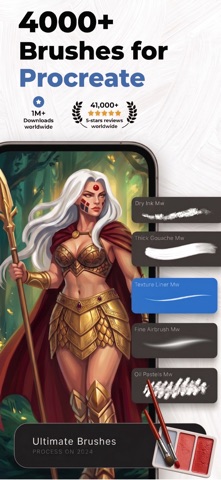
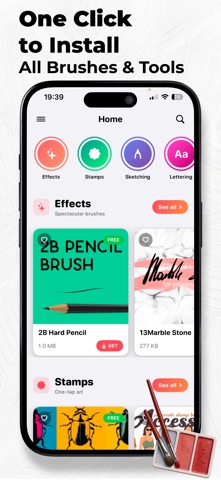
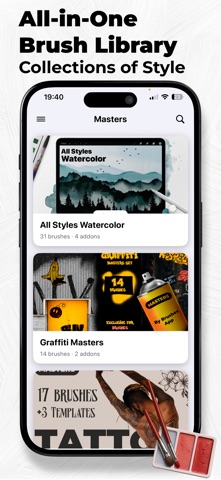
Brushes for Procreate™ – Premium Brush Pack for Digital Artists Unlock your full creative potential with Brushes for Procreate — a powerful collection of high-quality brushes designed for illustrators, designers, and digital artists of all levels. Whether you're sketching, inking, painting, or creating detailed illustrations, this app gives you everything you need to bring your ideas to life inside Procreate. All-in-One Brush Library Access a carefully curated selection of brushes, including: • Sketching and pencil brushes • Inking and line art tools • Watercolor and painting brushes • Texture and grain brushes • Special effects and creative brushes Each brush is optimized for smooth performance and a natural feel, helping you create professional-quality artwork with ease. Designed for Procreate All brushes are fully compatible with Procreate and easy to install in seconds. Just download, import, and start creating instantly. Create Without Limits • Achieve realistic strokes and textures • Speed up your workflow with ready-to-use tools • Experiment with different styles and techniques • Perfect for beginners and professionals alike Regular Updates New brushes and packs are added frequently, so you’ll always have fresh tools to explore and elevate your art. Simple and Fast Experience Clean interface, fast downloads, and seamless integration with Procreate ensure a smooth creative process from start to finish. Perfect for: • Illustrators • Tattoo artists • Graphic designers • Hobby artists and beginners • Anyone using Procreate Download Brushes for Procreate now and start creating stunning artwork with professional tools. Information About Subscription You can cancel your subscription or free trial anytime through your iTunes account settings. Subscriptions will automatically renew unless canceled at least 24 hours before the end of the current period. A subscription with a free trial will automatically renew to a paid subscription unless canceled before the trial ends. Any unused portion of a free trial will be forfeited upon purchase. Payment will be charged to your iTunes account at confirmation of purchase and upon each renewal. For more information, please review: Privacy Policy: https://brushestore.com/privacy.html Terms of Use: https://brushestore.com/terms.html EULA: https://www.apple.com/legal/internet-services/itunes/dev/stdeula/


