
PC 용 GigClick: Metronome, Setlist
- 카테고리: Music
- 최근 업데이트: 2026-11-13
- 현재 버전: 1.1
- 파일 크기: 3.20 MB
- 개발자: MATTHEW PETER WHIMP
- 호환성: 필요 Windows XP, Windows Vista, Windows 7, Windows 8, Windows 8.1 and Windows 10, Windows 11




PC에서 GigClick: Metronome, Setlist 용 호환 APK 다운로드
| 다운로드 | 개발자 | 평점 | 점수 | 현재 버전 | 성인 랭킹 |
|---|---|---|---|---|---|
| ↓ PC용 APK 다운로드 | MATTHEW PETER WHIMP | 1 | 1 | 1.1 | 4+ |
에뮬레이터의 중요성은 컴퓨터에서 안드로이드 환경을 흉내 내고 안드로이드 폰을 구입하지 않고도 안드로이드 앱을 설치하고 실행하는 것을 매우 쉽게 만들어주는 것입니다. 누가 당신이 두 세계를 즐길 수 없다고 말합니까? 우선 아래에있는 에뮬레이터 앱을 다운로드 할 수 있습니다.
A. Nox App . OR
B. Bluestacks App .
Bluestacks는 매우 대중적이므로 개인적으로 "B"옵션을 사용하는 것이 좋습니다. 문제가 발생하면 Google 또는 Naver.com에서 좋은 해결책을 찾을 수 있습니다.
Bluestacks.exe 또는 Nox.exe를 성공적으로 다운로드 한 경우 컴퓨터의 다운로드 폴더 또는 다운로드 한 파일을 일반적으로 저장하는 곳으로 이동하십시오.
찾으면 클릭하여 응용 프로그램을 설치하십시오. PC에서 설치 프로세스를 시작해야합니다.
다음을 클릭하여 EULA 라이센스 계약에 동의하십시오.
응용 프로그램을 설치하려면 화면 지시문을 따르십시오.
위 사항을 올바르게 수행하면 소프트웨어가 성공적으로 설치됩니다.
이제 설치 한 에뮬레이터 애플리케이션을 열고 검색 창을 찾으십시오. 지금 입력하십시오. - GigClick: Metronome, Setlist 앱을 쉽게 볼 수 있습니다. 그것을 클릭하십시오. 응용 프로그램 창이 열리고 에뮬레이터 소프트웨어에 응용 프로그램이 표시됩니다. 설치 버튼을 누르면 응용 프로그램이 다운로드되기 시작합니다. 이제 우리는 모두 끝났습니다.
그런 다음 "모든 앱"아이콘이 표시됩니다.
클릭하면 설치된 모든 응용 프로그램이 포함 된 페이지로 이동합니다.
당신은 GigClick: Metronome, Setlist 상. 그것을 클릭하고 응용 프로그램 사용을 시작하십시오.
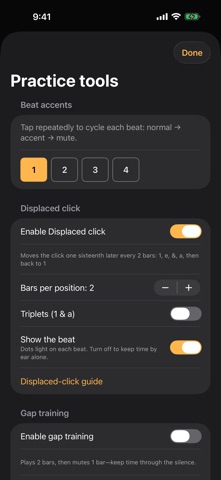
GigClick is a metronome for musicians, built by a drummer. It gives solo players and full bands a dependable pulse, with meters counted the way musicians use them and setlists you can run on stage. ROCK SOLID FROM THE FIRST BAR TO THE LAST 20 to 300 BPM, set with the slider, tap tempo or ±1 and ±5 controls. The click keeps playing with the screen locked or the app in the background, and changes apply while it runs. Audio latency on Bluetooth devices is automatically adjusted for, with manual adjustment as a backup. GigClick remembers the offset for each device. METERS COUNTED THE WAY MUSICIANS USE THEM Presets for 2/4, 3/4, 4/4, 5/4, 6/8 and 7/8, with 6/8 counted in two and 7/8 grouped 2+2+2+1. Build custom meters up to 16 with your own grouping, such as 2+2+3 or 3+3+3+2. The BPM always shows which note it counts, so the BPM gives the tempo you expect. SEE THE COUNT A large beat count shows every click, 1 e & a, with the accent flashing in your chosen colour. Full screen mode keeps the count, the current song and the setlist controls in view. SONGS AND SETLISTS YOU CAN RUN ON STAGE • Save the tempo, meter, click pattern, accents and notes for each song, in folders • Give a song a structure: sections that each have their own bars, tempo and meter, changing on the bar • Build setlists, drag to reorder, and step through them with large previous and next controls • See the song notes, your position and the next song while you play • Queue songs on the fly, then save the queue as a setlist • Export any setlist as a printable PDF • Back up and restore your library SHARE ONE CLICK ACROSS THE BAND Connect the band's phones to the leader's phone to share their click. Join on the same Wi-Fi network or hotspot by scanning its QR code or entering its address and joining code. Each device plays its own click sound and volume while the leader controls the tempo, meter and start/stop, and followers see the current song, notes, setlist position and next song. No account or internet server is involved. Session traffic is not encrypted, so avoid sensitive song or setlist notes. PRACTICE • Subdivisions: quarter notes, eighths, triplets or sixteenths • Per-beat accents: make any beat loud, normal or silent, for example a click on 2 and 4 only • Gap training: choose how many bars play and how many are silent, then check where you land • Tempo trainer: set the tempo to increase automatically while you play, say +2 BPM every 8 bars, to build speed • Displaced click: practise keeping the beat while you hear the click between beats. Choose sixteenths or triplets in 2/4, 3/4, 4/4 or 5/4 • Practice guides: short exercises on subdivisions, Gap training, Displaced click and Tempo trainer, each able to set up the metronome for you MAKE IT YOURS Eight click sounds (Classic, Woodblock, Soft, Cowbell, Rimshot, Clave, Hi-hat and Shaker), adjustable click pitch and volume, six accent colours and beat-flash strength. Audio, visual or combined output. A dark interface made for dark stages. Pay once. No ads. No account. No subscriptions and no tracking. GigClick collects no data, and your library stays on your device.


