
PC 용 Emphasis: Flow & Focus Timer
- 카테고리: Productivity
- 최근 업데이트: 2026-11-09
- 현재 버전: 10.7.0
- 파일 크기: 41.36 MB
- 개발자: Aleksandr Fiodorov
- 호환성: 필요 Windows XP, Windows Vista, Windows 7, Windows 8, Windows 8.1 and Windows 10, Windows 11



PC에서 Emphasis: Flow & Focus Timer 용 호환 APK 다운로드
| 다운로드 | 개발자 | 평점 | 점수 | 현재 버전 | 성인 랭킹 |
|---|---|---|---|---|---|
| ↓ PC용 APK 다운로드 | Aleksandr Fiodorov | 170 | 4.8 | 10.7.0 | 4+ |
에뮬레이터의 중요성은 컴퓨터에서 안드로이드 환경을 흉내 내고 안드로이드 폰을 구입하지 않고도 안드로이드 앱을 설치하고 실행하는 것을 매우 쉽게 만들어주는 것입니다. 누가 당신이 두 세계를 즐길 수 없다고 말합니까? 우선 아래에있는 에뮬레이터 앱을 다운로드 할 수 있습니다.
A. Nox App . OR
B. Bluestacks App .
Bluestacks는 매우 대중적이므로 개인적으로 "B"옵션을 사용하는 것이 좋습니다. 문제가 발생하면 Google 또는 Naver.com에서 좋은 해결책을 찾을 수 있습니다.
Bluestacks.exe 또는 Nox.exe를 성공적으로 다운로드 한 경우 컴퓨터의 다운로드 폴더 또는 다운로드 한 파일을 일반적으로 저장하는 곳으로 이동하십시오.
찾으면 클릭하여 응용 프로그램을 설치하십시오. PC에서 설치 프로세스를 시작해야합니다.
다음을 클릭하여 EULA 라이센스 계약에 동의하십시오.
응용 프로그램을 설치하려면 화면 지시문을 따르십시오.
위 사항을 올바르게 수행하면 소프트웨어가 성공적으로 설치됩니다.
이제 설치 한 에뮬레이터 애플리케이션을 열고 검색 창을 찾으십시오. 지금 입력하십시오. - Emphasis: Flow & Focus Timer 앱을 쉽게 볼 수 있습니다. 그것을 클릭하십시오. 응용 프로그램 창이 열리고 에뮬레이터 소프트웨어에 응용 프로그램이 표시됩니다. 설치 버튼을 누르면 응용 프로그램이 다운로드되기 시작합니다. 이제 우리는 모두 끝났습니다.
그런 다음 "모든 앱"아이콘이 표시됩니다.
클릭하면 설치된 모든 응용 프로그램이 포함 된 페이지로 이동합니다.
당신은 Emphasis: Flow & Focus Timer 상. 그것을 클릭하고 응용 프로그램 사용을 시작하십시오.
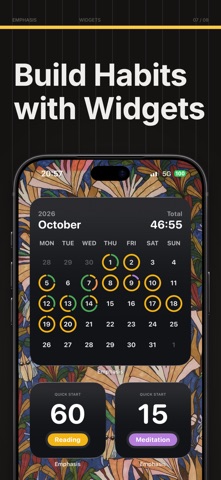
Emphasis is an ADHD-friendly Focus Timer. It is built around the principles of the Pomodoro Technique, which in a nutshell are bursts of intentional focused work followed by short breaks. Every couple of hours you take a longer break to recharge and get ready for the next cycle. Following this approach lets you get into the flow state without much effort. Plan your day ahead with time blocks for focused work and start the timer. Emphasis will take care of blocking out distracting apps like social media or video streaming services. It will also provide you with a steady layer of ambient sound that helps your brain feel anchored instead of hunting for the next distraction, because for an ADHD mind, silence can feel restless. Emphasis tracks the time you spent focused and gives you a nice overview of how you spend your days. Use it long enough and you will see patterns that will help you move towards your goals. Emphasis is fully integrated into the Apple ecosystem with Widgets and a watchOS app. You can also use it on your MacBook, all synced together seamlessly. Here is the full list of features: * Customizable focus timers. You define the duration of your focus time, short and long breaks, as well as the length of the focus cycle. You can also set up reminders for each timer. * Block Distracting Apps. You can select the apps that get you out of your flow and Emphasis will block those apps during your focus sessions. * Sonic Spaces. Emphasis comes with a set of ambient sounds & binaural beats. You can fully customize and create ambients that are aimed to aid your focus or relax you during your yoga session. * Statistics. Emphasis tracks your focused time and displays it in the form of interactive stats. Each focus timer has a color assigned to it so you can see how you spend your days at a quick glance at an Emphasis calendar. * Focus hours schedule. Emphasis lets you block out time-wasting apps during your focus hours. I can't tell you how many times this feature brought me back to what matters when my hand reached out for a phone to scroll some social media, only to get reminded by Emphasis that I'm on focus hours. * Widgets. Emphasis comes with a set of widgets that let you start your timers or have your focus time statistics right on your home screen. * Works on your Apple Watch, MacBook & iPad all seamlessly synchronized. https://www.apple.com/legal/internet-services/itunes/dev/stdeula/