PC 용 Word Square Collection
- 카테고리: Games
- 최근 업데이트: 2018-12-21
- 현재 버전: 1.10
- 파일 크기: 29.47 MB
- 개발자: MmpApps Corp.
- 호환성: 필요 Windows XP, Windows Vista, Windows 7, Windows 8, Windows 8.1 and Windows 10, Windows 11




PC에서 Word Square Collection 용 호환 APK 다운로드
| 다운로드 | 개발자 | 평점 | 점수 | 현재 버전 | 성인 랭킹 |
|---|---|---|---|---|---|
| ↓ PC용 APK 다운로드 | MmpApps Corp. | 0 | 0 | 1.10 | 4+ |
에뮬레이터의 중요성은 컴퓨터에서 안드로이드 환경을 흉내 내고 안드로이드 폰을 구입하지 않고도 안드로이드 앱을 설치하고 실행하는 것을 매우 쉽게 만들어주는 것입니다. 누가 당신이 두 세계를 즐길 수 없다고 말합니까? 우선 아래에있는 에뮬레이터 앱을 다운로드 할 수 있습니다.
A. Nox App . OR
B. Bluestacks App .
Bluestacks는 매우 대중적이므로 개인적으로 "B"옵션을 사용하는 것이 좋습니다. 문제가 발생하면 Google 또는 Naver.com에서 좋은 해결책을 찾을 수 있습니다.
Bluestacks.exe 또는 Nox.exe를 성공적으로 다운로드 한 경우 컴퓨터의 다운로드 폴더 또는 다운로드 한 파일을 일반적으로 저장하는 곳으로 이동하십시오.
찾으면 클릭하여 응용 프로그램을 설치하십시오. PC에서 설치 프로세스를 시작해야합니다.
다음을 클릭하여 EULA 라이센스 계약에 동의하십시오.
응용 프로그램을 설치하려면 화면 지시문을 따르십시오.
위 사항을 올바르게 수행하면 소프트웨어가 성공적으로 설치됩니다.
이제 설치 한 에뮬레이터 애플리케이션을 열고 검색 창을 찾으십시오. 지금 입력하십시오. - Word Square Collection 앱을 쉽게 볼 수 있습니다. 그것을 클릭하십시오. 응용 프로그램 창이 열리고 에뮬레이터 소프트웨어에 응용 프로그램이 표시됩니다. 설치 버튼을 누르면 응용 프로그램이 다운로드되기 시작합니다. 이제 우리는 모두 끝났습니다.
그런 다음 "모든 앱"아이콘이 표시됩니다.
클릭하면 설치된 모든 응용 프로그램이 포함 된 페이지로 이동합니다.
당신은 Word Square Collection 상. 그것을 클릭하고 응용 프로그램 사용을 시작하십시오.
Mac OS 에서 Word Square Collection 다운로드
| 다운로드 | 개발자 | 점수 | 현재 버전 | 성인 랭킹 |
|---|---|---|---|---|
| 무료 - Mac 에서 다운로드 | MmpApps Corp. | 0 |
1.10 | 4+ |
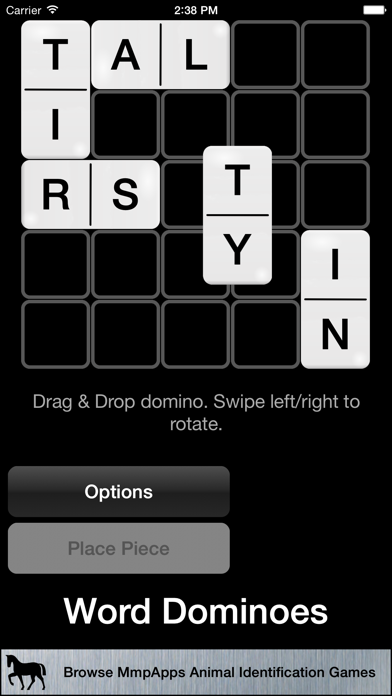
WORD SQUARE COLLECTION is a 11-in-1 collection of word games related by the Word Square theme. Totally free!! No in-app purchases. Most games can be played in two variants, 5x5 and 6x6. WORD SQUARE: The classic word game where you place letters in a grid. You score points for all the words of three-or-more letters made in rows and columns. For example MAPES will score MAP APE and APES. *NEW* WORD PUSH: Choose with row/column to push the next letter. Letters already in play will move accordingly. When the board is full it will score as in standard Word Square. WORD HEXAGON: Similar to classic Word Square but played on a hexagonal grid. BUY-A-LETTER: Just like Word Square but with the opportunity to buy a letter of your choice at four points in the game. WORD DRAW: A variant of Word Square where you start with a full grid of cards and have four rounds to discard any number of cards you want. WORD DOMINOES: A variant of Word Square where you place letter dominoes in a 5x5 grid. WORD CACHE: A variant of Word Square where you have 4 cache spots where you can keep letters for later play. WORD SPRAWL: A variant of Word Square with a challenging constraint that letters can only be placed adjacent to a previously placed letter. Two-letter words are also scored. WORD CHOICE: A variant of Word Square where you can choose the next letter to play from a set of five options. GRAVITY WORD: A variant of Word Square with a challenging gravitational constraint. You choose into which column the next letter will fall. Two-letter words are also scored. WORD PILE: A variant of Word Square where you can choose to place the next letter or put it on a discard pile. The top letter on the discard pile can be played at anytime revealing the letter underneath.