PC 용 FallSafety Pro—Safety Alerts
- 카테고리: Health & Fitness
- 최근 업데이트: 2021-10-27
- 현재 버전: 5.9
- 파일 크기: 70.48 MB
- 개발자: Tidyware, LLC
- 호환성: 필요 Windows XP, Windows Vista, Windows 7, Windows 8, Windows 8.1 and Windows 10, Windows 11



PC에서 FallSafety Pro—Safety Alerts 용 호환 APK 다운로드
| 다운로드 | 개발자 | 평점 | 점수 | 현재 버전 | 성인 랭킹 |
|---|---|---|---|---|---|
| ↓ PC용 APK 다운로드 | Tidyware, LLC | 1 | 3 | 5.9 | 4+ |
에뮬레이터의 중요성은 컴퓨터에서 안드로이드 환경을 흉내 내고 안드로이드 폰을 구입하지 않고도 안드로이드 앱을 설치하고 실행하는 것을 매우 쉽게 만들어주는 것입니다. 누가 당신이 두 세계를 즐길 수 없다고 말합니까? 우선 아래에있는 에뮬레이터 앱을 다운로드 할 수 있습니다.
A. Nox App . OR
B. Bluestacks App .
Bluestacks는 매우 대중적이므로 개인적으로 "B"옵션을 사용하는 것이 좋습니다. 문제가 발생하면 Google 또는 Naver.com에서 좋은 해결책을 찾을 수 있습니다.
Bluestacks.exe 또는 Nox.exe를 성공적으로 다운로드 한 경우 컴퓨터의 다운로드 폴더 또는 다운로드 한 파일을 일반적으로 저장하는 곳으로 이동하십시오.
찾으면 클릭하여 응용 프로그램을 설치하십시오. PC에서 설치 프로세스를 시작해야합니다.
다음을 클릭하여 EULA 라이센스 계약에 동의하십시오.
응용 프로그램을 설치하려면 화면 지시문을 따르십시오.
위 사항을 올바르게 수행하면 소프트웨어가 성공적으로 설치됩니다.
이제 설치 한 에뮬레이터 애플리케이션을 열고 검색 창을 찾으십시오. 지금 입력하십시오. - FallSafety Pro—Safety Alerts 앱을 쉽게 볼 수 있습니다. 그것을 클릭하십시오. 응용 프로그램 창이 열리고 에뮬레이터 소프트웨어에 응용 프로그램이 표시됩니다. 설치 버튼을 누르면 응용 프로그램이 다운로드되기 시작합니다. 이제 우리는 모두 끝났습니다.
그런 다음 "모든 앱"아이콘이 표시됩니다.
클릭하면 설치된 모든 응용 프로그램이 포함 된 페이지로 이동합니다.
당신은 FallSafety Pro—Safety Alerts 상. 그것을 클릭하고 응용 프로그램 사용을 시작하십시오.
Mac OS 에서 FallSafety Pro—Safety Alerts 다운로드
| 다운로드 | 개발자 | 점수 | 현재 버전 | 성인 랭킹 |
|---|---|---|---|---|
| 무료 - Mac 에서 다운로드 | Tidyware, LLC | 3 |
5.9 | 4+ |
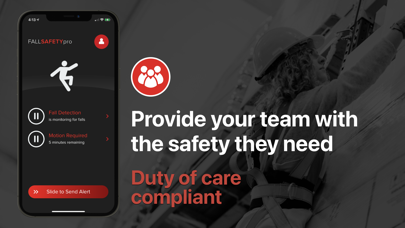
FallSafety Pro provides the most comprehensive and customizable Health and Safety solution for people who work at height both indoors and outdoors. Using the iPhone and Apple Watch, advanced safety protocols protect people from environmental, health, and social dangers. Protect your workers, protect your company. FallSafety Pro gives you the tools to provide duty of care, compliance, and peace of mind. Across all industries, workers are faced with hazardous conditions daily. FallSafety Pro allows you to improve safety, ensuring that your workers get a rapid emergency response and the help they need leading to better outcomes. Safety Improvements • Increase safety compliance for your workforce • Improve practical risk management for your organization • Provide industry leading safety best practices • Protect your employees with robust safety protocols Safety Protocols • Emergency Check-Ins • Industry Leading Fall Detection • Automatic Worker Down Detection • Panic Button Safety by Design • All safety protocols run in the background • Set up one or hundreds of accounts in minutes • Automatically alerts emergency contacts by group or team • Alerts by voice message, text message, and email • Useful in areas with limited Wi-Fi and cell phone service The FallSafety Service is a subscription service with volume discounts available for medium and large organizations. FallSafety Pro comes with a 10-day fully functional free trial (no credit card required). Contact sales for extended trials. Subscribe for $6.99 monthly per person to protect workers. For safety, FallSafety Pro monitors your location in the background in case of an emergency. For privacy, your location is only shared in the event of an emergency. FallSafety Pro is tested to run all day with newer iPhones. Note: Continued use of GPS running in the background can dramatically decrease battery life. Your subscription will renew automatically each month and payment will be charged to your iTunes Account within 24-hours prior to the end of the current period. You can turn off auto-renewal by going to your Account Settings after purchase. No cancellation of your subscription is allowed during the active subscription period. When working in situations where dropping a phone is not an option, FallSafety Pro for Apple Watch may be the best safety solution. FallSafety Pro for Apple Watch is included and offers the same safety protocols as the iPhone and optionally detects extended high heart rate. FallSafety Pro integrates with the Health app and optionally tracks the number of times a person has fallen. Terms: https://fallsafetyapp.com/terms Privacy: https://fallsafetyapp.com/privacy