PC 용 Book Mower Audiobook Player
- 카테고리: Entertainment
- 최근 업데이트: 2018-09-03
- 현재 버전: 3.7.6
- 파일 크기: 69.33 MB
- 개발자: Freshmowed Software
- 호환성: 필요 Windows XP, Windows Vista, Windows 7, Windows 8, Windows 8.1 and Windows 10, Windows 11


PC에서 Book Mower Audiobook Player 용 호환 APK 다운로드
| 다운로드 | 개발자 | 평점 | 점수 | 현재 버전 | 성인 랭킹 |
|---|---|---|---|---|---|
| ↓ PC용 APK 다운로드 | Freshmowed Software | 0 | 0 | 3.7.6 | 4+ |
호환되는 PC 앱 또는 대안 확인
| 소프트웨어 | 다운로드 | 평점 | 개발자 |
|---|---|---|---|
| Book Mower Audiobook Player |
PC 앱 받기 | 0/5 0 리뷰 0 |
Freshmowed Software |
에뮬레이터의 중요성은 컴퓨터에서 안드로이드 환경을 흉내 내고 안드로이드 폰을 구입하지 않고도 안드로이드 앱을 설치하고 실행하는 것을 매우 쉽게 만들어주는 것입니다. 누가 당신이 두 세계를 즐길 수 없다고 말합니까? 우선 아래에있는 에뮬레이터 앱을 다운로드 할 수 있습니다.
A. Nox App . OR
B. Bluestacks App .
Bluestacks는 매우 대중적이므로 개인적으로 "B"옵션을 사용하는 것이 좋습니다. 문제가 발생하면 Google 또는 Naver.com에서 좋은 해결책을 찾을 수 있습니다.
Bluestacks.exe 또는 Nox.exe를 성공적으로 다운로드 한 경우 컴퓨터의 다운로드 폴더 또는 다운로드 한 파일을 일반적으로 저장하는 곳으로 이동하십시오.
찾으면 클릭하여 응용 프로그램을 설치하십시오. PC에서 설치 프로세스를 시작해야합니다.
다음을 클릭하여 EULA 라이센스 계약에 동의하십시오.
응용 프로그램을 설치하려면 화면 지시문을 따르십시오.
위 사항을 올바르게 수행하면 소프트웨어가 성공적으로 설치됩니다.
이제 설치 한 에뮬레이터 애플리케이션을 열고 검색 창을 찾으십시오. 지금 입력하십시오. - Book Mower Audiobook Player 앱을 쉽게 볼 수 있습니다. 그것을 클릭하십시오. 응용 프로그램 창이 열리고 에뮬레이터 소프트웨어에 응용 프로그램이 표시됩니다. 설치 버튼을 누르면 응용 프로그램이 다운로드되기 시작합니다. 이제 우리는 모두 끝났습니다.
그런 다음 "모든 앱"아이콘이 표시됩니다.
클릭하면 설치된 모든 응용 프로그램이 포함 된 페이지로 이동합니다.
당신은 Book Mower Audiobook Player 상. 그것을 클릭하고 응용 프로그램 사용을 시작하십시오.
Mac OS 에서 Book Mower Audiobook Player 다운로드
| 다운로드 | 개발자 | 점수 | 현재 버전 | 성인 랭킹 |
|---|---|---|---|---|
| 무료 - Mac 에서 다운로드 | Freshmowed Software | 0 |
3.7.6 | 4+ |
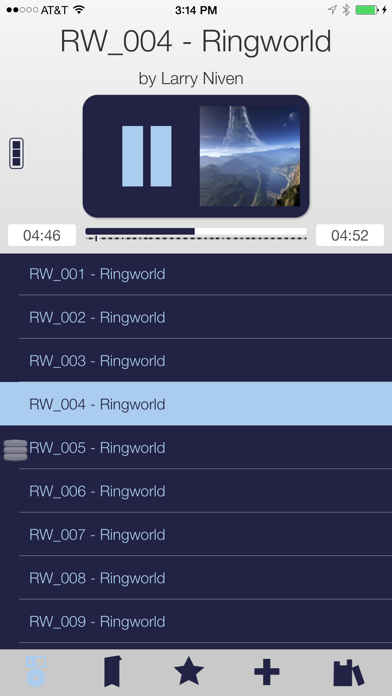
Thousands of details have been considered in pursuit of a single goal: make getting, playing, and managing audiobooks a delightful experience. Precise Control: Sliders are difficult with long audio. If you mis-slide, you can't get back to where you were, making it very easy to lose your place. For this reason, Book Mower has no position scrubber. Instead, the app provides customizable skip buttons: jump by specific amounts in either direction. A Driving Mode makes listening to audiobooks in the car safer. The screen becomes tap-to-play/pause and swipe-to-skip. Book Mower continues playing in the background after leaving the app, and automatically transitions between parts of books. Automatic Bookmarks: Book Mower will keep track of your progress with automatically created bookmarks. Events, such as chapter transitions, interruptions (like phone calls), and app suspensions, get bookmarked. Just tapping Pause will create a bookmark also, so you don't have to do anything special to create one. Then, if you customize any bookmarks -- change their name, color, position or notes, -- they become permanent, and you can export them as HTML/CSV/Text. The Sleep Timer has features like shake-to-add-time, auto screen dimming, and it bookmarks when the timer started and ended, so you can easily pick up where you dozed off. Playback Speed Controls offer fine-grained adjustment, with non-linear increments: from slightly faster to double speed. Book Mower works great with remote controls, like Bluetooth or Apple headphones. With any audio, you can play/pause remotely. If you listen to DRM-free audiobooks, you can also skip +/- 30 seconds, and create bookmarks even while the app is backgrounded. Complete control over audio files: - Reorder parts/chapters. - Rename audiobooks and parts/chapters. - Cover artwork can be added or replaced -- just a simple copy-and-paste of any image from web or photo library. Use hi-res images for Retina display devices. - Download/delete/re-download audio files whenever you want. Redirect audio output with AirPlay support. Get, play and manage audio content from a wide variety of sources -- iTunes, Audible.com, Librivox.org, CDs, public library downloads, ... . Free Audiobooks included: Search or Browse through thousands of titles available from Librivox.org directly in the app. Browse and add to your Bookshelf, then download when you are ready to listen. iTunes Audiobook Store is built right in: browse the most popular titles and search the entire catalog. Audio File Types Supported: - DRM-enabled content (from Audible.com or iTunes Store) - non-DRM content (from web downloads, CDs, etc.) - M4B audiobooks, including chapters, artwork - MP3 audio files, including artwork, ID3 tags - import individual audio files or Zip archives (including artwork image files) Audio Import Options (for mp3, m4b, or zip files): - add from on-device iTunes Library (required for DRM-enabled audio, like from Audible) - use iTunes File Sharing (no syncing required) - Open in... Book Mower from Dropbox, and most other cloud storage systems - use a web browser on your computer to transfer files. Try it for free! Try it as a FREE TRIAL with 5 audiobooks for up to 60 days, then only $3.99 for unlimited audiobooks.