
PC 용 Phonique
- 카테고리: Developer Tools
- 최근 업데이트: 2026-11-11
- 현재 버전: 3.0
- 파일 크기: 1.29 MB
- 개발자: nthState
- 호환성: 필요 Windows XP, Windows Vista, Windows 7, Windows 8, Windows 8.1 and Windows 10, Windows 11


에뮬레이터의 중요성은 컴퓨터에서 안드로이드 환경을 흉내 내고 안드로이드 폰을 구입하지 않고도 안드로이드 앱을 설치하고 실행하는 것을 매우 쉽게 만들어주는 것입니다. 누가 당신이 두 세계를 즐길 수 없다고 말합니까? 우선 아래에있는 에뮬레이터 앱을 다운로드 할 수 있습니다.
A. Nox App . OR
B. Bluestacks App .
Bluestacks는 매우 대중적이므로 개인적으로 "B"옵션을 사용하는 것이 좋습니다. 문제가 발생하면 Google 또는 Naver.com에서 좋은 해결책을 찾을 수 있습니다.
Bluestacks.exe 또는 Nox.exe를 성공적으로 다운로드 한 경우 컴퓨터의 다운로드 폴더 또는 다운로드 한 파일을 일반적으로 저장하는 곳으로 이동하십시오.
찾으면 클릭하여 응용 프로그램을 설치하십시오. PC에서 설치 프로세스를 시작해야합니다.
다음을 클릭하여 EULA 라이센스 계약에 동의하십시오.
응용 프로그램을 설치하려면 화면 지시문을 따르십시오.
위 사항을 올바르게 수행하면 소프트웨어가 성공적으로 설치됩니다.
이제 설치 한 에뮬레이터 애플리케이션을 열고 검색 창을 찾으십시오. 지금 입력하십시오. - Phonique 앱을 쉽게 볼 수 있습니다. 그것을 클릭하십시오. 응용 프로그램 창이 열리고 에뮬레이터 소프트웨어에 응용 프로그램이 표시됩니다. 설치 버튼을 누르면 응용 프로그램이 다운로드되기 시작합니다. 이제 우리는 모두 끝났습니다.
그런 다음 "모든 앱"아이콘이 표시됩니다.
클릭하면 설치된 모든 응용 프로그램이 포함 된 페이지로 이동합니다.
당신은 Phonique 상. 그것을 클릭하고 응용 프로그램 사용을 시작하십시오.
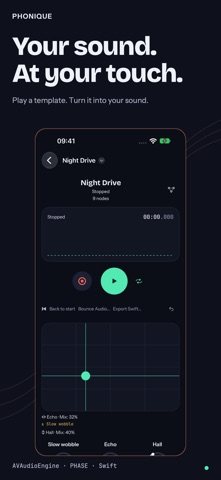
Phonique is a node editor for Apple audio. Wire up players, effects and spatial scenes, hear them live as you work, then export clean Swift for AVAudioEngine or PHASE. DRAW IT Drag sources, effects and controls onto the canvas and connect them with cables. An LFO can move any value; a trigger can flip one. Tidy the graph with one command when it sprawls. HEAR IT The graph plays while you edit. Turn a dial and the sound changes under your hand; meters and a spectrum show what is happening. Bounce a graph without live microphone input to an audio file. SHIP IT Export a Swift package that needs nothing beyond Apple’s frameworks, with an Xcode project that plays it. Add the package to your app and call start(). TWO ENGINES, ONE CANVAS • Graph, on AVAudioEngine: file players, a sampler, waveforms and the microphone; EQ, reverb, delay, distortion, pitch shift, varispeed and mixers; LFOs, triggers and if-then listeners; speakers, recorders and a live spectrum. • Space, on PHASE: sources around a listener, walls of wood or glass that muffle them, rooms that ring. Hear the room binaurally on headphones, and export the scene as PHASE code. EVERY SCREEN • Mac and iPad: the full editor. • iPhone: start from a template, then play and tweak anywhere. • iPhone Duo: folded, it is a player; open, it is the full editor. START FROM A SOUND Each template is a curated starting point. Open one in Phonique and pull it apart. Every node has a help page, with the Apple documentation behind it, at phonique.com.