
PC 용 crowdDJ
- 카테고리: Entertainment
- 최근 업데이트: 2026-10-26
- 현재 버전: 2.58.24
- 파일 크기: 34.67 MB
- 개발자: Nightlife Music Pty Ltd
- 호환성: 필요 Windows XP, Windows Vista, Windows 7, Windows 8, Windows 8.1 and Windows 10, Windows 11

PC에서 crowdDJ 용 호환 APK 다운로드
| 다운로드 | 개발자 | 평점 | 점수 | 현재 버전 | 성인 랭킹 |
|---|---|---|---|---|---|
| ↓ PC용 APK 다운로드 | Nightlife Music Pty Ltd | 2 | 5 | 2.58.24 | 4+ |
에뮬레이터의 중요성은 컴퓨터에서 안드로이드 환경을 흉내 내고 안드로이드 폰을 구입하지 않고도 안드로이드 앱을 설치하고 실행하는 것을 매우 쉽게 만들어주는 것입니다. 누가 당신이 두 세계를 즐길 수 없다고 말합니까? 우선 아래에있는 에뮬레이터 앱을 다운로드 할 수 있습니다.
A. Nox App . OR
B. Bluestacks App .
Bluestacks는 매우 대중적이므로 개인적으로 "B"옵션을 사용하는 것이 좋습니다. 문제가 발생하면 Google 또는 Naver.com에서 좋은 해결책을 찾을 수 있습니다.
Bluestacks.exe 또는 Nox.exe를 성공적으로 다운로드 한 경우 컴퓨터의 다운로드 폴더 또는 다운로드 한 파일을 일반적으로 저장하는 곳으로 이동하십시오.
찾으면 클릭하여 응용 프로그램을 설치하십시오. PC에서 설치 프로세스를 시작해야합니다.
다음을 클릭하여 EULA 라이센스 계약에 동의하십시오.
응용 프로그램을 설치하려면 화면 지시문을 따르십시오.
위 사항을 올바르게 수행하면 소프트웨어가 성공적으로 설치됩니다.
이제 설치 한 에뮬레이터 애플리케이션을 열고 검색 창을 찾으십시오. 지금 입력하십시오. - crowdDJ 앱을 쉽게 볼 수 있습니다. 그것을 클릭하십시오. 응용 프로그램 창이 열리고 에뮬레이터 소프트웨어에 응용 프로그램이 표시됩니다. 설치 버튼을 누르면 응용 프로그램이 다운로드되기 시작합니다. 이제 우리는 모두 끝났습니다.
그런 다음 "모든 앱"아이콘이 표시됩니다.
클릭하면 설치된 모든 응용 프로그램이 포함 된 페이지로 이동합니다.
당신은 crowdDJ 상. 그것을 클릭하고 응용 프로그램 사용을 시작하십시오.
Mac OS 에서 crowdDJ 다운로드
| 다운로드 | 개발자 | 점수 | 현재 버전 | 성인 랭킹 |
|---|---|---|---|---|
| 무료 - Mac 에서 다운로드 | Nightlife Music Pty Ltd | 5 |
2.58.24 | 4+ |
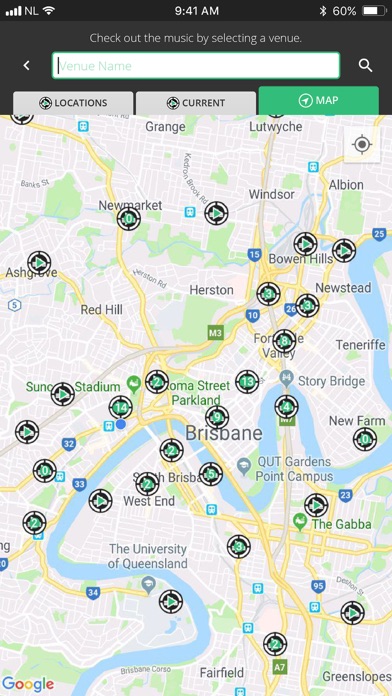
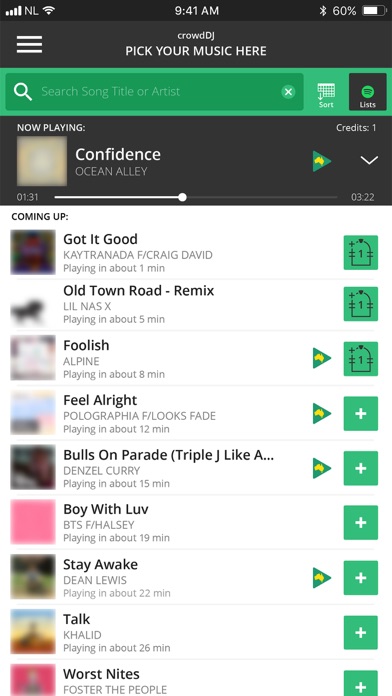
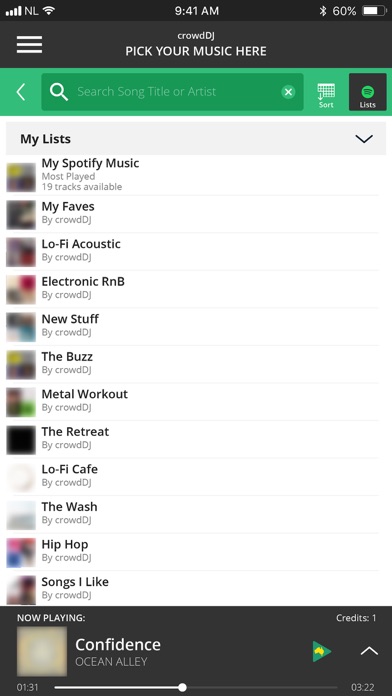
crowdDJ® lets you choose your favourite songs in your favourite places - gyms, bars, hotels, bowling alleys, cruise ships and thousands of other locations. Using crowdDJ® you can: - find crowdDJ venues - view the current playlist (past and upcoming) - search and browse the venue's music library - sort alphabetically or by release year - play your favourite songs by adding them into the playback queue - support Aussie musicians and play their music - you'll see our new Australian Played icon next to all Aussie tracks By connecting your Spotify account, you can also: - import your Spotify playlists to match with the venue's music library - take home the previous or upcoming 50 tracks by saving to your own Spotify playlists - add individual songs to your Spotify playlists or a new Spotify playlist - view featured and suggested songs similar to your music selections - listen to or preview a track through Spotify There's no need to create an account or give any of your details - just turn on Location Services so you can be verified at the venue (we do not use or store this information), choose 'Continue as Guest' and 'Check In' to your current Location! Use the Map to see where you can crowdDJ® next. Each crowdDJ® venue has a unique sound, and you can add to the vibe in that location by picking songs that fit their brand. This unique sound and music library may include release year filters, exclude explicit content or focus on a particular music genre. If you are importing your Spotify playlists please note that song-matching may be affected by these settings, which are requested by the venue. Search results may also be affected. crowdDJ® is a public performance music platform exclusive to Nightlife Music clients. Chances are you listen to Nightlife at your favourite bar, work out to it at your gym, dance to it at the hottest nightclubs and even shop to it at your local mall. Nightlife Music is Australia's most recognised music entertainment system and has been for almost 30 years - nightlife.com.au.


