PC 용 Stick Nodes Pro - Animator
- 카테고리: Entertainment
- 최근 업데이트: 2024-10-12
- 현재 버전: 4.2.3
- 파일 크기: 158.30 MB
- 개발자: ForTheLoss Games, Inc
- 호환성: 필요 Windows XP, Windows Vista, Windows 7, Windows 8, Windows 8.1 and Windows 10, Windows 11
PC에서 Stick Nodes Pro - Animator 용 호환 APK 다운로드
| 다운로드 | 개발자 | 평점 | 점수 | 현재 버전 | 성인 랭킹 |
|---|---|---|---|---|---|
| ↓ PC용 APK 다운로드 | ForTheLoss Games, Inc | 8 | 5 | 4.2.3 | 4+ |
에뮬레이터의 중요성은 컴퓨터에서 안드로이드 환경을 흉내 내고 안드로이드 폰을 구입하지 않고도 안드로이드 앱을 설치하고 실행하는 것을 매우 쉽게 만들어주는 것입니다. 누가 당신이 두 세계를 즐길 수 없다고 말합니까? 우선 아래에있는 에뮬레이터 앱을 다운로드 할 수 있습니다.
A. Nox App . OR
B. Bluestacks App .
Bluestacks는 매우 대중적이므로 개인적으로 "B"옵션을 사용하는 것이 좋습니다. 문제가 발생하면 Google 또는 Naver.com에서 좋은 해결책을 찾을 수 있습니다.
Bluestacks.exe 또는 Nox.exe를 성공적으로 다운로드 한 경우 컴퓨터의 다운로드 폴더 또는 다운로드 한 파일을 일반적으로 저장하는 곳으로 이동하십시오.
찾으면 클릭하여 응용 프로그램을 설치하십시오. PC에서 설치 프로세스를 시작해야합니다.
다음을 클릭하여 EULA 라이센스 계약에 동의하십시오.
응용 프로그램을 설치하려면 화면 지시문을 따르십시오.
위 사항을 올바르게 수행하면 소프트웨어가 성공적으로 설치됩니다.
이제 설치 한 에뮬레이터 애플리케이션을 열고 검색 창을 찾으십시오. 지금 입력하십시오. - Stick Nodes Pro - Animator 앱을 쉽게 볼 수 있습니다. 그것을 클릭하십시오. 응용 프로그램 창이 열리고 에뮬레이터 소프트웨어에 응용 프로그램이 표시됩니다. 설치 버튼을 누르면 응용 프로그램이 다운로드되기 시작합니다. 이제 우리는 모두 끝났습니다.
그런 다음 "모든 앱"아이콘이 표시됩니다.
클릭하면 설치된 모든 응용 프로그램이 포함 된 페이지로 이동합니다.
당신은 Stick Nodes Pro - Animator 상. 그것을 클릭하고 응용 프로그램 사용을 시작하십시오.
Mac OS 에서 Stick Nodes Pro 다운로드
| 다운로드 | 개발자 | 점수 | 현재 버전 | 성인 랭킹 |
|---|---|---|---|---|
| ₩3,900 - Mac 에서 다운로드 | ForTheLoss Games, Inc | 5 |
4.2.3 | 4+ |
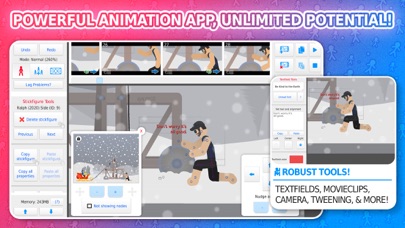
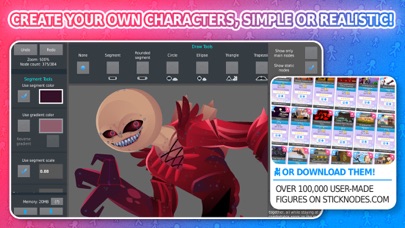
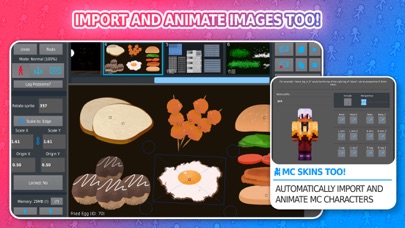
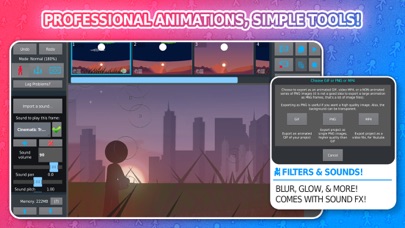
Stick Nodes is a powerful stickman animator app created with mobile devices in mind! Inspired from the popular Pivot stickfigure animator, Stick Nodes allows users to create their own stickfigure-based movies and export them as animated videos (GIF or MP4)! It is one of the most popular animation apps among young animators! ■ This is the PRO VERSION of Stick Nodes. Extra Pro features include ■ ◆ No startup ad ◆ No watermark on exports ◆ Add sound effects to frames ◆ Export to MP4 video (not just GIF) ◆ More stickfigure filters (blur, glow, and more) ■ Features ■ ◆ Import and animate images as well! ◆ Automatic customizeable frame-tweening, make your animations smoother! ◆ A simple camera to pan/zoom/rotate around the scene, similar to the "v-cam" in Flash. ◆ Movieclips allow you to create and reuse/loop animation objects within your projects. ◆ A variety of shapes, color/scale on a per-segment basis, gradients - create any "stickfigure" you can imagine! ◆ Textfields allow for easy text and speech in your animations. ◆ Add all kinds of sounds effects to make your animations epic. ◆ Apply different filters to your stickfigures - transparency, blur, glow, and more. ◆ Join stickfigures together to easily simulate holding/wearing objects. ◆ A large community full of all kinds of interesting people and other animators. ◆ Over 30,000+ stickfigures (and counting) to download from the website. ◆ Export to GIF (or MP4 for Pro) to share your animation online. ◆ Compatibility with pre-3.0 Pivot stickfigure files. ◆ Save/open/share your projects, stickfigures, and movieclips. ◆ And all the other typical animation stuff - undo/redo, onion-skin, background images, and more! * Please note, sounds, filters, and MP4-export are Pro-only features ■ Lanuages ■ ◆ English ◆ Español ◆ Français ◆ Japanese ◆ Filipino ◆ Português ◆ Russian ◆ Türkçe Stick Nodes has a thriving community where animators have a good time, help each other out, show off their work, and even create stickfigures for others to use! There are thousands of stickfigures (and more added daily!) over at the main website https://sticknodes.com/stickfigures/ As of one of the latest updates, Stick Nodes is also a Minecraft™ animator as it allows you to easily import Minecraft™ skins and animate them instantly! Search for "stick nodes" on YouTube to see just a few of the thousands of animations users have made with this stickfigure animation app! If you're looking for an animation creator or an animation maker app, this is it! ■ Stay Updated ■ New updates have been never-ending for Stick Nodes since it's original 2014 release. Keep up-to-date with the latest news and updates about your favorite stick figure animation app and join in with the community! ◆ Website: https://sticknodes.com ◆ Facebook: http://facebook.com/sticknodes ◆ Reddit: http://reddit.com/r/sticknodes ◆ Twitter: http://twitter.com/FTLRalph ◆ Youtube: http://youtube.com/FTLRalph Stick Nodes is *the best* simple animation app available on the iOS market! It's a great tool for learning animation, even in a school setting for students or newbies. At the same time, Stick Nodes is robust enough and powerful enough for even the most skilled animator to really showcase their skills! Thank you for trying out Stick Nodes! Leave any questions/comments below or on the main Stick Nodes website! Common questions are already answered on the FAQ page here https://sticknodes.com/faqs/


