
PC 용 Disc Golf Scorecard + Stats
- 카테고리: Sports
- 최근 업데이트: 2026-10-01
- 현재 버전: 8.2
- 파일 크기: 12.17 MB
- 개발자: InfoTalk LLC
- 호환성: 필요 Windows XP, Windows Vista, Windows 7, Windows 8, Windows 8.1 and Windows 10, Windows 11





PC에서 Disc Golf Scorecard + Stats 용 호환 APK 다운로드
| 다운로드 | 개발자 | 평점 | 점수 | 현재 버전 | 성인 랭킹 |
|---|---|---|---|---|---|
| ↓ PC용 APK 다운로드 | InfoTalk LLC | 1 | 5 | 8.2 | 4+ |
에뮬레이터의 중요성은 컴퓨터에서 안드로이드 환경을 흉내 내고 안드로이드 폰을 구입하지 않고도 안드로이드 앱을 설치하고 실행하는 것을 매우 쉽게 만들어주는 것입니다. 누가 당신이 두 세계를 즐길 수 없다고 말합니까? 우선 아래에있는 에뮬레이터 앱을 다운로드 할 수 있습니다.
A. Nox App . OR
B. Bluestacks App .
Bluestacks는 매우 대중적이므로 개인적으로 "B"옵션을 사용하는 것이 좋습니다. 문제가 발생하면 Google 또는 Naver.com에서 좋은 해결책을 찾을 수 있습니다.
Bluestacks.exe 또는 Nox.exe를 성공적으로 다운로드 한 경우 컴퓨터의 다운로드 폴더 또는 다운로드 한 파일을 일반적으로 저장하는 곳으로 이동하십시오.
찾으면 클릭하여 응용 프로그램을 설치하십시오. PC에서 설치 프로세스를 시작해야합니다.
다음을 클릭하여 EULA 라이센스 계약에 동의하십시오.
응용 프로그램을 설치하려면 화면 지시문을 따르십시오.
위 사항을 올바르게 수행하면 소프트웨어가 성공적으로 설치됩니다.
이제 설치 한 에뮬레이터 애플리케이션을 열고 검색 창을 찾으십시오. 지금 입력하십시오. - Disc Golf Scorecard + Stats 앱을 쉽게 볼 수 있습니다. 그것을 클릭하십시오. 응용 프로그램 창이 열리고 에뮬레이터 소프트웨어에 응용 프로그램이 표시됩니다. 설치 버튼을 누르면 응용 프로그램이 다운로드되기 시작합니다. 이제 우리는 모두 끝났습니다.
그런 다음 "모든 앱"아이콘이 표시됩니다.
클릭하면 설치된 모든 응용 프로그램이 포함 된 페이지로 이동합니다.
당신은 Disc Golf Scorecard + Stats 상. 그것을 클릭하고 응용 프로그램 사용을 시작하십시오.
Mac OS 에서 Disc Golf Scorecard + Stats 다운로드
| 다운로드 | 개발자 | 점수 | 현재 버전 | 성인 랭킹 |
|---|---|---|---|---|
| 무료 - Mac 에서 다운로드 | InfoTalk LLC | 5 |
8.2 | 4+ |
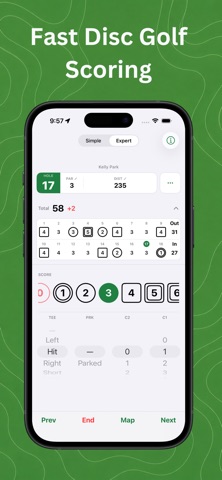
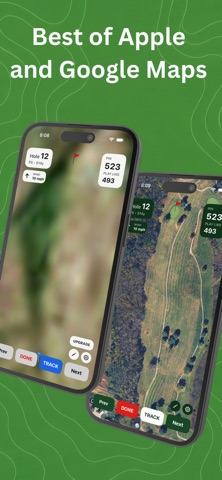
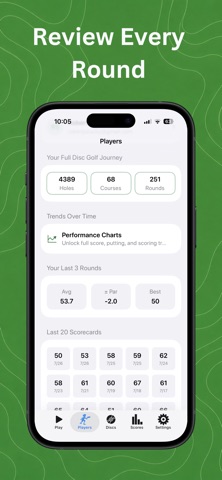
Disc Golf is a fast, battery-efficient scorecard, GPS rangefinder, and disc tracking app built so you can focus on your round. Track scores, measure distances, manage courses, review stats, and use Apple Watch support right from the course. 1. GPS Rangefinder for Disc Golf – Get fast distance readings to the basket with efficient GPS designed for all-day play. 2. Apple Maps & Google Maps Support – Switch map providers for better satellite views, course layouts, and rangefinder accuracy. 3. Wind-Aware Shot Planning – View wind information in the rangefinder to help plan smarter throws. 4. Disc Distance Tracking – Record throws, track disc distances, and build a better understanding of every disc in your bag. 5. Disc Recommendations – Use your saved disc distance data to help choose the right disc for the shot. 6. Driving Range / Disc Calibration – Find an open field, throw multiple discs, and record each distance to calibrate your bag. 7. Advanced Score Entry – Track score, putts, fairway hits, wind, and other round details with a fast scoring flow. 8. Colorful Digital Scorecard – Birdies, pars, bogeys, and double bogeys are clearly marked with colors and shapes. 9. Powerful Round Statistics – Review charts and trends for scoring, putting, fairway accuracy, and overall performance. 10. Search 15,000+ Courses – Find courses by GPS location, name, city, or state. 11. Create and Edit Courses – Build your own course and customize GPS points, tees, holes, and course details. 12. Smart Hole Auto-Advance – Automatically move to the next hole in both GPS rangefinder and score entry views. 13. Apple Watch Support – Check GPS yardage, use rangefinder features, and enter scores from your wrist. 14. HealthKit Step Support – Add walking step counts to saved rounds when HealthKit data is available and permission is granted. 15. Lightweight and Battery Efficient – Built to stay fast, smooth, and efficient through full rounds. …and much more for you to explore. Terms of the in-app purchases: Disc Golf Annual Membership with advanced GPS & stats features and an ad-free experience on the course can be purchased from App Store. Payment for in-app upgrades will be charged to your iTunes Account at confirmation of purchase. Subscriptions automatically renew unless auto-renew is turned off at least 24-hours before the end of the current period. Your iTunes Account will be charged for renewal within 24-hours prior to the end of the current period, at the original subscription amount. Subscriptions may be managed by you and auto-renewal may be turned off by going to your iTunes Account Settings after purchase. Any unused portion of a free trial period, if offered, will be forfeited when the user purchases a subscription to that publication. Privacy Policy and Terms of Service are located at: http://www.infotalkcorporation.com/privacypolicy.html.