
PC 용 MorphRush
- 카테고리: Graphics & Design
- 최근 업데이트: 2026-08-01
- 현재 버전: 1.6
- 파일 크기: 96.74 MB
- 개발자: Keiichi Moriya
- 호환성: 필요 Windows XP, Windows Vista, Windows 7, Windows 8, Windows 8.1 and Windows 10, Windows 11


에뮬레이터의 중요성은 컴퓨터에서 안드로이드 환경을 흉내 내고 안드로이드 폰을 구입하지 않고도 안드로이드 앱을 설치하고 실행하는 것을 매우 쉽게 만들어주는 것입니다. 누가 당신이 두 세계를 즐길 수 없다고 말합니까? 우선 아래에있는 에뮬레이터 앱을 다운로드 할 수 있습니다.
A. Nox App . OR
B. Bluestacks App .
Bluestacks는 매우 대중적이므로 개인적으로 "B"옵션을 사용하는 것이 좋습니다. 문제가 발생하면 Google 또는 Naver.com에서 좋은 해결책을 찾을 수 있습니다.
Bluestacks.exe 또는 Nox.exe를 성공적으로 다운로드 한 경우 컴퓨터의 다운로드 폴더 또는 다운로드 한 파일을 일반적으로 저장하는 곳으로 이동하십시오.
찾으면 클릭하여 응용 프로그램을 설치하십시오. PC에서 설치 프로세스를 시작해야합니다.
다음을 클릭하여 EULA 라이센스 계약에 동의하십시오.
응용 프로그램을 설치하려면 화면 지시문을 따르십시오.
위 사항을 올바르게 수행하면 소프트웨어가 성공적으로 설치됩니다.
이제 설치 한 에뮬레이터 애플리케이션을 열고 검색 창을 찾으십시오. 지금 입력하십시오. - MorphRush 앱을 쉽게 볼 수 있습니다. 그것을 클릭하십시오. 응용 프로그램 창이 열리고 에뮬레이터 소프트웨어에 응용 프로그램이 표시됩니다. 설치 버튼을 누르면 응용 프로그램이 다운로드되기 시작합니다. 이제 우리는 모두 끝났습니다.
그런 다음 "모든 앱"아이콘이 표시됩니다.
클릭하면 설치된 모든 응용 프로그램이 포함 된 페이지로 이동합니다.
당신은 MorphRush 상. 그것을 클릭하고 응용 프로그램 사용을 시작하십시오.
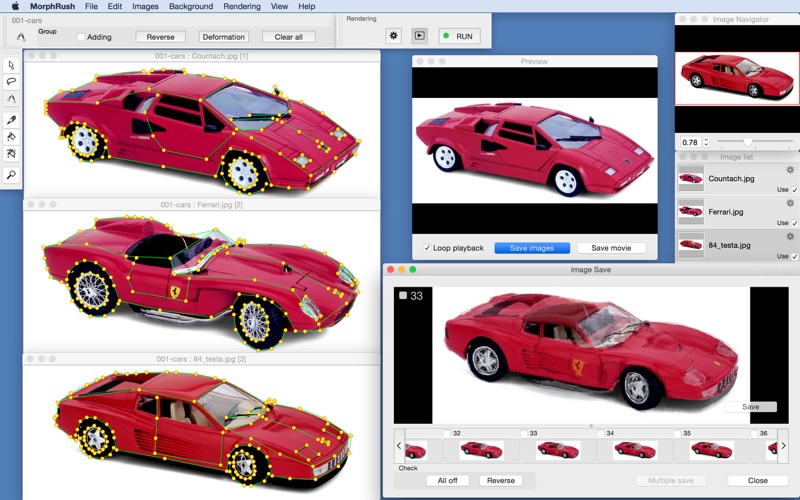
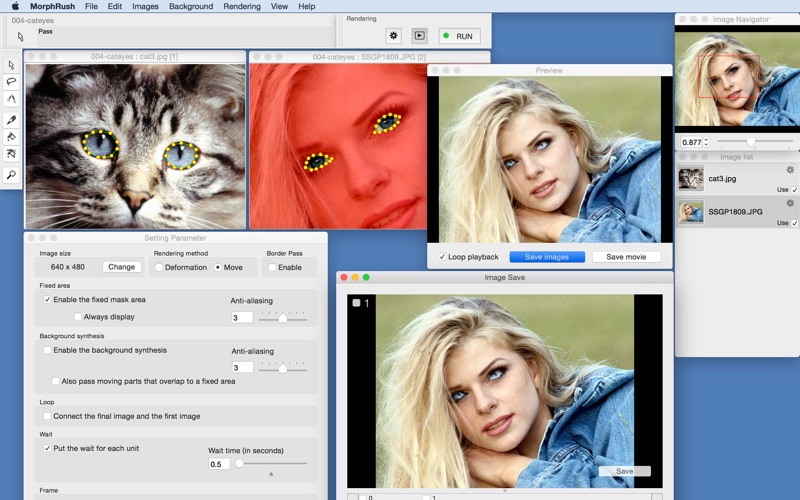
MorphRush is a tool application used to read multiple image files for the morphing process in order to create movies and synthetic images. Since conventional morphing software products deform the backgrounds with changes in the objects, they need to unify the background by using no color. MorphRush can morph only the required part and synthesize it with the desired background image. Sequential morphing of multiple images is available. Even if the display sizes of the used images are different, you do not need to process them in advance thanks to the expanding and shrinking functions. You can create a movie from a single still image. Using a single image, you can make eyes wink and move hands and legs. Of course, you can synthesize an image with a background image. You can edit a still image by pasting part of another image onto the still image. For example, in order to change a person’s eyes to a cat’s eyes, conventionally you had to use the paint tool to cut out the cat’s eyes and expand/shrink and rotate them to fit onto the person’s eyes and paste them by specifying anti-aliasing. Though depending on the tool performance, this required experience. MorphRush can process images more naturally and more easily. Movie format that can be output: - QuickTime (mov) Image formats that can be output: - JPEG (jpg) - PNG (png) - TIFF (tiff) MorphRush operation environment: - Mac OS X 10.10 or later Functionality of MorphRush: MorphRush supports all the functions that seem necessary within those provided by the conventional morphing software products. Further, MorphRush has some additional unique functions. Major functions of MorphRush: - Extraction of outlines of the morphed part and synthesis of a background image - Sequential morphing of multiple images - Morphing of shape only (warp) - Designation of part of an image Upgrade to regular version: You can upgrade MorphRush to the regular version by use of billing within the application. Restrictions before purchase: “SAMPLE” watermarks are added to movies of rendering results and output movies/still images. The functions and the operations are not restricted.