PC 용 Calorie Counter - Meal Planner
- 카테고리: Health & Fitness
- 최근 업데이트: 2024-04-04
- 현재 버전: 1.5.1
- 파일 크기: 61.26 MB
- 개발자: Mobiem
- 호환성: 필요 Windows XP, Windows Vista, Windows 7, Windows 8, Windows 8.1 and Windows 10, Windows 11



PC에서 Calorie Counter - Meal Planner 용 호환 APK 다운로드
| 다운로드 | 개발자 | 평점 | 점수 | 현재 버전 | 성인 랭킹 |
|---|---|---|---|---|---|
| ↓ PC용 APK 다운로드 | Mobiem | 0 | 0 | 1.5.1 | 4+ |
에뮬레이터의 중요성은 컴퓨터에서 안드로이드 환경을 흉내 내고 안드로이드 폰을 구입하지 않고도 안드로이드 앱을 설치하고 실행하는 것을 매우 쉽게 만들어주는 것입니다. 누가 당신이 두 세계를 즐길 수 없다고 말합니까? 우선 아래에있는 에뮬레이터 앱을 다운로드 할 수 있습니다.
A. Nox App . OR
B. Bluestacks App .
Bluestacks는 매우 대중적이므로 개인적으로 "B"옵션을 사용하는 것이 좋습니다. 문제가 발생하면 Google 또는 Naver.com에서 좋은 해결책을 찾을 수 있습니다.
Bluestacks.exe 또는 Nox.exe를 성공적으로 다운로드 한 경우 컴퓨터의 다운로드 폴더 또는 다운로드 한 파일을 일반적으로 저장하는 곳으로 이동하십시오.
찾으면 클릭하여 응용 프로그램을 설치하십시오. PC에서 설치 프로세스를 시작해야합니다.
다음을 클릭하여 EULA 라이센스 계약에 동의하십시오.
응용 프로그램을 설치하려면 화면 지시문을 따르십시오.
위 사항을 올바르게 수행하면 소프트웨어가 성공적으로 설치됩니다.
이제 설치 한 에뮬레이터 애플리케이션을 열고 검색 창을 찾으십시오. 지금 입력하십시오. - Calorie Counter - Meal Planner 앱을 쉽게 볼 수 있습니다. 그것을 클릭하십시오. 응용 프로그램 창이 열리고 에뮬레이터 소프트웨어에 응용 프로그램이 표시됩니다. 설치 버튼을 누르면 응용 프로그램이 다운로드되기 시작합니다. 이제 우리는 모두 끝났습니다.
그런 다음 "모든 앱"아이콘이 표시됩니다.
클릭하면 설치된 모든 응용 프로그램이 포함 된 페이지로 이동합니다.
당신은 Calorie Counter - Meal Planner 상. 그것을 클릭하고 응용 프로그램 사용을 시작하십시오.
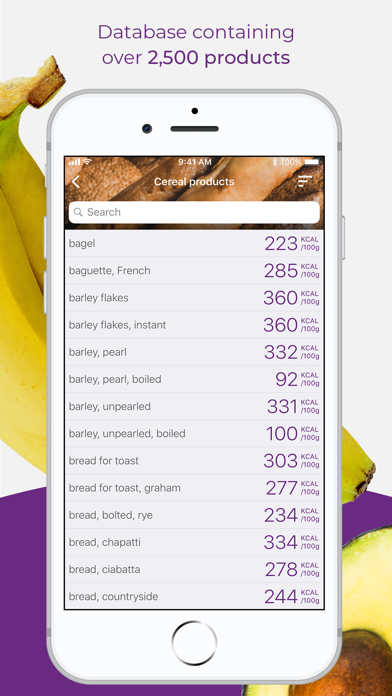
A balanced diet is essential for a healthy lifestyle. How to improve the quality of your diet? Plan a meal composition! Using the app " Calorie table - I know what I eat " you will do it in an easy way! Calorie table - how to lose overweight using it? If you want to be fit, you need to take care of what you eat. For first you must start eating regularly. Diet plans need counting calories. You can use the Calorie Table app. Counting calories is one of the most popular ways to fight overweight. Using calorie tables, we are able to plan each meal in such a way that meal energy value will be balanced. Calorie table - how to use it? Before you start preparing a meal, check the energy values of products in the calorie table, weigh them and add them together in the app. In order for the result not to be distorted, think about buying kitchen scales, which will show values of approximately 1g. During the diet, it will help you not only to choose the right portion of products. Using of the Calorie Counter - meal planer app is a very easy. First, you must search product, add weight and that's it! Calorie Tables app automatically calculate calories and macronutrients. If you prepare meal you can use free the meal planner. How it makes it? Tap on the button " Add to the meal". Your product will be added to the list the Own Dish. Why you must install Calorie Counter - Meal Planner: - calories tables divided into categories of products - fast calorie counter - diet products search engine - info on macronutrients found in food products - free tool for improving your diet plan - calorie tables app is free Do you want to improve your diet and make better look? Have you repeatedly considered switching to a diet? For example of 1000 kcal diet or 1200 kcal diet? With Calorie Counter - Meal Planner, you can carefully plan a diet for the whole day! Healthy diet is a balanced meal. With use Calorie tables you make list of products and calculate carbohydrates, protein, fats and calories of your food. If you cook for your friends or family, with Calorie Counter You can calculate macronutrients of the dish to dinner or breakfast. With calorie tables you can't afraid of bad balanced diet. We also encourage you to visit a dietitian who will prepare a personal diet for you, and with the Calorie Table application you will be able to calculate calories and meal macroelements easily. Do You training or running - use the Calorie Counter app! Sport is a health. Regular fit training and exercises need balanced diet. Our app is a good tool to counting calories of the meals. You can plan your healthy food for all day and be sure that your meals have right amount calories to training plans. With good counting calories you can improve training performance. Calorie tracker with base of products: You can calorie tracker with our app. Base of product is divided into categories, like: vegetables, fruits, cereal products, dairy, sweets, drinks, meat, fast food and others. Calorie burn will not be a problem and you can monitor your calorie deficit. Base of products is totaly free - you can search and calculate calories of meals without limits.