PC 용 Polar Scope Align
- 카테고리: Utilities
- 최근 업데이트: 2026-10-23
- 현재 버전: 7.3
- 파일 크기: 30.89 MB
- 개발자: Dimitrios Kechagias
- 호환성: 필요 Windows XP, Windows Vista, Windows 7, Windows 8, Windows 8.1 and Windows 10, Windows 11




PC에서 Polar Scope Align 용 호환 APK 다운로드
| 다운로드 | 개발자 | 평점 | 점수 | 현재 버전 | 성인 랭킹 |
|---|---|---|---|---|---|
| ↓ PC용 APK 다운로드 | Dimitrios Kechagias | 5 | 5 | 7.3 | 4+ |
에뮬레이터의 중요성은 컴퓨터에서 안드로이드 환경을 흉내 내고 안드로이드 폰을 구입하지 않고도 안드로이드 앱을 설치하고 실행하는 것을 매우 쉽게 만들어주는 것입니다. 누가 당신이 두 세계를 즐길 수 없다고 말합니까? 우선 아래에있는 에뮬레이터 앱을 다운로드 할 수 있습니다.
A. Nox App . OR
B. Bluestacks App .
Bluestacks는 매우 대중적이므로 개인적으로 "B"옵션을 사용하는 것이 좋습니다. 문제가 발생하면 Google 또는 Naver.com에서 좋은 해결책을 찾을 수 있습니다.
Bluestacks.exe 또는 Nox.exe를 성공적으로 다운로드 한 경우 컴퓨터의 다운로드 폴더 또는 다운로드 한 파일을 일반적으로 저장하는 곳으로 이동하십시오.
찾으면 클릭하여 응용 프로그램을 설치하십시오. PC에서 설치 프로세스를 시작해야합니다.
다음을 클릭하여 EULA 라이센스 계약에 동의하십시오.
응용 프로그램을 설치하려면 화면 지시문을 따르십시오.
위 사항을 올바르게 수행하면 소프트웨어가 성공적으로 설치됩니다.
이제 설치 한 에뮬레이터 애플리케이션을 열고 검색 창을 찾으십시오. 지금 입력하십시오. - Polar Scope Align 앱을 쉽게 볼 수 있습니다. 그것을 클릭하십시오. 응용 프로그램 창이 열리고 에뮬레이터 소프트웨어에 응용 프로그램이 표시됩니다. 설치 버튼을 누르면 응용 프로그램이 다운로드되기 시작합니다. 이제 우리는 모두 끝났습니다.
그런 다음 "모든 앱"아이콘이 표시됩니다.
클릭하면 설치된 모든 응용 프로그램이 포함 된 페이지로 이동합니다.
당신은 Polar Scope Align 상. 그것을 클릭하고 응용 프로그램 사용을 시작하십시오.
Mac OS 에서 Polar Scope Align 다운로드
| 다운로드 | 개발자 | 점수 | 현재 버전 | 성인 랭킹 |
|---|---|---|---|---|
| 무료 - Mac 에서 다운로드 | Dimitrios Kechagias | 5 |
7.3 | 4+ |
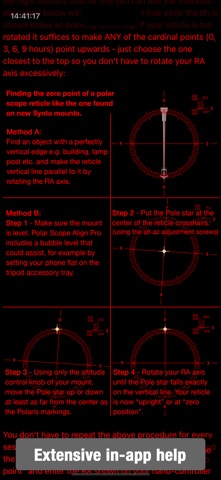
Polar Scope Align is a free, ad-supported polar alignment app for iPhone and iPad. It calculates the position of Polaris or σ Octantis in your polar scope reticle for your location, date and time, helping you get a quick and accurate polar alignment with an equatorial mount. POLAR SCOPE ALIGNMENT • Accurate Polaris and Sigma Octantis position for your date and location • Atmospheric refraction correction for better accuracy, especially at lower latitudes - readings may differ slightly from simpler apps that skip this correction, but will agree with precise sources (USNO, scientific software) • Automatic time and location • Manual location support • Reticle centering-error measurement and correction • Zero-position help for common Celestron / Sky-Watcher / Orion style reticles • Full red night-mode interface SUPPORTED RETICLES Polar Scope Align supports 35+ polar scope and finder reticle types, including: iOptron, Astro-Physics RAPAS & PASILL, Takahashi (EM-10/11/200/400/500, NJP, PM-1, P2-Z), Sky-Watcher / Orion (including EQ6/AZ-EQ and Star Adventurer), Celestron, Meade, EXOS2, Bresser, Vixen (Atlux/SX/SXD/SXP/AXD/GP/GP-DX, Polarie), Astrotrac, Losmandy, Kenko, Avalon, Konus, Telrad, Rigel QuikFinder, and several older polar finders (Tuthill, Explore Scientific, Meade 9x60, Vixen Polaris, Celestron 7x50, Carton Optical). OBSERVING TOOLS The free version also includes: • Moon phase • Messier, Caldwell and bright-star database • DSS image downloads for included database objects • Saved, editable and printable DSO lists • 8 astronomy calculators for observing and imaging • Sample Pro tools available from Settings, including aurora forecast • iOptron WiFi Connect - report mount status, set mount Time/Date/Location LOOKING FOR ALIGNMENT WITHOUT A POLAR SCOPE? Polar Scope Align Pro adds the advanced tools many users search for: • Daytime / No Polar Scope Alignment • Camera Azimuth Calibration using the Sun, Moon, planets or bright stars • Laser / Hop Align for night alignment when Polaris is blocked • Push To / manual GoTo for non-GoTo telescopes • Live sky maps for Daytime Alignment, Laser / Hop Align, Push To and Hop To • Full 22,000+ object DSO database • Xasteria astro weather, aurora, satellite passes and widgets • 30+ calculators • Bubble level, compass and iOptron WiFi mount control • Apple Watch companion app • No ads If you only need accurate polar-scope alignment, this free version is a capable tool. If you want alignment without a polar scope, observing planning, weather and field tools, Pro is the complete version.