PC 용 Preschool Learning Time
- 카테고리: Book
- 최근 업데이트: 2026-10-27
- 현재 버전: 6.9.4
- 파일 크기: 180.48 MB
- 개발자: Diveo Media
- 호환성: 필요 Windows XP, Windows Vista, Windows 7, Windows 8, Windows 8.1 and Windows 10, Windows 11



PC에서 Preschool Learning Time 용 호환 APK 다운로드
| 다운로드 | 개발자 | 평점 | 점수 | 현재 버전 | 성인 랭킹 |
|---|---|---|---|---|---|
| ↓ PC용 APK 다운로드 | Diveo Media | 172 | 4.7093 | 6.9.4 | 4+ |
호환되는 PC 앱 또는 대안 확인
| 소프트웨어 | 다운로드 | 평점 | 개발자 |
|---|---|---|---|
| Preschool Learning Time |
PC 앱 받기 | 4.7093/5 172 리뷰 4.7093 |
Diveo Media |
에뮬레이터의 중요성은 컴퓨터에서 안드로이드 환경을 흉내 내고 안드로이드 폰을 구입하지 않고도 안드로이드 앱을 설치하고 실행하는 것을 매우 쉽게 만들어주는 것입니다. 누가 당신이 두 세계를 즐길 수 없다고 말합니까? 우선 아래에있는 에뮬레이터 앱을 다운로드 할 수 있습니다.
A. Nox App . OR
B. Bluestacks App .
Bluestacks는 매우 대중적이므로 개인적으로 "B"옵션을 사용하는 것이 좋습니다. 문제가 발생하면 Google 또는 Naver.com에서 좋은 해결책을 찾을 수 있습니다.
Bluestacks.exe 또는 Nox.exe를 성공적으로 다운로드 한 경우 컴퓨터의 다운로드 폴더 또는 다운로드 한 파일을 일반적으로 저장하는 곳으로 이동하십시오.
찾으면 클릭하여 응용 프로그램을 설치하십시오. PC에서 설치 프로세스를 시작해야합니다.
다음을 클릭하여 EULA 라이센스 계약에 동의하십시오.
응용 프로그램을 설치하려면 화면 지시문을 따르십시오.
위 사항을 올바르게 수행하면 소프트웨어가 성공적으로 설치됩니다.
이제 설치 한 에뮬레이터 애플리케이션을 열고 검색 창을 찾으십시오. 지금 입력하십시오. - Preschool Learning Time 앱을 쉽게 볼 수 있습니다. 그것을 클릭하십시오. 응용 프로그램 창이 열리고 에뮬레이터 소프트웨어에 응용 프로그램이 표시됩니다. 설치 버튼을 누르면 응용 프로그램이 다운로드되기 시작합니다. 이제 우리는 모두 끝났습니다.
그런 다음 "모든 앱"아이콘이 표시됩니다.
클릭하면 설치된 모든 응용 프로그램이 포함 된 페이지로 이동합니다.
당신은 Preschool Learning Time 상. 그것을 클릭하고 응용 프로그램 사용을 시작하십시오.
Mac OS 에서 Preschool Learning Time 다운로드
| 다운로드 | 개발자 | 점수 | 현재 버전 | 성인 랭킹 |
|---|---|---|---|---|
| 무료 - Mac 에서 다운로드 | Diveo Media | 4.7093 |
6.9.4 | 4+ |
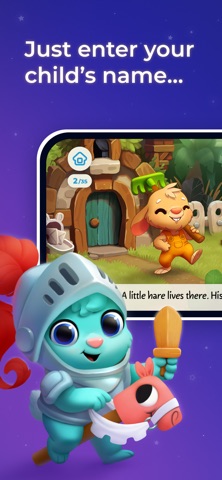
Little Stories is a collection of personalised kids books where your child is the main character. Our authors and illustrators don't use generative AI, so every story is thoughtfully created to help your child fall in love with reading. Enter your child's name and gender in the settings to enjoy personalised children’s books starring your son or daughter. To make things even better, we've added beautiful soundtracks and detailed illustrations to accompany each story and help you raise your child in a positive environment. You can also make your own audiobooks! Take a few minutes to record yourself and your child will be able to listen to a charming bedtime story in your voice! If you like fairy tales, bed time stories, or baby books for kids, then "Little Stories" is a great option. Our bedtime stories for kids fill your family's leisure time with love and kindness! Why Little Stories? • 4500+ illustrations • Illustrations will match your child’s gender • 90+ good bedtime stories, and many more to come • Enchanting music accompanying each story • Create audiobooks by recording your voice! • 4 free bedtime stories to read We’d like to tell you a bit more about the process we use to create short personalised bedtime stories for kids so that you have a better idea of the hard work we put into “Little Stories”. 1) We search for an author. Regardless of the writer’s nationality or language, we look for unique and captivating short stories for kids. Our main condition is that each story contains at most 50 scenes and is educational. Author’s bedtime stories must be interesting for both – parents and kindergarteners. And the stories shouldn’t contain more than 800 words, so they work as 5 minute bedtime stories. 2) Then we create the storyboard. It consists of rough sketches that serve as the template for the finalised drawings in the storybook, helping us decide how it will look. 3) Once the storyboard has been approved by our team, we search for an illustrator. We take great pride in matching each artist with a story that suits their style. Personal touches make our bedtime stories for kids come to life! 4) At the same time, our composer begins creating the soundtrack for the story. Inspired by the theme of the tale, he designs a gentle melody that will transport your child to relaxation and sleep (maybe you too). 5) At the same time we are looking for a professional narrator. We want to be sure our app could read aloud books for kindergarten kids. Currently you can listen to our audio books in three languages: English, Spanish and Russian. And we also support 14 languages total: Arabic, Dutch, English, French, German, Indonesian, Italian, Japanese, Malay, Polish, Portuguese, Russian, Spanish, Swedish. 6) After the story is finished, we translate it so that the children of the world can enjoy it in their language. 7) The story is then published in our library of books for kids. The entire process might take anywhere from 2 to 9 months. We are always looking for the highest quality content to create the best bedtime stories for reading. We also provide 4 free books that you can read to your baby anytime. We constantly add new children's stories to our collection! Our books are good for kids 3 to 6 year olds. Follow us on social media: @diveomedia