
PC 용 Strydr: City Walking Navigator
- 카테고리: Navigation
- 최근 업데이트: 2026-10-03
- 현재 버전: 3.1.1
- 파일 크기: 45.75 MB
- 개발자: Ubernav Ltd
- 호환성: 필요 Windows XP, Windows Vista, Windows 7, Windows 8, Windows 8.1 and Windows 10, Windows 11



PC에서 Strydr: City Walking Navigator 용 호환 APK 다운로드
| 다운로드 | 개발자 | 평점 | 점수 | 현재 버전 | 성인 랭킹 |
|---|---|---|---|---|---|
| ↓ PC용 APK 다운로드 | Ubernav Ltd | 0 | 0 | 3.1.1 | 4+ |
에뮬레이터의 중요성은 컴퓨터에서 안드로이드 환경을 흉내 내고 안드로이드 폰을 구입하지 않고도 안드로이드 앱을 설치하고 실행하는 것을 매우 쉽게 만들어주는 것입니다. 누가 당신이 두 세계를 즐길 수 없다고 말합니까? 우선 아래에있는 에뮬레이터 앱을 다운로드 할 수 있습니다.
A. Nox App . OR
B. Bluestacks App .
Bluestacks는 매우 대중적이므로 개인적으로 "B"옵션을 사용하는 것이 좋습니다. 문제가 발생하면 Google 또는 Naver.com에서 좋은 해결책을 찾을 수 있습니다.
Bluestacks.exe 또는 Nox.exe를 성공적으로 다운로드 한 경우 컴퓨터의 다운로드 폴더 또는 다운로드 한 파일을 일반적으로 저장하는 곳으로 이동하십시오.
찾으면 클릭하여 응용 프로그램을 설치하십시오. PC에서 설치 프로세스를 시작해야합니다.
다음을 클릭하여 EULA 라이센스 계약에 동의하십시오.
응용 프로그램을 설치하려면 화면 지시문을 따르십시오.
위 사항을 올바르게 수행하면 소프트웨어가 성공적으로 설치됩니다.
이제 설치 한 에뮬레이터 애플리케이션을 열고 검색 창을 찾으십시오. 지금 입력하십시오. - Strydr: City Walking Navigator 앱을 쉽게 볼 수 있습니다. 그것을 클릭하십시오. 응용 프로그램 창이 열리고 에뮬레이터 소프트웨어에 응용 프로그램이 표시됩니다. 설치 버튼을 누르면 응용 프로그램이 다운로드되기 시작합니다. 이제 우리는 모두 끝났습니다.
그런 다음 "모든 앱"아이콘이 표시됩니다.
클릭하면 설치된 모든 응용 프로그램이 포함 된 페이지로 이동합니다.
당신은 Strydr: City Walking Navigator 상. 그것을 클릭하고 응용 프로그램 사용을 시작하십시오.
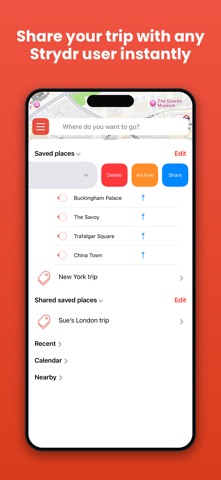
A city walking app that works the way you want to walk in a city, through an intuitive compass-inspired pointer tuned to the needs of a pedestrian. No turn-by-turn list to follow. No need to recalculate a route when you wander off somewhere interesting. Set a destination, glance at the pointer, and walk. Skip the subway, the bus and the taxi, whether you're on vacation, on a business trip, meeting someone, or just out for the day. A POINTER, NOT A LIST OF TURNS Strydr points an arrow at your destination and keeps it there, so you always know which way to go. You learn the shape of a city instead of staring at your phone. PLAN A WALK FROM ANYWHERE Set any point on the map as your starting place, and Strydr builds the walking route from there. Plan tomorrow morning's walk from your hotel tonight. Check how far the restaurant really is from the station before you book. One tap swaps back to walking from where you are now. PLAN A DAY ON FOOT Group the places you want to see into a trip, save it, and share it with everyone you are traveling with. ADD A STOP ALONG THE WAY Add a stop nearest to you, nearest your destination, or along your route. A detour without losing your way. SAVE, TAG AND SHARE PLACES Keep the places you love, group them with tags, and share them with other Strydr users. ORGANIZE YOUR SAVED PLACES Drag a place into a tag, reorder your list, archive what you are finished with, and rename tags and places whenever you like. Your places, arranged the way your trip runs. LISTS SHARED WITH YOU Places and tags other people send you arrive in their own section, ready to walk to and ready to move across to your own list. Open a shared link and it arrives complete, without changing anything you have already saved. WALK TO A CALENDAR EVENT Pick an event straight from your calendar and start walking to it. MARK MY SPOT Pin where you are and find your way back. For parked cars, hotel entrances and festival tents. SHARE YOUR LOCATION Let friends and fellow Strydr users find you with a single tap. ONE-TOUCH ROUTING Pick a destination and you are on your way. No route calculation, no loading screen. WHEN THE SIGNAL DROPS Lose your connection and the map stays on screen, with all your saved places still working, so you can still see where you are and which way you are heading. DYNAMIC COMPASSES IN YOUR RESULTS Every search result carries its own small pointer, so you can see what is ahead of you before you choose. WHAT STRYDR USERS SAY ***** "This is the go-to app for walking or just developing a general sense of direction in a new city. The arrow pointing to the target location is simple but ingenious." - MACZ29 ***** "I love this app. The compass pointer is awesome. This app is light, responsive and well laid out. Great job." - QQPossum ***** "I have tried a lot of apps to help me when I want to find some place in the city. This app is the only one that always points right to the place I want to go. Well done!" - AbLatheef ***** "I used it in Athens and it was a great help getting around. Offline use. Interactive." - deandarafael ***** "One of the few apps that actually works as it should." - Bmc Fred Download Strydr and start exploring your city the way it was meant to be seen, on foot. KEEP IN TOUCH Questions or feedback? Email us at [email protected]


