PC 용 Heart Rate Plus PRO
- 카테고리: Health & Fitness
- 최근 업데이트: 2018-08-14
- 현재 버전: 2.0.2
- 파일 크기: 9.15 MB
- 개발자: Matteo Tagliafico
- 호환성: 필요 Windows XP, Windows Vista, Windows 7, Windows 8, Windows 8.1 and Windows 10, Windows 11


PC에서 Heart Rate Plus PRO 용 호환 APK 다운로드
| 다운로드 | 개발자 | 평점 | 점수 | 현재 버전 | 성인 랭킹 |
|---|---|---|---|---|---|
| ↓ PC용 APK 다운로드 | Matteo Tagliafico | 0 | 2.0.2 | 17+ |
에뮬레이터의 중요성은 컴퓨터에서 안드로이드 환경을 흉내 내고 안드로이드 폰을 구입하지 않고도 안드로이드 앱을 설치하고 실행하는 것을 매우 쉽게 만들어주는 것입니다. 누가 당신이 두 세계를 즐길 수 없다고 말합니까? 우선 아래에있는 에뮬레이터 앱을 다운로드 할 수 있습니다.
A. Nox App . OR
B. Bluestacks App .
Bluestacks는 매우 대중적이므로 개인적으로 "B"옵션을 사용하는 것이 좋습니다. 문제가 발생하면 Google 또는 Naver.com에서 좋은 해결책을 찾을 수 있습니다.
Bluestacks.exe 또는 Nox.exe를 성공적으로 다운로드 한 경우 컴퓨터의 다운로드 폴더 또는 다운로드 한 파일을 일반적으로 저장하는 곳으로 이동하십시오.
찾으면 클릭하여 응용 프로그램을 설치하십시오. PC에서 설치 프로세스를 시작해야합니다.
다음을 클릭하여 EULA 라이센스 계약에 동의하십시오.
응용 프로그램을 설치하려면 화면 지시문을 따르십시오.
위 사항을 올바르게 수행하면 소프트웨어가 성공적으로 설치됩니다.
이제 설치 한 에뮬레이터 애플리케이션을 열고 검색 창을 찾으십시오. 지금 입력하십시오. - Heart Rate Plus PRO 앱을 쉽게 볼 수 있습니다. 그것을 클릭하십시오. 응용 프로그램 창이 열리고 에뮬레이터 소프트웨어에 응용 프로그램이 표시됩니다. 설치 버튼을 누르면 응용 프로그램이 다운로드되기 시작합니다. 이제 우리는 모두 끝났습니다.
그런 다음 "모든 앱"아이콘이 표시됩니다.
클릭하면 설치된 모든 응용 프로그램이 포함 된 페이지로 이동합니다.
당신은 Heart Rate Plus PRO 상. 그것을 클릭하고 응용 프로그램 사용을 시작하십시오.
Mac OS 에서 Heart Rate Plus PRO 다운로드
| 다운로드 | 개발자 | 점수 | 현재 버전 | 성인 랭킹 |
|---|---|---|---|---|
| ₩1,200 - Mac 에서 다운로드 | Matteo Tagliafico | 2.0.2 | 17+ |
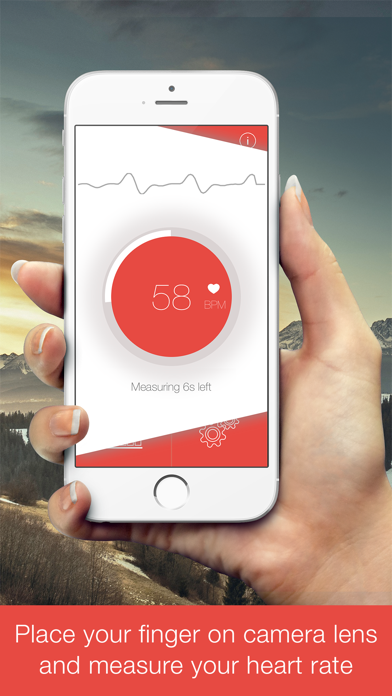
Free today with ‘App of the Day’. Turn your iPhone into your personal Heart Rate Monitor ! Download now Heart Rate Plus and use your camera’s flash to see how healthy you are! With a graphic and a menu designed specifically, Heart Rate Plus offers a complete suite of tools for anyone who wants to monitor the heart rate. SPECIFICATIONS: * Integration of Apple's 'Health' app. * Ability to create an account (optional) to synchronize data between multiple devices and backup your measures. * Measure your heart rate: Place your index finger on the iPhone's camera and our advanced algorithm accurately calculates your heart rate. * Graph in real time: a real-time chart will show you every heartbeat, similar to pulse oximeters used in hospitals. * Tag the measure: associate a Tag to each measure. Ability to add unlimited personal Tag. * Discover the Heart Rate Zones: based on your rate at rest, the maximum frequency and age we calculate the HR Zones. After each measurement, an indicator signal in which zone you are. Here are the HR Zones: - Rest area (0 to 50% of heart rate reserve) - Warm Up zone (50-60% of heart rate reserve) - Fat Burn Zone (60-70% of heart rate reserve) - Cardio Zone (70-80% of heart rate reserve) - Zone Extreme (80-90% of heart rate reserve) - Max Zone (90-100% of heart rate reserve) This is absolutely important for those who train, want lose weight or want keep the beat under control. In the information panel is available a detailed explanation of the HR Zones. * Statistics: view statistics in bar graph or a common chart. Filter statistics by the measure's Tag. * Map mode: Displays real-time measurements made around the world in order to see the worldwide trending. The heartbeat at rest changes from person to person depending on age and level of training. Who makes sport regularly or an athlete will have a value of the beat at rest less than those who lead a sedentary lifestyle. Are you curious to know if your fitness has improved? Measure your pulse regularly and monitors the progress of your resting heart rate. NOTE: Be sure to completely cover the lens of the camera and flash with your finger. Press gently because too much pressure reduces circulation in the finger and complicates detection. Ensure that your fingers are not cold. This application is designed only for fun or for training!