PC 용 Master Class! For Premiere Pro
- 카테고리: Photo & Video
- 최근 업데이트: 2017-10-19
- 현재 버전: 4.1
- 파일 크기: 2.61 MB
- 개발자: Tony Walsh
- 호환성: 필요 Windows XP, Windows Vista, Windows 7, Windows 8, Windows 8.1 and Windows 10, Windows 11


PC에서 Master Class! For Premiere Pro 용 호환 APK 다운로드
| 다운로드 | 개발자 | 평점 | 점수 | 현재 버전 | 성인 랭킹 |
|---|---|---|---|---|---|
| ↓ PC용 APK 다운로드 | Tony Walsh | 0 | 0 | 4.1 | 4+ |
에뮬레이터의 중요성은 컴퓨터에서 안드로이드 환경을 흉내 내고 안드로이드 폰을 구입하지 않고도 안드로이드 앱을 설치하고 실행하는 것을 매우 쉽게 만들어주는 것입니다. 누가 당신이 두 세계를 즐길 수 없다고 말합니까? 우선 아래에있는 에뮬레이터 앱을 다운로드 할 수 있습니다.
A. Nox App . OR
B. Bluestacks App .
Bluestacks는 매우 대중적이므로 개인적으로 "B"옵션을 사용하는 것이 좋습니다. 문제가 발생하면 Google 또는 Naver.com에서 좋은 해결책을 찾을 수 있습니다.
Bluestacks.exe 또는 Nox.exe를 성공적으로 다운로드 한 경우 컴퓨터의 다운로드 폴더 또는 다운로드 한 파일을 일반적으로 저장하는 곳으로 이동하십시오.
찾으면 클릭하여 응용 프로그램을 설치하십시오. PC에서 설치 프로세스를 시작해야합니다.
다음을 클릭하여 EULA 라이센스 계약에 동의하십시오.
응용 프로그램을 설치하려면 화면 지시문을 따르십시오.
위 사항을 올바르게 수행하면 소프트웨어가 성공적으로 설치됩니다.
이제 설치 한 에뮬레이터 애플리케이션을 열고 검색 창을 찾으십시오. 지금 입력하십시오. - Master Class! For Premiere Pro 앱을 쉽게 볼 수 있습니다. 그것을 클릭하십시오. 응용 프로그램 창이 열리고 에뮬레이터 소프트웨어에 응용 프로그램이 표시됩니다. 설치 버튼을 누르면 응용 프로그램이 다운로드되기 시작합니다. 이제 우리는 모두 끝났습니다.
그런 다음 "모든 앱"아이콘이 표시됩니다.
클릭하면 설치된 모든 응용 프로그램이 포함 된 페이지로 이동합니다.
당신은 Master Class! For Premiere Pro 상. 그것을 클릭하고 응용 프로그램 사용을 시작하십시오.
Mac OS 에서 Master Class! For Premiere Pro 다운로드
| 다운로드 | 개발자 | 점수 | 현재 버전 | 성인 랭킹 |
|---|---|---|---|---|
| ₩8,900 - Mac 에서 다운로드 | Tony Walsh | 0 |
4.1 | 4+ |
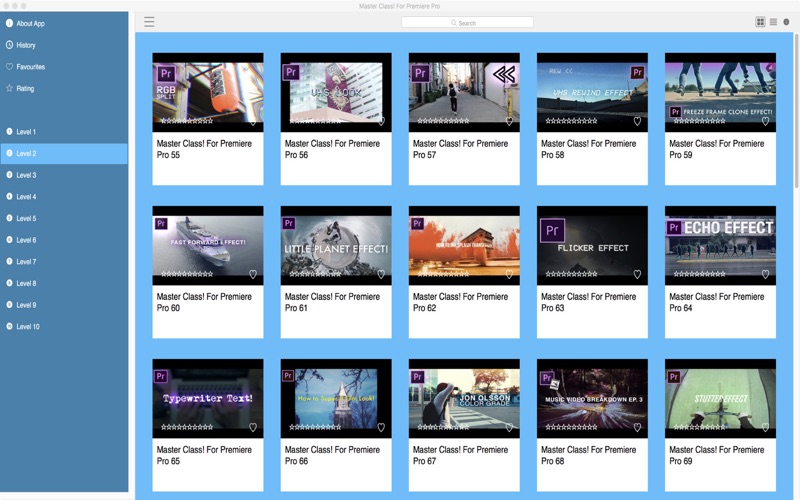
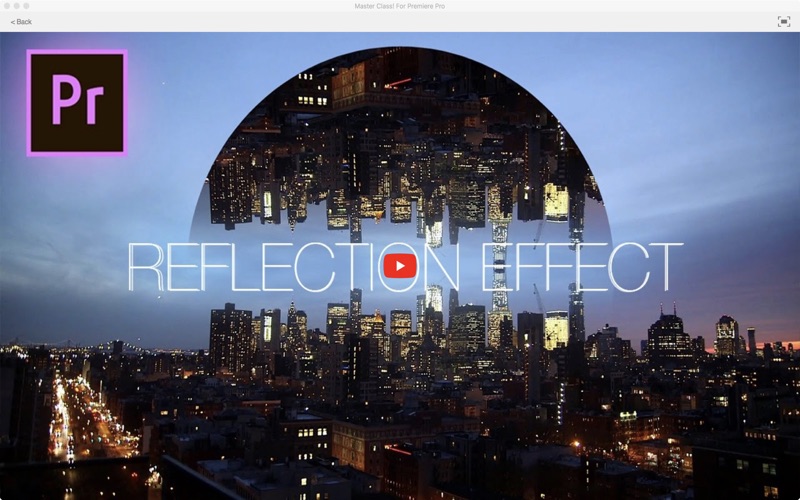
Create Stunning Videos with Adobe Premiere Pro, a timeline-based video editing software application. It is part of the Adobe Creative Cloud, which includes video editing, graphic design, and web development programs. There are many skills to learn and this collection of 459 Tutorial Video Lessons will get you well on the way. Use this app as a “Video Referencing Library” where you can come back for a refresher lesson or search for how to do something new. App features: ** Edit the video title, subtitle and keep your own set of user notes. ** Move the video around it's group and even change it's group. ** Make videos your favourites and give them your own rating ** Search by title or notes ** View by favourites or rating ** View by history the last ten played or visited videos Lessons include: Adobe Premiere Series for Beginners Introduction Adobe Premiere Series - Lets Get Up and Running - Part 1 Adobe Premiere Series - The Project Bin - Part 2 Adobe Premiere Series - The Source Monitor - Part 3 Adobe PremiereSeries - Starting With the Timeline - Part 4 Adobe Premiere Series - Lets Get to Editing - Part 5 Adobe Premiere Series - The Shortcuts - Part 6 Adobe Premiere Series - Pen Tool - Curve Editor - Part 7 Adobe Premiere Series - Effect Controls - Part 8 Adobe Premiere Series - Animating Effects - Part 9 Adobe Premiere Series - Effects Panel - Part 10 Adobe Premiere Series - Rendering - Part 11 The Final Episode How To Freeze Frame in Premiere Pro CC How To Zoom In and Out On Adobe Premiere Pro How To Create Earth Zoom in Adobe Premiere Pro How To Smooth Slow Motion in Premiere Pro CC How To Screen Pump in Premiere Pro How To Use a Greenscreen in Premiere Pro How To Hollywood Film Look in Adobe Premiere Pro CC How To Use Overlays in Premiere Pro How To Censor Beep Words in Premiere Pro How To Separate Audio and Video in Premiere Pro How To Reverse Audio and Video in Premiere Pro How To Screen Shake in Premiere Pro How To Make a Glitch Effect in Premiere Pro How To Night Vision Effect in Adobe Premiere Pro CC How To Make Text Flicker in Adobe Premiere Pro CC How To Clone Yourself in Adobe Premiere Pro CC TUTORIALS WITH FACECAM How To VideoImage Inside Text in Adobe Premiere Pro CC How To Add Smoke in Adobe Premiere Pro CC How To Fly Effect in Adobe Premiere Pro CC How To Add an Explosion in Adobe Premiere Pro CC How To AppearDisappear Effect with Smoke in Adobe Premeire Pro CC How To Create Sad Effect in Adobe Premiere Pro CC How To Create Square Facecam in Adobe Premiere Pro CC How To Teleport Effect in Adobe Premiere Pro CC How To Create a Circle Facecam in Adobe Premiere Pro CC How To Text Behind Object in Adobe Premiere Pro CC How To Make a Pop Out Effect in Adobe Premiere Pro CC How To Create a Smooth Slide Transition in Adobe Premiere Pro CC How To Sky Replacement Effect in Adobe Premiere Pro CC How To Sam Kolder Zoom Transition in Adobe Premiere Pro CC How To Export Multiple Videos in Adobe Premiere Pro CC Adobe Premiere Pro CC 2017 Beginners Guide How To Export Videos for Instagram in Premiere Pro CC How To No Color to Color Fade in Adobe Premiere Pro CC How To Sync Text with a Beat in Adobe Premiere Pro CC How To Improve Video Quality in Adobe Premiere Pro CC 2017 How To Create a Vertigo Effect in Adobe Premiere Pro CC 2017 Motion Blur Hyperlapse Timelapse Premiere Pro tutorial by Chung Dha Premiere Pro Call Out Tracking Tutorial by Chung Dha Youtube Outro Tutorial Challenge in Adobe Premiere Pro CC2017 by Chung Dha Website display tutorial in Adobe Premiere Pro by Chung Dha Text slide tutorial in Adobe Premiere Pro CC2017 by Chung Dha Arrow Wipe Transition Tutorial in Adobe Premiere Pro by Chung Dha Improve position Feature request Adobe Premiere Pro by Chung Dha Anamorphic Blur Tutorial in Adobe Premiere Pro by Chung Dha Import Old Title Template in Adobe Premiere Pro CC2017 by Chung Dha Slice Jump Transition Tutorial in Adobe Premiere Pro by Chung Dha and more