PC 용 foolcontrol RAVEN Camera Kit
- 카테고리: Photo & Video
- 최근 업데이트: 2020-09-15
- 현재 버전: 3.49
- 파일 크기: 21.20 MB
- 개발자: Mikael Lubtchansky
- 호환성: 필요 Windows XP, Windows Vista, Windows 7, Windows 8, Windows 8.1 and Windows 10, Windows 11


PC에서 foolcontrol RAVEN Camera Kit 용 호환 APK 다운로드
| 다운로드 | 개발자 | 평점 | 점수 | 현재 버전 | 성인 랭킹 |
|---|---|---|---|---|---|
| ↓ PC용 APK 다운로드 | Mikael Lubtchansky | 0 | 0 | 3.49 | 4+ |
호환되는 PC 앱 또는 대안 확인
| 소프트웨어 | 다운로드 | 평점 | 개발자 |
|---|---|---|---|
| foolcontrol RAVEN Camera Kit |
PC 앱 받기 | 0/5 0 리뷰 0 |
Mikael Lubtchansky |
에뮬레이터의 중요성은 컴퓨터에서 안드로이드 환경을 흉내 내고 안드로이드 폰을 구입하지 않고도 안드로이드 앱을 설치하고 실행하는 것을 매우 쉽게 만들어주는 것입니다. 누가 당신이 두 세계를 즐길 수 없다고 말합니까? 우선 아래에있는 에뮬레이터 앱을 다운로드 할 수 있습니다.
A. Nox App . OR
B. Bluestacks App .
Bluestacks는 매우 대중적이므로 개인적으로 "B"옵션을 사용하는 것이 좋습니다. 문제가 발생하면 Google 또는 Naver.com에서 좋은 해결책을 찾을 수 있습니다.
Bluestacks.exe 또는 Nox.exe를 성공적으로 다운로드 한 경우 컴퓨터의 다운로드 폴더 또는 다운로드 한 파일을 일반적으로 저장하는 곳으로 이동하십시오.
찾으면 클릭하여 응용 프로그램을 설치하십시오. PC에서 설치 프로세스를 시작해야합니다.
다음을 클릭하여 EULA 라이센스 계약에 동의하십시오.
응용 프로그램을 설치하려면 화면 지시문을 따르십시오.
위 사항을 올바르게 수행하면 소프트웨어가 성공적으로 설치됩니다.
이제 설치 한 에뮬레이터 애플리케이션을 열고 검색 창을 찾으십시오. 지금 입력하십시오. - foolcontrol RAVEN Camera Kit 앱을 쉽게 볼 수 있습니다. 그것을 클릭하십시오. 응용 프로그램 창이 열리고 에뮬레이터 소프트웨어에 응용 프로그램이 표시됩니다. 설치 버튼을 누르면 응용 프로그램이 다운로드되기 시작합니다. 이제 우리는 모두 끝났습니다.
그런 다음 "모든 앱"아이콘이 표시됩니다.
클릭하면 설치된 모든 응용 프로그램이 포함 된 페이지로 이동합니다.
당신은 foolcontrol RAVEN Camera Kit 상. 그것을 클릭하고 응용 프로그램 사용을 시작하십시오.
Mac OS 에서 foolcontrol RAVEN Camera Kit 다운로드
| 다운로드 | 개발자 | 점수 | 현재 버전 | 성인 랭킹 |
|---|---|---|---|---|
| 무료 - Mac 에서 다운로드 | Mikael Lubtchansky | 0 |
3.49 | 4+ |
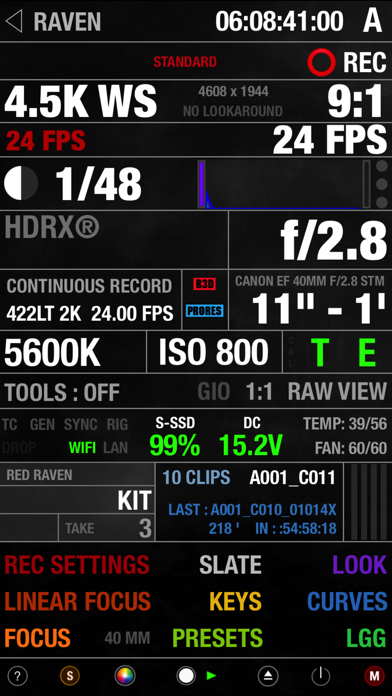
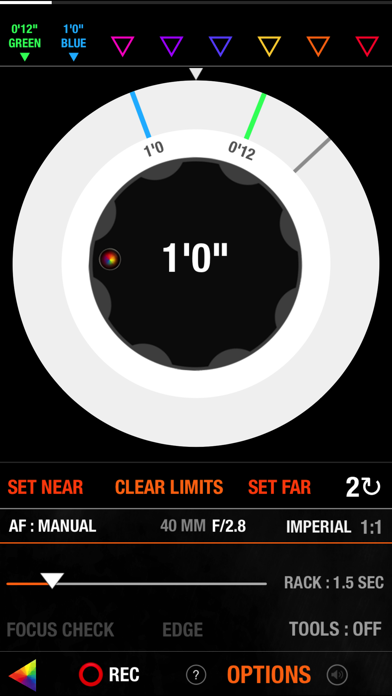
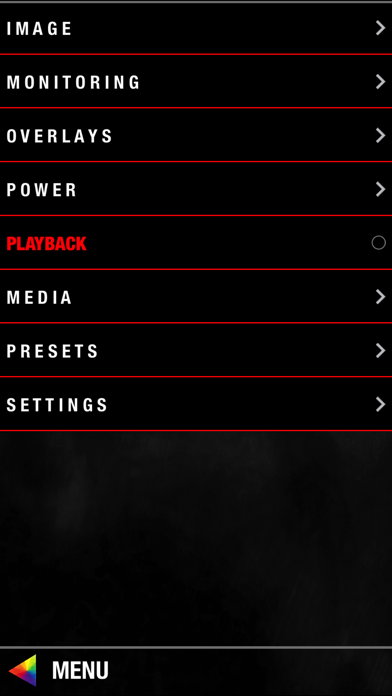
Exclusively for RED RAVEN Camera Kit owners, this version of foolcontrol lets you get full control over your RAVEN camera when connected to the same network as your iOS device. Features includes : - PREVIEW : recording state, format, project / sensor frame rate, timecode, pre-record, frame trigger, frame tagging, REDcode, lookaround, shutter angle / speed, histogram, goal posts, traffic lights, gamma / color space, recording mode, frame processing, HDRx, iris value, white balance, tint, ISO, tools, RAW view, magnify, scene metadata, VU meter, battery level, media remaining, clip count, clip name, camera status, eject media, power options... - FOCUS : Circular focus disc colored users marks, smooth bezier rack focus with adjustable speed, hard stop for near/far focus, 1,2,3,4,5 or 10 knob turns, user focus distance discs. AF mode selection, autofocus trigger, AF zone size, rack focus points recall, iris, magnify, record start stop, audible marks and more. - LOOK : set camera look using a multi speed slider or manual value input : contrast, exposure, saturation, shadow, brightness, RGB gains, kelvin, tint and FLUT. Color temperature presets, auto white balance, ISO, color / gamma space. - CURVES : Shape luma, red, green and blue curves to create in-camera grades. Drag curves points using 3 different modes for normal, fine, and super fine curve adjustment. - PLAYBACK : list all the clips on your media with timecode, thumbnail and duration. Play forward, backward, frame by frame, go to end and beginning, set in/out points, navigate marked frame, set playback speed and looping mode. - KEYS : navigate your camera menu using knob, buttons or gesture pad. Key Mapping. - PRESETS : create and apply camera presets. A preset can include one or combine multiple parameters from look, camera settings etc - SLATE : quickly set metadata values for production, director, DOP, scene, shot, take, project info, camera operator, unit and location. GPS location (on GPS enabled devices). - CAMERA MENU tree - RECORD SETTINGS with access to advanced record formats, mode and options. - LINEAR FOCUS for single operators ------------- It is recommended to use a router (infrastructure mode) instead of the Ad Hoc network mode in camera when possible. See foolcolor.net/tips.pdf for more info.. FAQ and help : http://foolcolor.net/foolcontrol_iOS IG : @mikafool ------------- Please note : This application requires iOS 8.1 and up and will ONLY work with RED RAVEN Camera Kit (with custom case showing the foolcolor logo) purchased after July 31st 2017. RED RAVEN 'Brain only' or other any other package are not supported and requires the regular version of foolcontrol.