PC 용 No Crop - No Crop Photo & Video
- 카테고리: Photo & Video
- 최근 업데이트: 2017-08-04
- 현재 버전: 1.0
- 파일 크기: 49.76 MB
- 개발자: Ravi Kalathiya
- 호환성: 필요 Windows XP, Windows Vista, Windows 7, Windows 8, Windows 8.1 and Windows 10, Windows 11


PC에서 No Crop - No Crop Photo & Video 용 호환 APK 다운로드
| 다운로드 | 개발자 | 평점 | 점수 | 현재 버전 | 성인 랭킹 |
|---|---|---|---|---|---|
| ↓ PC용 APK 다운로드 | Ravi Kalathiya | 0 | 1.0 | 4+ |
에뮬레이터의 중요성은 컴퓨터에서 안드로이드 환경을 흉내 내고 안드로이드 폰을 구입하지 않고도 안드로이드 앱을 설치하고 실행하는 것을 매우 쉽게 만들어주는 것입니다. 누가 당신이 두 세계를 즐길 수 없다고 말합니까? 우선 아래에있는 에뮬레이터 앱을 다운로드 할 수 있습니다.
A. Nox App . OR
B. Bluestacks App .
Bluestacks는 매우 대중적이므로 개인적으로 "B"옵션을 사용하는 것이 좋습니다. 문제가 발생하면 Google 또는 Naver.com에서 좋은 해결책을 찾을 수 있습니다.
Bluestacks.exe 또는 Nox.exe를 성공적으로 다운로드 한 경우 컴퓨터의 다운로드 폴더 또는 다운로드 한 파일을 일반적으로 저장하는 곳으로 이동하십시오.
찾으면 클릭하여 응용 프로그램을 설치하십시오. PC에서 설치 프로세스를 시작해야합니다.
다음을 클릭하여 EULA 라이센스 계약에 동의하십시오.
응용 프로그램을 설치하려면 화면 지시문을 따르십시오.
위 사항을 올바르게 수행하면 소프트웨어가 성공적으로 설치됩니다.
이제 설치 한 에뮬레이터 애플리케이션을 열고 검색 창을 찾으십시오. 지금 입력하십시오. - No Crop - No Crop Photo & Video 앱을 쉽게 볼 수 있습니다. 그것을 클릭하십시오. 응용 프로그램 창이 열리고 에뮬레이터 소프트웨어에 응용 프로그램이 표시됩니다. 설치 버튼을 누르면 응용 프로그램이 다운로드되기 시작합니다. 이제 우리는 모두 끝났습니다.
그런 다음 "모든 앱"아이콘이 표시됩니다.
클릭하면 설치된 모든 응용 프로그램이 포함 된 페이지로 이동합니다.
당신은 No Crop - No Crop Photo & Video 상. 그것을 클릭하고 응용 프로그램 사용을 시작하십시오.
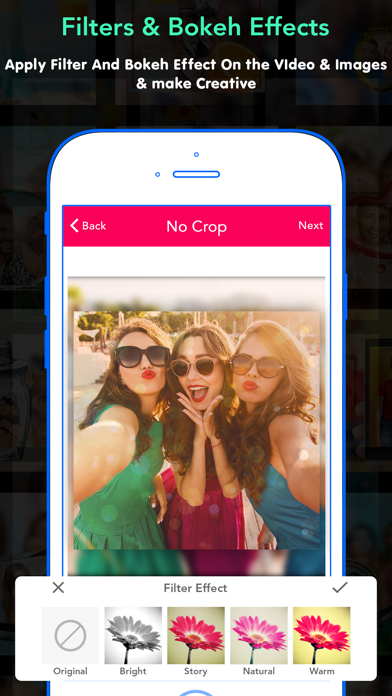
Do you want to post uncropped photos to Instagram,WhatsApp & Facebook ? The answer is No Crop. No Crop not only lets you post uncropped photos to social apps. On top of this we've added a photo effects editor to make the photos. you post on social apps even more special. Enjoy being creative and in control of various elements with borders and frames. eg shapes, rounded edges, shadow, patterns or solid color. ==> POST NON SQUARE PHOTOS AND VIDEOS Import photo from your Album or Clipboard, or take a new Photo with the Camera. The image will be automatically fitted to the square Instagram canvas. You can share your image right now or... MAIN FEATURES for PHOTO: ◉ Adjust photos Supports flipping, rotating, and free cropping. Ignore ratio limits, you can adjust your photos to any ratio and then post it to Instagram. ◉ Adjust filters and photo effects Over 90+ free filter effects. You can also adjust a photos brightness, contrast, saturation, temperature, corner fade, and shift effects. ◉ Add Beautiful Backgrounds Supports using your own photos as backgrounds, and adjusting their blurriness. You can also set colors or over 150+ eye-catching patterns to improve your photo's background. ◉ Add text You can use a huge number of words to add text. Plus you can rotate, flip, and design different colors to your text. Text is continuously being updated, and soon you'll be able to download even more stunning text. ◉ Stickers We have made over 400 gorgeous, free stickers for you to use, and we will keep adding more and more stickers to download. ◉ Doggy Face & Flower crown You can use a more than 100 flower crown & doggy face stickers. ◉ Frame With a wide range of beautiful frames . So you can set the frame on the Photo. ◉ Draw You can draw with your chosen colour & amazing 150+ patterns.You can draw with your finger touch with amazing brushes. ◉ Shape Over 200+ shapes with different types of patterns & share your new patterned photo to instagram. Shapes describes various categories like : Animal, Cartoon, Heros, Insects, Invaders, Love, People & may more. ◉ Lens Amazing lens effect are added.This is my Favourite . So try this . It creates amazing photo like bokeh effects. ◉ Snap This creates snap like snapchat app , So your photo looks like from snapchat. MAIN FEATURES for VIDEO: ◉ Blur & Pixellate Video Make your video background blur and pixellate ◉ Add Awesome Backgrounds Post your video on instagram & many social sites with amazing backgrounds. ◉ Stickers We have made over 400 gorgeous, free stickers for you to use, and we will keep adding more and more stickers to download. ◉ Add text You can use a huge number of words to add text. Plus you can rotate, flip, and design different colors to your text. Text is continuously being updated, and soon you'll be able to download even more stunning text.