
PC 용 waifu2x
- 카테고리: Photo & Video
- 최근 업데이트: 2026-10-14
- 현재 버전: 8.0.1
- 파일 크기: 47.69 MB
- 개발자: 宜 谢
- 호환성: 필요 Windows XP, Windows Vista, Windows 7, Windows 8, Windows 8.1 and Windows 10, Windows 11



에뮬레이터의 중요성은 컴퓨터에서 안드로이드 환경을 흉내 내고 안드로이드 폰을 구입하지 않고도 안드로이드 앱을 설치하고 실행하는 것을 매우 쉽게 만들어주는 것입니다. 누가 당신이 두 세계를 즐길 수 없다고 말합니까? 우선 아래에있는 에뮬레이터 앱을 다운로드 할 수 있습니다.
A. Nox App . OR
B. Bluestacks App .
Bluestacks는 매우 대중적이므로 개인적으로 "B"옵션을 사용하는 것이 좋습니다. 문제가 발생하면 Google 또는 Naver.com에서 좋은 해결책을 찾을 수 있습니다.
Bluestacks.exe 또는 Nox.exe를 성공적으로 다운로드 한 경우 컴퓨터의 다운로드 폴더 또는 다운로드 한 파일을 일반적으로 저장하는 곳으로 이동하십시오.
찾으면 클릭하여 응용 프로그램을 설치하십시오. PC에서 설치 프로세스를 시작해야합니다.
다음을 클릭하여 EULA 라이센스 계약에 동의하십시오.
응용 프로그램을 설치하려면 화면 지시문을 따르십시오.
위 사항을 올바르게 수행하면 소프트웨어가 성공적으로 설치됩니다.
이제 설치 한 에뮬레이터 애플리케이션을 열고 검색 창을 찾으십시오. 지금 입력하십시오. - waifu2x 앱을 쉽게 볼 수 있습니다. 그것을 클릭하십시오. 응용 프로그램 창이 열리고 에뮬레이터 소프트웨어에 응용 프로그램이 표시됩니다. 설치 버튼을 누르면 응용 프로그램이 다운로드되기 시작합니다. 이제 우리는 모두 끝났습니다.
그런 다음 "모든 앱"아이콘이 표시됩니다.
클릭하면 설치된 모든 응용 프로그램이 포함 된 페이지로 이동합니다.
당신은 waifu2x 상. 그것을 클릭하고 응용 프로그램 사용을 시작하십시오.
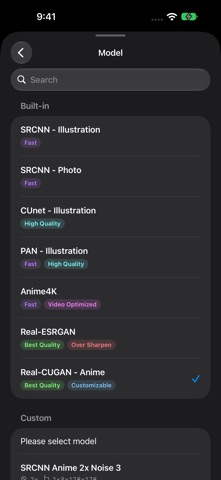
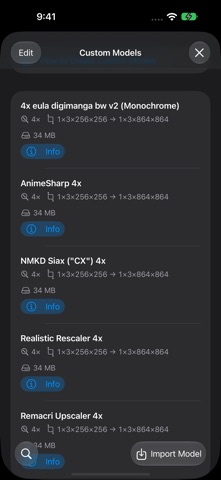
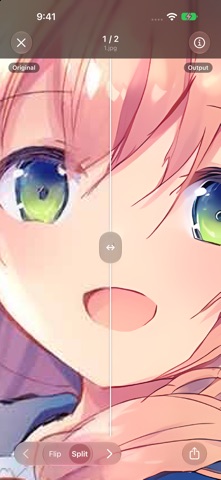
This app can scale and/or denoise images using various advanced on-device AI algorithms. Note that this app is not affiliated with the original waifu2x project. Privacy is one of the top priorities of this app. Your files will never leave your device to be processed. Additionally, we don't collect any personal information because there are no ADs even if you only use free models. Therefore, if you encounter any problems, please send us a feedback email or create a GitHub issue so that we can work together to fix them. Try additional models and custom models on your own images for free before you purchase! Highlight features: 1. Unlimited number of imported images. 2. Supports both SRCNN and CUnet models from the original waifu2x project. 3. Supports Real-ESRGAN models for both illustrations and photos. 4. Supports Real-CUGAN models for anime illustrations. Also supports customizable intensity. 5. Supports Anime4K models for anime videos. 6. Supports custom Core ML models. Import any model to process images for your specific needs. 7. Custom scale modes. You have options to scale images up to 128x, 1.5x, fixed size and more. 8. Supports multiple ways of importing images: the album, files, folders, drag and drop, other apps, Shortcuts. 9. Supports images with alpha channel. 10. Multiple output formats: PNG, JPEG, HEIF, WebP. 11. Multiple processing backends. You can choose between highest quality or highest speed. 12. Write output images directly to an external path (including network drives like SMB). 13. End-to-end support for 16-bit color and color spaces. Color accuracy will not be compromised after processing. 14. Highly optimized RAM usage. You can easily produce images that don't even fit inside your device RAM. 15. Supports deleting or replacing original images if they come from the album. 16. Supports downscaling images before processing, which is useful while processing some photos. Source code of core function is available on GitHub: https://github.com/imxieyi/waifu2x-ios Usage of images in screenshots is granted by the original author Kurumi: https://twitter.com/0115_kurumi The primary app icon is illustrated by Kapuru: https://twitter.com/KaPuRu_0410


