
PC 용 Exif Master
- 카테고리: Photo & Video
- 최근 업데이트: 2020-09-19
- 현재 버전: 1.6
- 파일 크기: 48.95 MB
- 개발자: ReachJunction Media Limited
- 호환성: 필요 Windows XP, Windows Vista, Windows 7, Windows 8, Windows 8.1 and Windows 10, Windows 11


PC에서 Exif Master 용 호환 APK 다운로드
| 다운로드 | 개발자 | 평점 | 점수 | 현재 버전 | 성인 랭킹 |
|---|---|---|---|---|---|
| ↓ PC용 APK 다운로드 | ReachJunction Media Limited | 1 | 3 | 1.6 | 4+ |
에뮬레이터의 중요성은 컴퓨터에서 안드로이드 환경을 흉내 내고 안드로이드 폰을 구입하지 않고도 안드로이드 앱을 설치하고 실행하는 것을 매우 쉽게 만들어주는 것입니다. 누가 당신이 두 세계를 즐길 수 없다고 말합니까? 우선 아래에있는 에뮬레이터 앱을 다운로드 할 수 있습니다.
A. Nox App . OR
B. Bluestacks App .
Bluestacks는 매우 대중적이므로 개인적으로 "B"옵션을 사용하는 것이 좋습니다. 문제가 발생하면 Google 또는 Naver.com에서 좋은 해결책을 찾을 수 있습니다.
Bluestacks.exe 또는 Nox.exe를 성공적으로 다운로드 한 경우 컴퓨터의 다운로드 폴더 또는 다운로드 한 파일을 일반적으로 저장하는 곳으로 이동하십시오.
찾으면 클릭하여 응용 프로그램을 설치하십시오. PC에서 설치 프로세스를 시작해야합니다.
다음을 클릭하여 EULA 라이센스 계약에 동의하십시오.
응용 프로그램을 설치하려면 화면 지시문을 따르십시오.
위 사항을 올바르게 수행하면 소프트웨어가 성공적으로 설치됩니다.
이제 설치 한 에뮬레이터 애플리케이션을 열고 검색 창을 찾으십시오. 지금 입력하십시오. - Exif Master 앱을 쉽게 볼 수 있습니다. 그것을 클릭하십시오. 응용 프로그램 창이 열리고 에뮬레이터 소프트웨어에 응용 프로그램이 표시됩니다. 설치 버튼을 누르면 응용 프로그램이 다운로드되기 시작합니다. 이제 우리는 모두 끝났습니다.
그런 다음 "모든 앱"아이콘이 표시됩니다.
클릭하면 설치된 모든 응용 프로그램이 포함 된 페이지로 이동합니다.
당신은 Exif Master 상. 그것을 클릭하고 응용 프로그램 사용을 시작하십시오.
Mac OS 에서 Exif Master 다운로드
| 다운로드 | 개발자 | 점수 | 현재 버전 | 성인 랭킹 |
|---|---|---|---|---|
| 무료 - Mac 에서 다운로드 | ReachJunction Media Limited | 3 |
1.6 | 4+ |
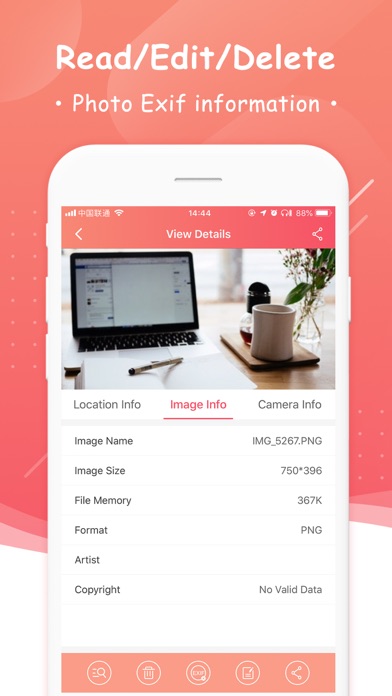
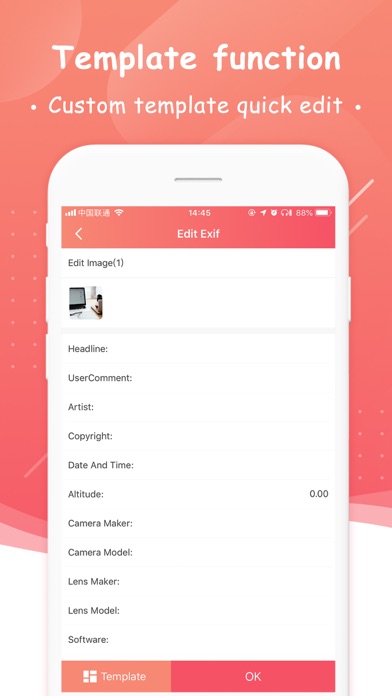
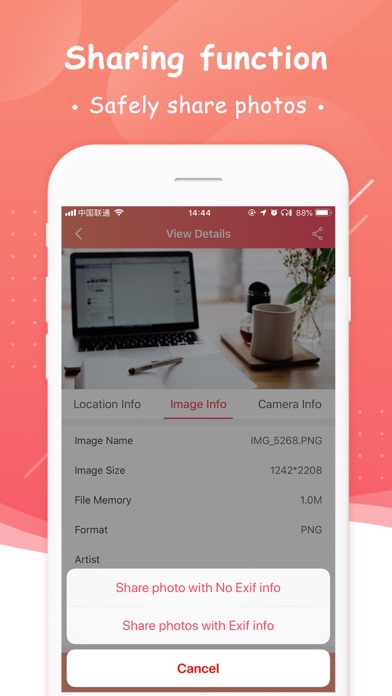
Exif master is an app for users who want to protect their photo privacy before sharing with others, and also for professional photographers who want to learn about the info behind a photo. Nowadays, when you take a picture with your iPhone or iPad, it store some privacy data like location, date, time in your photo. When you share a photo with someone else, you may want to edit or remove the data related with your privacy. What is cool features in Exif Master ▸ App allows you to remove EXIF metadata including Photos GPS location known as Geotagging of photos. ▸ App displays EXIF metadata of any photo on your iOS device(s), Photo Stream or iCloud. ▸ Display EXIF tags like ISO, Shutter Speed, Focal length, Camera Model, Lens Model, Time stamp, Aperture, Shutter Count. ▸ You can optionally share photos without EXIF metadata. ▸ Navigate quickly between next and previous photos in exif detail screen by swiping right or left. ▸ Ability to share Image with or without EXIF Metadata. ▸ Mass edit the photo metadata FAQ Q1) What is EXIF Metadata? EXIF “Exchangeable Image File Format”. We quite often take pictures with our digital camera or phone. It always records and store a considerable amount of exif data within each image you take, which contains a lot information about your camera settings (ISO, aperture, focal length, image size, shutter speed, camera model, lens model, GPS) date, time, location and many more. Viewing EXIF metadata tags is important for beginners and professional photographers alike, to understand and review what camera settings or software were used to create and edit photo. [Auto Renewable Ads Removal Subscription] ▸ Subscription Service: Remove the ads before the mass edit or delete the exif metadata of the photos. ▸ Subscription Length: One month ▸ Subscription Price: $4.99 USD or your local equivalent currency ▸ Subscription Payment: Once you confirm the payment, you can find the record in your iTunes Account ▸ Subscription Cancelation: Go to “Setting” -> “iTunes Store and App Store” -> “Apple Id”-> ”View Apple Id”-> “Account Setting” -> “Subscription” You have to cancel the subscription 24 hours before the end of previous subscription ▸ Term of Use: http://www.reachjunction.com/exif-master/term-of-use ▸ Privacy Policy: http://www.reachjunction.com/exif-master/privacy-policy