
PC 용 Batch Face Detect And Replace
- 카테고리: Photo & Video
- 최근 업데이트: 2026-01-04
- 현재 버전: 2.5
- 파일 크기: 36.19 MB
- 개발자: Arwer Software
- 호환성: 필요 Windows XP, Windows Vista, Windows 7, Windows 8, Windows 8.1 and Windows 10, Windows 11




PC에서 Batch Face Detect And Replace 용 호환 APK 다운로드
| 다운로드 | 개발자 | 평점 | 점수 | 현재 버전 | 성인 랭킹 |
|---|---|---|---|---|---|
| ↓ PC용 APK 다운로드 | Arwer Software | 0 | 0 | 2.5 | 4+ |
호환되는 PC 앱 또는 대안 확인
| 소프트웨어 | 다운로드 | 평점 | 개발자 |
|---|---|---|---|
| Batch Face Detect And Replace |
PC 앱 받기 | 0/5 0 리뷰 0 |
Arwer Software |
에뮬레이터의 중요성은 컴퓨터에서 안드로이드 환경을 흉내 내고 안드로이드 폰을 구입하지 않고도 안드로이드 앱을 설치하고 실행하는 것을 매우 쉽게 만들어주는 것입니다. 누가 당신이 두 세계를 즐길 수 없다고 말합니까? 우선 아래에있는 에뮬레이터 앱을 다운로드 할 수 있습니다.
A. Nox App . OR
B. Bluestacks App .
Bluestacks는 매우 대중적이므로 개인적으로 "B"옵션을 사용하는 것이 좋습니다. 문제가 발생하면 Google 또는 Naver.com에서 좋은 해결책을 찾을 수 있습니다.
Bluestacks.exe 또는 Nox.exe를 성공적으로 다운로드 한 경우 컴퓨터의 다운로드 폴더 또는 다운로드 한 파일을 일반적으로 저장하는 곳으로 이동하십시오.
찾으면 클릭하여 응용 프로그램을 설치하십시오. PC에서 설치 프로세스를 시작해야합니다.
다음을 클릭하여 EULA 라이센스 계약에 동의하십시오.
응용 프로그램을 설치하려면 화면 지시문을 따르십시오.
위 사항을 올바르게 수행하면 소프트웨어가 성공적으로 설치됩니다.
이제 설치 한 에뮬레이터 애플리케이션을 열고 검색 창을 찾으십시오. 지금 입력하십시오. - Batch Face Detect And Replace 앱을 쉽게 볼 수 있습니다. 그것을 클릭하십시오. 응용 프로그램 창이 열리고 에뮬레이터 소프트웨어에 응용 프로그램이 표시됩니다. 설치 버튼을 누르면 응용 프로그램이 다운로드되기 시작합니다. 이제 우리는 모두 끝났습니다.
그런 다음 "모든 앱"아이콘이 표시됩니다.
클릭하면 설치된 모든 응용 프로그램이 포함 된 페이지로 이동합니다.
당신은 Batch Face Detect And Replace 상. 그것을 클릭하고 응용 프로그램 사용을 시작하십시오.
Mac OS 에서 Batch Face Detect And Replace 다운로드
| 다운로드 | 개발자 | 점수 | 현재 버전 | 성인 랭킹 |
|---|---|---|---|---|
| 무료 - Mac 에서 다운로드 | Arwer Software | 0 |
2.5 | 4+ |
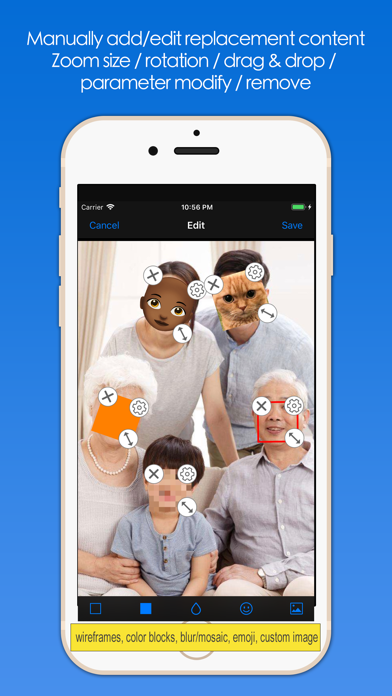
Sometimes, you take a lot of photos, you want to keep some of your privacy (without revealing your face), share them with your friends or social networks, and process them in batches and quickly, then "Batch Face Detect And Replace" The application will be well suited to your needs. "Batch Face Detect And Replace", the software automatically detects the faces in the image in batches, and then replaces or occludes the face according to the way you specify, such as mosaic blurred faces, emoticons to block faces, or the image you specify obscures the face, and so on. You can also add/edit replacements manually, and you can scale, rotate, drag and drop, parameter adjustments, and removes. The processed pictures can be saved to the system album, send mail, send messages, share to friends, transfer to computer, save to iCloud shared album, print, and so on. The software supports multiple system platforms of iOS/iPadOS/macOS. The software supports multiple languages, including: English, Simplified Chinese, Traditional Chinese, German, French, Portuguese, Spanish, Russian, Japanese, Italian (the new version will support more languages). The software can be downloaded for free, and we also offer a professional version of more advanced features, you can get a professional version through the subscription within the software. Automatic renewal professional version: -- Professional Edition Benefits: (1) All professional functions. (2) New professional and advanced features added in the new version. (3) You only need to purchase it once, and the software can be used in all platform versions of iPhone/iPad/macOS. -- Subscription period: 1 month (professional version of continuous monthly product), 6 months (professional version of continuous packaging for half a year), 12 months (professional version of continuous annual product). -- Subscription price: subject to IAP application information, such as $0.99 per month for consecutive monthly subscriptions and $5.49 per year for consecutive annual subscriptions. -- Payment: The user confirms the purchase and payment and then credits it to the iTunes account. -- Cancel Renewal: To cancel renewal, manually turn off auto-renew in iTunes/Apple ID Settings Management 24 hours before the current subscription period expires. -- Renewal: Apple's iTunes account will be charged within 24 hours before expiration. After the deduction is successful, the subscription period will be postponed for one subscription period. -- Privacy Policy: http://www.arwer.com/Software2/PrivacyPolicy.html -- Terms Of Service: http://www.arwer.com/Software2/TermsOfService.html