PC 용 Exif Metadata
- 카테고리: Photo & Video
- 최근 업데이트: 2026-05-03
- 현재 버전: 3.5
- 파일 크기: 21.82 MB
- 개발자: New Marketing Lab, Inc
- 호환성: 필요 Windows XP, Windows Vista, Windows 7, Windows 8, Windows 8.1 and Windows 10, Windows 11



PC에서 Exif Metadata 용 호환 APK 다운로드
| 다운로드 | 개발자 | 평점 | 점수 | 현재 버전 | 성인 랭킹 |
|---|---|---|---|---|---|
| ↓ PC용 APK 다운로드 | New Marketing Lab, Inc | 179 | 4.71508 | 3.5 | 4+ |
호환되는 PC 앱 또는 대안 확인
| 소프트웨어 | 다운로드 | 평점 | 개발자 |
|---|---|---|---|
| Exif Metadata |
PC 앱 받기 | 4.71508/5 179 리뷰 4.71508 |
New Marketing Lab, Inc |
에뮬레이터의 중요성은 컴퓨터에서 안드로이드 환경을 흉내 내고 안드로이드 폰을 구입하지 않고도 안드로이드 앱을 설치하고 실행하는 것을 매우 쉽게 만들어주는 것입니다. 누가 당신이 두 세계를 즐길 수 없다고 말합니까? 우선 아래에있는 에뮬레이터 앱을 다운로드 할 수 있습니다.
A. Nox App . OR
B. Bluestacks App .
Bluestacks는 매우 대중적이므로 개인적으로 "B"옵션을 사용하는 것이 좋습니다. 문제가 발생하면 Google 또는 Naver.com에서 좋은 해결책을 찾을 수 있습니다.
Bluestacks.exe 또는 Nox.exe를 성공적으로 다운로드 한 경우 컴퓨터의 다운로드 폴더 또는 다운로드 한 파일을 일반적으로 저장하는 곳으로 이동하십시오.
찾으면 클릭하여 응용 프로그램을 설치하십시오. PC에서 설치 프로세스를 시작해야합니다.
다음을 클릭하여 EULA 라이센스 계약에 동의하십시오.
응용 프로그램을 설치하려면 화면 지시문을 따르십시오.
위 사항을 올바르게 수행하면 소프트웨어가 성공적으로 설치됩니다.
이제 설치 한 에뮬레이터 애플리케이션을 열고 검색 창을 찾으십시오. 지금 입력하십시오. - Exif Metadata 앱을 쉽게 볼 수 있습니다. 그것을 클릭하십시오. 응용 프로그램 창이 열리고 에뮬레이터 소프트웨어에 응용 프로그램이 표시됩니다. 설치 버튼을 누르면 응용 프로그램이 다운로드되기 시작합니다. 이제 우리는 모두 끝났습니다.
그런 다음 "모든 앱"아이콘이 표시됩니다.
클릭하면 설치된 모든 응용 프로그램이 포함 된 페이지로 이동합니다.
당신은 Exif Metadata 상. 그것을 클릭하고 응용 프로그램 사용을 시작하십시오.
Mac OS 에서 Exif Metadata 다운로드
| 다운로드 | 개발자 | 점수 | 현재 버전 | 성인 랭킹 |
|---|---|---|---|---|
| 무료 - Mac 에서 다운로드 | New Marketing Lab, Inc | 4.71508 |
3.5 | 4+ |
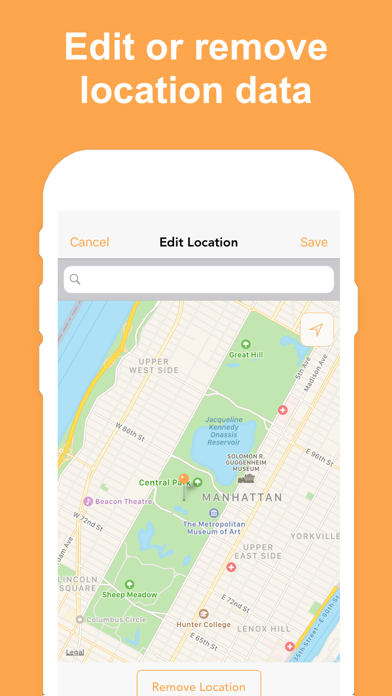
Exif Metadata lets you quickly and easily view, edit, and remove metadata, including GPS location, from your iPhone and iPad photos. It is a must-have tool for serious photographers and casual iPhoneographers alike. 10 reasons to use Exif Metadata: - It's free to try - View, edit, or remove Exif metadata on the fly - View, edit, or remove location data from your photos - Bulk edit multiple photos at the same time - Filter photos missing location or metadata - Your photos are processed on device and never sent to a server - Extension lets you view metadata directly from the Photos app - Works on both iPhone and iPad - Supports Dark Mode - Highly rated with an average of 4.5 stars REAL REVIEWS FROM REAL USERS "Still the best app for editing Exif metadata." -- by iPad User 0222 "As a conscientious parent, I am reluctant to share photos of my children on-line. This app clears any personal data and eases my concerns. Plus it is very straight forward and easy to use." -- by T puffin "This app is perfect in its simplicity. It’s the only exif app i have found which allows you to view metadata within the camera roll - awesome!" -- by Fshhshsns "EXIF Metadata does exactly what it says it will do. It’s extremely easy to use and the customer support is great. The inexpensive lifetime Pro version is worth every penny." -- by Apple TV Fan "Very clean interface, does its job very well. If you want to bulk update the metadata on a collection of photos (eg imported from somewhere else) this is your solution. Highly recommend." -- by JT Player FEATURES SPOTLIGHT View Exif metadata: - View basic photo information at a glance - View 50+ metadata tags - View location data such as GPS data, address, map location Edit Exif metadata: - Edit aperture, exposure, date, time, author, description, copyright, and more - Edit geotags or spoof location Filter photos: - Pro users can filter photos missing location and Exif metadata Remove Exif metadata: - Remove GPS location data independently of other Exif data - Remove all metadata at once Bulk edit metadata: - Pro users can edit metadata of multiple photos at once Clean & simple design: - Optimized for iPhone and iPad - Supports Dark Mode Photo extension: - Access metadata of your photos directly from the Photos app Protect your privacy: - Easily share photos online without any metadata This app works with: - All photos in your iPhone or iPad camera roll, except ProRAW photos - Photos in iCloud Photo Library - Photos in Photo Stream Exif Metadata Pro: The Pro version of Exif Metadata can be purchased via an annual subscription or one-time payment to remove ads and gain the ability to edit metadata for multiple photos at once. Payment will be charged to your Apple ID account at the confirmation of purchase. The subscription automatically renews every year unless it is canceled at least 24 hours before the end of the current period. Your account will be charged for renewal within 24 hours prior to the end of the current period. You can manage and cancel your subscriptions by going to your App Store account settings after purchase. Terms of use: https://www.sixstarapps.com/terms/ Privacy policy: https://www.sixstarapps.com/privacy/ HAVE QUESTIONS OR NEED HELP? If you have any question about the app, or need help about something, please do not hesitate to contact us at www.SixStarApps.com. We’ll be happy to help!