PC 용 Neon Photo Effects
- 카테고리: Photo & Video
- 최근 업데이트: 2021-07-22
- 현재 버전: 2.1
- 파일 크기: 42.26 MB
- 개발자: Nalin Savaliya
- 호환성: 필요 Windows XP, Windows Vista, Windows 7, Windows 8, Windows 8.1 and Windows 10, Windows 11




PC에서 Neon Photo Effects 용 호환 APK 다운로드
| 다운로드 | 개발자 | 평점 | 점수 | 현재 버전 | 성인 랭킹 |
|---|---|---|---|---|---|
| ↓ PC용 APK 다운로드 | Nalin Savaliya | 0 | 0 | 2.1 | 4+ |
에뮬레이터의 중요성은 컴퓨터에서 안드로이드 환경을 흉내 내고 안드로이드 폰을 구입하지 않고도 안드로이드 앱을 설치하고 실행하는 것을 매우 쉽게 만들어주는 것입니다. 누가 당신이 두 세계를 즐길 수 없다고 말합니까? 우선 아래에있는 에뮬레이터 앱을 다운로드 할 수 있습니다.
A. Nox App . OR
B. Bluestacks App .
Bluestacks는 매우 대중적이므로 개인적으로 "B"옵션을 사용하는 것이 좋습니다. 문제가 발생하면 Google 또는 Naver.com에서 좋은 해결책을 찾을 수 있습니다.
Bluestacks.exe 또는 Nox.exe를 성공적으로 다운로드 한 경우 컴퓨터의 다운로드 폴더 또는 다운로드 한 파일을 일반적으로 저장하는 곳으로 이동하십시오.
찾으면 클릭하여 응용 프로그램을 설치하십시오. PC에서 설치 프로세스를 시작해야합니다.
다음을 클릭하여 EULA 라이센스 계약에 동의하십시오.
응용 프로그램을 설치하려면 화면 지시문을 따르십시오.
위 사항을 올바르게 수행하면 소프트웨어가 성공적으로 설치됩니다.
이제 설치 한 에뮬레이터 애플리케이션을 열고 검색 창을 찾으십시오. 지금 입력하십시오. - Neon Photo Effects 앱을 쉽게 볼 수 있습니다. 그것을 클릭하십시오. 응용 프로그램 창이 열리고 에뮬레이터 소프트웨어에 응용 프로그램이 표시됩니다. 설치 버튼을 누르면 응용 프로그램이 다운로드되기 시작합니다. 이제 우리는 모두 끝났습니다.
그런 다음 "모든 앱"아이콘이 표시됩니다.
클릭하면 설치된 모든 응용 프로그램이 포함 된 페이지로 이동합니다.
당신은 Neon Photo Effects 상. 그것을 클릭하고 응용 프로그램 사용을 시작하십시오.
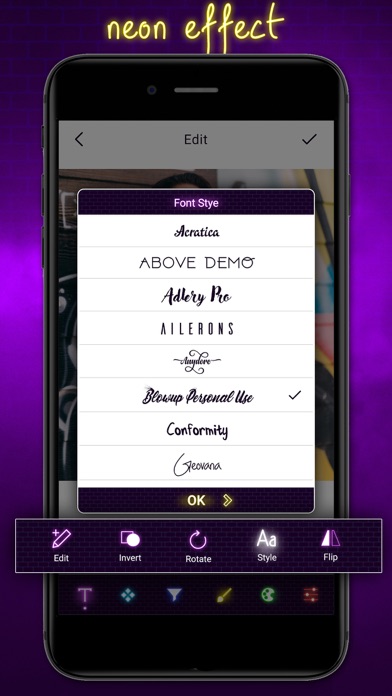
Are you crazy to share your images on social side..? Try to make the best ever image with color editing options..? Then try our Neon Photo Effects application which has the option to design your old image into an amazing neon acidic colorful image. apply ultraviolet color and many more effects in the image to change your old image. our application special design to considering all points to adorn your image. Neon Photo Effects application has all acidic colors effects and also features like to apply Text, Sharpes, Filters, Brush and many more beautiful effects which are more eligible to make adorable your image. now no need to install any beauty editing software to change your old image just install this application and take some simple steps to change an image. some special characteristics of this application which are as below.. Text : - # Write name in image with "Text" option # Text editor allow user can set image into invert part of text # Rotate your text with free finger touch # Flip your text # Set outline of text # Apply align # Change font style Shapes and Frames:- # Set one your favorite shape in an image # Set in an image with free finger option # Have also option to invert your image into shape # Set outline and rotate shape to set it in your image # Have gesture choice to set your shape in the image Filters: - # Apply solid filter in image # Make more beautiful image with gradient effects # Have also option to invert your image into shape # Gesture to set filter in image Brush:- # Draw your wish shape in the image with this amazing option # Apply color softness in the draw # Set size of draw brush Eraser:- # Best part of this app is eraser with that you can remove any unwanted part easily Color:- # Change amazing acidic gredient color with many more Random colors Effects:- # Apply amazing effects in the image to make a more elegant image # Apply "Saturation" # Set "Transparency" in image # Make shinier your image with "Glow" option # Also get facilities to change BG color of your image Save and Share:- # At last option to save an image and share on the social side or also with friends which you like