
PC 용 Quick GIF Editor - crop,resize
- 카테고리: Photo & Video
- 최근 업데이트: 2026-08-01
- 현재 버전: 2.0
- 파일 크기: 9.39 MB
- 개발자: 国林 孙
- 호환성: 필요 Windows XP, Windows Vista, Windows 7, Windows 8, Windows 8.1 and Windows 10, Windows 11



PC에서 Quick GIF Editor - crop,resize 용 호환 APK 다운로드
| 다운로드 | 개발자 | 평점 | 점수 | 현재 버전 | 성인 랭킹 |
|---|---|---|---|---|---|
| ↓ PC용 APK 다운로드 | 国林 孙 | 2 | 3 | 2.0 | 4+ |
에뮬레이터의 중요성은 컴퓨터에서 안드로이드 환경을 흉내 내고 안드로이드 폰을 구입하지 않고도 안드로이드 앱을 설치하고 실행하는 것을 매우 쉽게 만들어주는 것입니다. 누가 당신이 두 세계를 즐길 수 없다고 말합니까? 우선 아래에있는 에뮬레이터 앱을 다운로드 할 수 있습니다.
A. Nox App . OR
B. Bluestacks App .
Bluestacks는 매우 대중적이므로 개인적으로 "B"옵션을 사용하는 것이 좋습니다. 문제가 발생하면 Google 또는 Naver.com에서 좋은 해결책을 찾을 수 있습니다.
Bluestacks.exe 또는 Nox.exe를 성공적으로 다운로드 한 경우 컴퓨터의 다운로드 폴더 또는 다운로드 한 파일을 일반적으로 저장하는 곳으로 이동하십시오.
찾으면 클릭하여 응용 프로그램을 설치하십시오. PC에서 설치 프로세스를 시작해야합니다.
다음을 클릭하여 EULA 라이센스 계약에 동의하십시오.
응용 프로그램을 설치하려면 화면 지시문을 따르십시오.
위 사항을 올바르게 수행하면 소프트웨어가 성공적으로 설치됩니다.
이제 설치 한 에뮬레이터 애플리케이션을 열고 검색 창을 찾으십시오. 지금 입력하십시오. - Quick GIF Editor - crop,resize 앱을 쉽게 볼 수 있습니다. 그것을 클릭하십시오. 응용 프로그램 창이 열리고 에뮬레이터 소프트웨어에 응용 프로그램이 표시됩니다. 설치 버튼을 누르면 응용 프로그램이 다운로드되기 시작합니다. 이제 우리는 모두 끝났습니다.
그런 다음 "모든 앱"아이콘이 표시됩니다.
클릭하면 설치된 모든 응용 프로그램이 포함 된 페이지로 이동합니다.
당신은 Quick GIF Editor - crop,resize 상. 그것을 클릭하고 응용 프로그램 사용을 시작하십시오.
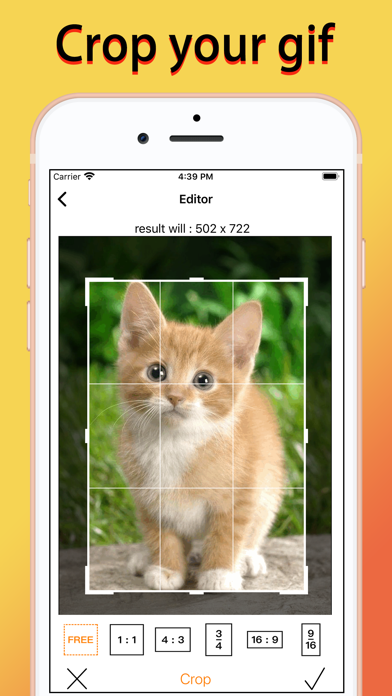
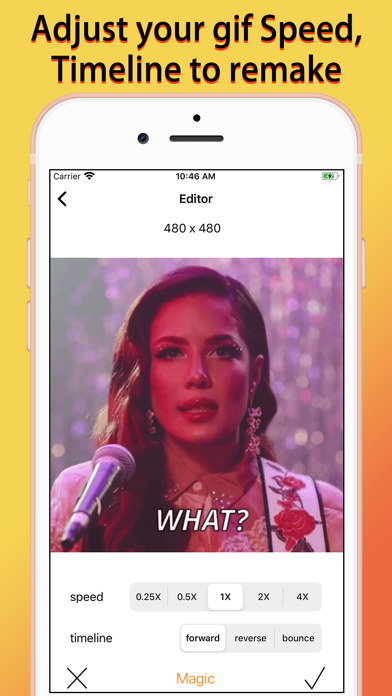
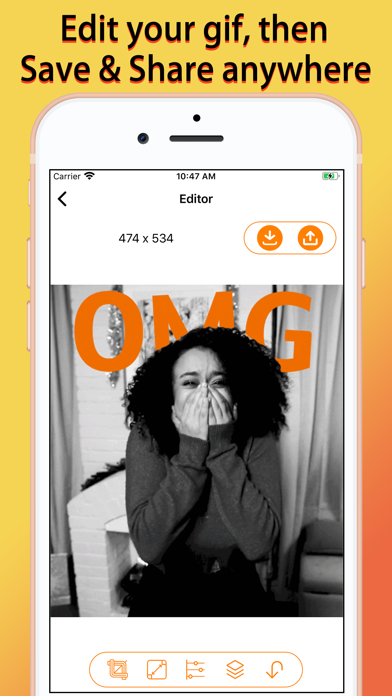
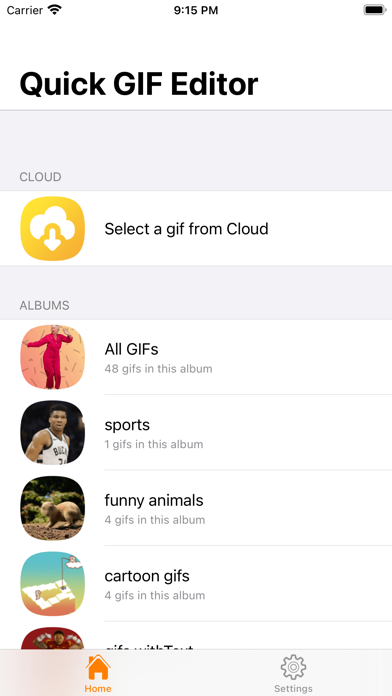
Now you can crop and resize your GIFs like a photo editor. For example, by adjusting the speed and timeline, you can speed up, slow down, rewind, or make a boomerang GIF – which means you can create a hilarious meme in seconds! Plus, new features like custom watermarks and frame compression are here to take your creations even further! Unleash your creativity with Quick GIF Editor, the ultimate GIF editing and meme-making app. With its intuitive interface and powerful features, transforming ordinary GIFs into extraordinary creations has never been easier. Whether you're a meme enthusiast or a GIF aficionado, Quick GIF Editor is your go-to solution for crafting captivating visual content. Key Features: ◈ Seamless Crop and Resize: Crop and Resize your GIFs like a professional photo editor. Choose from a range of versatile crop proportions, including freeform, classic ratios like 1:1 and 4:3, 16:9, and more. Resize with precision by percentage or set specific dimensions effortlessly. ◈ Dynamic Speed Control: Experience complete control over your GIF's tempo. Adjust playback speed with a wide range of options, from a brisk 0.25x to an exhilarating 4x. Whether you want to create high-energy animations or captivating slow-motion sequences, Quick GIF Editor has you covered. ◈ Time Manipulation Made Easy: Rewind, fast-forward, or create mesmerizing boomerang GIFs by effortlessly manipulating the playback timeline. Craft captivating visual stories with a simple touch, making your GIFs stand out in a crowd. ◈ Custom Watermark: Add your own text or image watermark to any GIF, protecting your work or branding your memes with a personal touch. Let your signature shine on every frame! ◈ Zip Pack & Export Frames: Compress all GIF frames into a single ZIP archive with one tap, and easily share or save the packed file. Perfect for batch exporting, backup, or sending to other tools. ◈ Dive into GIF Metadata: Explore the intricate details of your GIFs with the ability to view their metadata. From file size to frame dimensions, Quick GIF Editor empowers you with insights into your animated creations. ◈ Frame-by-Frame Brilliance: Unleash the potential of each GIF by splitting and saving individual frames. Let your imagination run wild as you explore new creative dimensions with every frame – now you can even pack them all into a ZIP for easy management. ◈ Organize with Ease: Effortlessly manage your GIF albums directly within your device's photo collection. Keep your creations organized and ready for sharing at any moment. ◈ Real-Time Preview: Witness your GIFs come to life in real-time as you make adjustments. Enjoy a seamless and convenient editing experience that allows you to fine-tune every detail. ◈ Embrace Innovation: Quick GIF Editor isn't just an app – it's your gateway to unleashing your inner GIF maestro. Create, customize, and recreate GIFs that showcase your unique perspective and sense of humor. And we've also optimized the export engine for faster processing and smoother performance, so you can enjoy a more responsive editing experience than ever. Unlock the true potential of your GIFs with Quick GIF Editor. Whether you're a casual creator or a seasoned professional, our app provides the tools you need to transform simple GIFs into captivating works of art. Try Quick GIF Editor today and witness the magic of GIF editing like never before.


