PC 용 PromptSmart+
- 카테고리: Photo & Video
- 최근 업데이트: 2026-10-30
- 현재 버전: 4.1.2
- 파일 크기: 174.02 MB
- 개발자: PromptSmart
- 호환성: 필요 Windows XP, Windows Vista, Windows 7, Windows 8, Windows 8.1 and Windows 10, Windows 11




PC에서 PromptSmart+ 용 호환 APK 다운로드
| 다운로드 | 개발자 | 평점 | 점수 | 현재 버전 | 성인 랭킹 |
|---|---|---|---|---|---|
| ↓ PC용 APK 다운로드 | PromptSmart | 7 | 4.57143 | 4.1.2 | 4+ |
에뮬레이터의 중요성은 컴퓨터에서 안드로이드 환경을 흉내 내고 안드로이드 폰을 구입하지 않고도 안드로이드 앱을 설치하고 실행하는 것을 매우 쉽게 만들어주는 것입니다. 누가 당신이 두 세계를 즐길 수 없다고 말합니까? 우선 아래에있는 에뮬레이터 앱을 다운로드 할 수 있습니다.
A. Nox App . OR
B. Bluestacks App .
Bluestacks는 매우 대중적이므로 개인적으로 "B"옵션을 사용하는 것이 좋습니다. 문제가 발생하면 Google 또는 Naver.com에서 좋은 해결책을 찾을 수 있습니다.
Bluestacks.exe 또는 Nox.exe를 성공적으로 다운로드 한 경우 컴퓨터의 다운로드 폴더 또는 다운로드 한 파일을 일반적으로 저장하는 곳으로 이동하십시오.
찾으면 클릭하여 응용 프로그램을 설치하십시오. PC에서 설치 프로세스를 시작해야합니다.
다음을 클릭하여 EULA 라이센스 계약에 동의하십시오.
응용 프로그램을 설치하려면 화면 지시문을 따르십시오.
위 사항을 올바르게 수행하면 소프트웨어가 성공적으로 설치됩니다.
이제 설치 한 에뮬레이터 애플리케이션을 열고 검색 창을 찾으십시오. 지금 입력하십시오. - PromptSmart+ 앱을 쉽게 볼 수 있습니다. 그것을 클릭하십시오. 응용 프로그램 창이 열리고 에뮬레이터 소프트웨어에 응용 프로그램이 표시됩니다. 설치 버튼을 누르면 응용 프로그램이 다운로드되기 시작합니다. 이제 우리는 모두 끝났습니다.
그런 다음 "모든 앱"아이콘이 표시됩니다.
클릭하면 설치된 모든 응용 프로그램이 포함 된 페이지로 이동합니다.
당신은 PromptSmart+ 상. 그것을 클릭하고 응용 프로그램 사용을 시작하십시오.
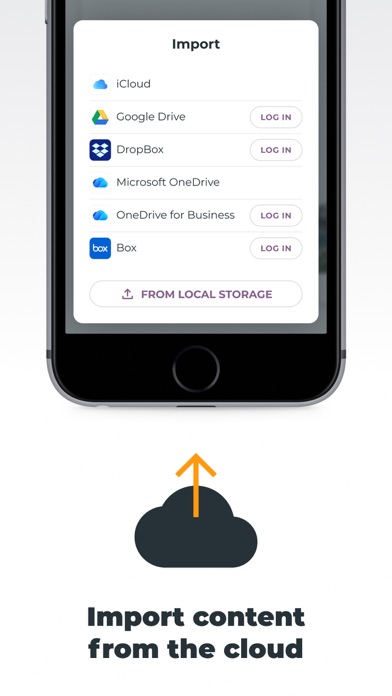
PromptSmart is a patented teleprompter application that automatically follows as you speak in real time, without the internet, making your presentations or video productions less stressful and more efficient. PromptSmart's innovative VoiceTrack scrolling method is now expanded into even more languages other than English including: French, Spanish, German, Italian, Portuguese, Russian, Turkish, Chinese (Mandarin), Japanese, Hindi, Ukrainian, Vietnamese, Polish, and Dutch. VoiceTrack automatically moves the text as you speak and stops when you pause or improvise. PromptSmart will wait for you to begin speaking the script again before it continues moving. With PromptSmart, speakers stay calm and act naturally, which saves time and is less stressful. There is no time limit to your presentations. VoiceTrack will continue to listen and scroll with your voice until you close the presentation screen. PromptSmart+ is fast, accurate, and secure, performing all of the speech recognition tasks on the device, without the need for an internet connection. PromptSmart+ will make your presentations or video productions less stressful and more efficient. PromptSmart+ is an invaluable teleprompter tool for a wide range of public speakers; clergy, educators, politicians, podcasters, audiobook creators, business leaders, performers or for those in broadcast media. Our prompter apps can also be useful as a practice tool or as a reference guide for even the most novice speaker, keeping you on-message during live speaking engagements. PromptSmart+ is cloud-enabled (optional) and you can also record HD videos inside the app while presenting. Use Selfie Mode to position the text next to or beneath the front-facing camera so you don't look like you're reading. VoiceTrack gives you unparalleled control with speech-recognition scrolling -- but you can also scroll the text with a pre-set speed, or a remote control room. All of the features mentioned above are included in a PromptSmart+ subscription which you can activate on a monthly or yearly basis. Create a PromptSmart account inside the app and then activate a 7-day trial subscription to get the full app experience before you commit. An active PromptSmart+ subscription or introductory trial are required for the following features: [+] VoiceTrack—Speech-recognition based scrolling. If you go off-script, VoiceTrack knows and will hold your place, waiting for you to return. [+] Scroll at a pre-set speed. [+] Invert text to reflect off two-way teleprompter glass [+] Narrow the side margins to reduce side-to-side eye movements [+] Selfie Mode: fix text next to the camera and record HD video simultaneously [+] In-app camera controls: tap-to-focus, auto-exposure lock, and auto-focus lock [+] Import these file-types into PromptSmart: -DOCX -PDF (must be OCR-scanned first) -RTF -TXT -GDOC (Google Documents) [+] Import and export scripts to and from the cloud: Google Drive, Box, OneDrive, iCloud, or Dropbox [+] Bulk delete scripts [+] An optional mic meter in Presentation Mode [+] Volume buttons play/pause presentations (Selfie Stick friendly!) [+] View and adjust text position from a web-based Remote Control Room IMPORTANT! Review carefully: -VoiceTrack languages supported: English, Spanish, French, German, Italian, Portuguese, Dutch, Polish, Russian, Ukrainian, Turkish, Chinese (Mandarin), Japanese, Vietnamese, and Hindi. -Device Specifications: iPad Air 2 (or newer); iPhone 6S (or newer); iOS 13 (or newer) -External wired microphone recommended with VoiceTrack (but not required) Your satisfaction is important to us. Contact us anytime: [email protected] PromptSmart EULA and Privacy Policy: https://promptsmart.com/download_file/149/0