PC 용 Find My Lost Headphones App
- 카테고리: Utilities
- 최근 업데이트: 2021-08-15
- 현재 버전: 1.02
- 파일 크기: 32.91 MB
- 개발자: Mobifarm IVS
- 호환성: 필요 Windows XP, Windows Vista, Windows 7, Windows 8, Windows 8.1 and Windows 10, Windows 11


PC에서 Find My Lost Headphones App 용 호환 APK 다운로드
| 다운로드 | 개발자 | 평점 | 점수 | 현재 버전 | 성인 랭킹 |
|---|---|---|---|---|---|
| ↓ PC용 APK 다운로드 | Mobifarm IVS | 0 | 1.02 | 4+ |
에뮬레이터의 중요성은 컴퓨터에서 안드로이드 환경을 흉내 내고 안드로이드 폰을 구입하지 않고도 안드로이드 앱을 설치하고 실행하는 것을 매우 쉽게 만들어주는 것입니다. 누가 당신이 두 세계를 즐길 수 없다고 말합니까? 우선 아래에있는 에뮬레이터 앱을 다운로드 할 수 있습니다.
A. Nox App . OR
B. Bluestacks App .
Bluestacks는 매우 대중적이므로 개인적으로 "B"옵션을 사용하는 것이 좋습니다. 문제가 발생하면 Google 또는 Naver.com에서 좋은 해결책을 찾을 수 있습니다.
Bluestacks.exe 또는 Nox.exe를 성공적으로 다운로드 한 경우 컴퓨터의 다운로드 폴더 또는 다운로드 한 파일을 일반적으로 저장하는 곳으로 이동하십시오.
찾으면 클릭하여 응용 프로그램을 설치하십시오. PC에서 설치 프로세스를 시작해야합니다.
다음을 클릭하여 EULA 라이센스 계약에 동의하십시오.
응용 프로그램을 설치하려면 화면 지시문을 따르십시오.
위 사항을 올바르게 수행하면 소프트웨어가 성공적으로 설치됩니다.
이제 설치 한 에뮬레이터 애플리케이션을 열고 검색 창을 찾으십시오. 지금 입력하십시오. - Find My Lost Headphones App 앱을 쉽게 볼 수 있습니다. 그것을 클릭하십시오. 응용 프로그램 창이 열리고 에뮬레이터 소프트웨어에 응용 프로그램이 표시됩니다. 설치 버튼을 누르면 응용 프로그램이 다운로드되기 시작합니다. 이제 우리는 모두 끝났습니다.
그런 다음 "모든 앱"아이콘이 표시됩니다.
클릭하면 설치된 모든 응용 프로그램이 포함 된 페이지로 이동합니다.
당신은 Find My Lost Headphones App 상. 그것을 클릭하고 응용 프로그램 사용을 시작하십시오.
Mac OS 에서 Find My Lost Headphones App 다운로드
| 다운로드 | 개발자 | 점수 | 현재 버전 | 성인 랭킹 |
|---|---|---|---|---|
| 무료 - Mac 에서 다운로드 | Mobifarm IVS | 1.02 | 4+ |
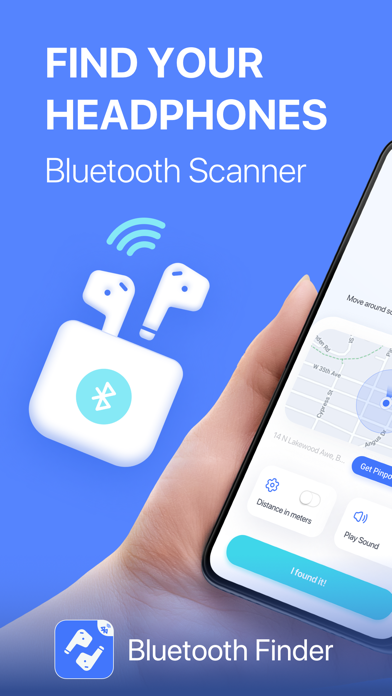
Can't find your Headphones or Bluetooth device? It happens all the time, but with our Bluetooth finder this will not bother you anymore! - Best Bluetooth scanner app in the App Store! - Don't spend hundreds of dollars replacing your lost headphones Main features of Bluetooth Finder: - Play sound on lost devices: You can play a sound to find lost devices easily. - Pinpoint any bluetooth device: The map shows you all devices nearby - Bluetooth Scanner: Detect the location of any Bluetooth Device nearby - Distance Score: Move around to see whether the strength increase. The higher the strength, the closer you are. Find my: Bluetooth Finder is quick and easy to use: 1. Scan with our Bluetooth Device finder (BLE Scanner) 2. Select the device you want to find 3. Move around so that the shown Distance Score increases. 4. Find your lost device! Benefits of Find my: Bluetooth Finder - Find your lost bluetooth devices like headphones in seconds - not days or hours - Extremely user friendly and easy to use. Technical knowledge of your devices not required! - Works indoors and outdoors. You can find your headphones anywhere! - Fantastic 24/7 mail support. Contact us if you need help! - Use this device finder any time you or your friends lose your headphones -- 24/7 MAIL SUPPORT -- If you have any problem or need help fast; please contact us on [email protected] before leaving negative reviews to App Store. We always reply to every email and provide a solution within 24 hours. We appreciate your feedback. Subscription and terms: Payment will be charged to the credit card connected to your iTunes Account when you confirm the initial subscription purchase. Subscriptions automatically renew unless auto-renew is turned off at least 24-hours before the end of the current subscription period. Your account will be charged for renewal within 24-hours prior to the end of the current period, and the cost of the renewal will be identified. You may manage your subscription and auto-renewal may be turned off by going to your Account Settings after the purchase. Any unused portion of a free trial period, if offered, will be forfeited when you purchase a subscription, where applicable. Read more about our terms and conditions here: Privacy Policy: https://airpodfinder.app/privacy-policy.html Terms of Use: https://airpodfinder.app/terms-conditions.html * AirPods, iPhone and iPad is a trademark of Apple Inc. * Find my: Bluetooth Finder is not intended to give you the exact location but will tell you the area where your headphones are hiding. * We're not affiliated or sponsored by any of the companies mentioned above. *Devices must be on and emitting Bluetooth to be found. The app can't find lost headphones in the case, or a case itself - it requires a Bluetooth signal.


