PC 용 VivuVideo Maker & Editor
- 카테고리: Photo & Video
- 최근 업데이트: 2023-05-17
- 현재 버전: 2.4
- 파일 크기: 63.95 MB
- 개발자: Cao Hoang
- 호환성: 필요 Windows XP, Windows Vista, Windows 7, Windows 8, Windows 8.1 and Windows 10, Windows 11


PC에서 VivuVideo Maker & Editor 용 호환 APK 다운로드
| 다운로드 | 개발자 | 평점 | 점수 | 현재 버전 | 성인 랭킹 |
|---|---|---|---|---|---|
| ↓ PC용 APK 다운로드 | Cao Hoang | 4 | 2.75 | 2.4 | 4+ |
에뮬레이터의 중요성은 컴퓨터에서 안드로이드 환경을 흉내 내고 안드로이드 폰을 구입하지 않고도 안드로이드 앱을 설치하고 실행하는 것을 매우 쉽게 만들어주는 것입니다. 누가 당신이 두 세계를 즐길 수 없다고 말합니까? 우선 아래에있는 에뮬레이터 앱을 다운로드 할 수 있습니다.
A. Nox App . OR
B. Bluestacks App .
Bluestacks는 매우 대중적이므로 개인적으로 "B"옵션을 사용하는 것이 좋습니다. 문제가 발생하면 Google 또는 Naver.com에서 좋은 해결책을 찾을 수 있습니다.
Bluestacks.exe 또는 Nox.exe를 성공적으로 다운로드 한 경우 컴퓨터의 다운로드 폴더 또는 다운로드 한 파일을 일반적으로 저장하는 곳으로 이동하십시오.
찾으면 클릭하여 응용 프로그램을 설치하십시오. PC에서 설치 프로세스를 시작해야합니다.
다음을 클릭하여 EULA 라이센스 계약에 동의하십시오.
응용 프로그램을 설치하려면 화면 지시문을 따르십시오.
위 사항을 올바르게 수행하면 소프트웨어가 성공적으로 설치됩니다.
이제 설치 한 에뮬레이터 애플리케이션을 열고 검색 창을 찾으십시오. 지금 입력하십시오. - VivuVideo Maker & Editor 앱을 쉽게 볼 수 있습니다. 그것을 클릭하십시오. 응용 프로그램 창이 열리고 에뮬레이터 소프트웨어에 응용 프로그램이 표시됩니다. 설치 버튼을 누르면 응용 프로그램이 다운로드되기 시작합니다. 이제 우리는 모두 끝났습니다.
그런 다음 "모든 앱"아이콘이 표시됩니다.
클릭하면 설치된 모든 응용 프로그램이 포함 된 페이지로 이동합니다.
당신은 VivuVideo Maker & Editor 상. 그것을 클릭하고 응용 프로그램 사용을 시작하십시오.
Mac OS 에서 VivuVideo Maker & Editor 다운로드
| 다운로드 | 개발자 | 점수 | 현재 버전 | 성인 랭킹 |
|---|---|---|---|---|
| 무료 - Mac 에서 다운로드 | Cao Hoang | 2.75 |
2.4 | 4+ |
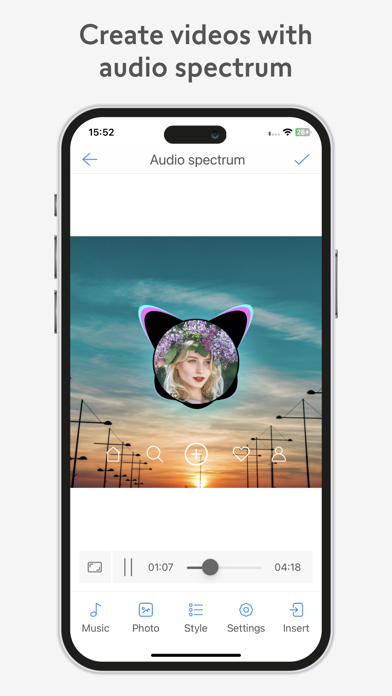
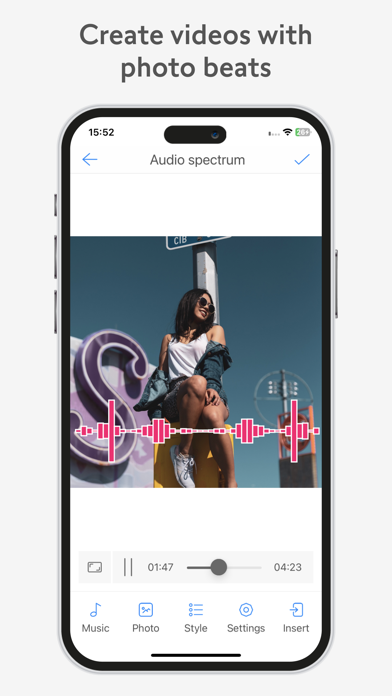
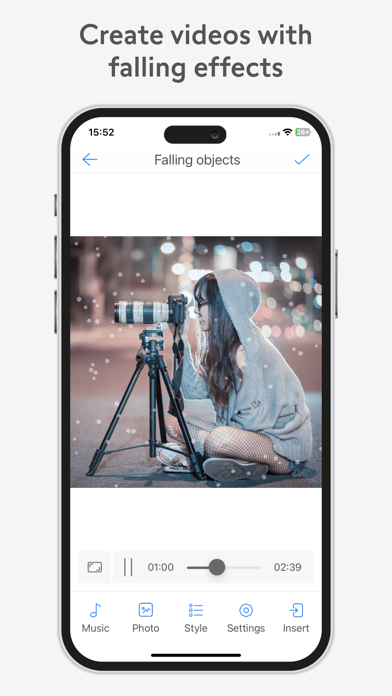
VivuVideo Maker & Editor is an application that creates videos from photos and music with limitless customization. This application is completely free and is constantly updated with new features. Choose a favorite music, a beautiful image and add some effects to create an amazing video as you like. With many video effects, beautifully displayed audio images and excellent sound quality, VivuVideo Maker & Editor is very suitable for creating videos for friends, lovers or creating EDM, Remix, Lofi, Chill music videos to share on social networks like YouTube, TikTok, Facebook Stories, etc. The main features of VivuVideo Maker & Editor include: - Create videos with a falling effect. - Create video with audio spectrum (music wave, audio visualization video maker). - Create photo beats with music videos. - Create videos with a timer. - Create videos with compact disc rotation effects. - Create videos with glitch images. - Create videos with progress bars. Video maker with drop effect: - Create videos from photos and music with beautiful drop effects. - Support falling snow, falling flowers, falling leaves, dropping hearts and many other effects. - There are more than 50 built-in falling objects for you to choose from. - Customize the size, speed and density of falling objects. - Objects can fall randomly or in a straight line. - Objects can fall from above or from many directions. Video maker with audio spectrum: - Create videos from images with a sound screen. - Create videos from music with a sound screen. - The screen will generate sound waves according to the frequency of the sound. - More than 20 beautiful sound screens have been integrated. - Symmetrical, circular and horizontal audio spectrum support. - Support rabbit ear wave, external or internal music wave. - Change image center and size for music waves. - Move music waves to many different locations. - Customize amp, wave thickness, color. - Advanced features: shake, bang, glitch, strobe, rotate. Make photo beats with music video: - Create a video with an image that beats according to the intensity of the sound. - Customize the level of hitting for photos (hit hard or light). - Change effects for images: black and white, blur, etc. - Advanced features: vibration, shock, flash, flying dust. Video maker with timer: - Create videos with the time of the song. - Support count types: count up, countdown. - Customize font, font color, font size, animation. - Make a copy of the clock with a mirror effect. Some other features: - Supports multiple video ratios: 1:1, 1:2, 2:1, 2:3, 3:2, 3:4, 4:3, 9:16, 16:9. - Change effects, brightness for video background images. - Background effects: shake, glitch, beat, flash. - The flying dust effect makes the video more vivid. - Insert text into video, support more than 100+ different fonts. - Insert text into multiple parts in the same video. - Insert photos into video. - Insert logo into video. - Insert stickers into videos. - Insert images into video. - Export video in 720p (HD) or 1080p (full HD) quality, which varies by device. - Video output up to 60 FPS (fps), varies by device. - Video is output with high quality and fast speed. - Easily manage and share created video cross-platform. - And many other features that cannot be fully listed here. You can use VivuVideo Maker & Editor to: - Create videos from photos. - Create videos from music. - Create videos from images. - Create remix music videos, EDM. - Create music videos Lofi, Chill... - Create videos with lyrics... - Create videos with many effects... - Create videos to share to YouTube. - Create videos to share with Tiktok. - Create videos to share on Facebook. - Create videos to share to Instagram. - Create videos to share on Twitter. Do you like VivuVideo Maker & Editor? Please leave your rating and suggestions, it will help us to make this app better in the next versions! Thank you!