PC 용 Bee Squared Beekeeping
- 카테고리: Utilities
- 최근 업데이트: 2024-01-25
- 현재 버전: 1.1.3
- 파일 크기: 24.73 MB
- 개발자: OmniChrome
- 호환성: 필요 Windows XP, Windows Vista, Windows 7, Windows 8, Windows 8.1 and Windows 10, Windows 11



PC에서 Bee Squared Beekeeping 용 호환 APK 다운로드
| 다운로드 | 개발자 | 평점 | 점수 | 현재 버전 | 성인 랭킹 |
|---|---|---|---|---|---|
| ↓ PC용 APK 다운로드 | OmniChrome | 0 | 0 | 1.1.3 | 4+ |
에뮬레이터의 중요성은 컴퓨터에서 안드로이드 환경을 흉내 내고 안드로이드 폰을 구입하지 않고도 안드로이드 앱을 설치하고 실행하는 것을 매우 쉽게 만들어주는 것입니다. 누가 당신이 두 세계를 즐길 수 없다고 말합니까? 우선 아래에있는 에뮬레이터 앱을 다운로드 할 수 있습니다.
A. Nox App . OR
B. Bluestacks App .
Bluestacks는 매우 대중적이므로 개인적으로 "B"옵션을 사용하는 것이 좋습니다. 문제가 발생하면 Google 또는 Naver.com에서 좋은 해결책을 찾을 수 있습니다.
Bluestacks.exe 또는 Nox.exe를 성공적으로 다운로드 한 경우 컴퓨터의 다운로드 폴더 또는 다운로드 한 파일을 일반적으로 저장하는 곳으로 이동하십시오.
찾으면 클릭하여 응용 프로그램을 설치하십시오. PC에서 설치 프로세스를 시작해야합니다.
다음을 클릭하여 EULA 라이센스 계약에 동의하십시오.
응용 프로그램을 설치하려면 화면 지시문을 따르십시오.
위 사항을 올바르게 수행하면 소프트웨어가 성공적으로 설치됩니다.
이제 설치 한 에뮬레이터 애플리케이션을 열고 검색 창을 찾으십시오. 지금 입력하십시오. - Bee Squared Beekeeping 앱을 쉽게 볼 수 있습니다. 그것을 클릭하십시오. 응용 프로그램 창이 열리고 에뮬레이터 소프트웨어에 응용 프로그램이 표시됩니다. 설치 버튼을 누르면 응용 프로그램이 다운로드되기 시작합니다. 이제 우리는 모두 끝났습니다.
그런 다음 "모든 앱"아이콘이 표시됩니다.
클릭하면 설치된 모든 응용 프로그램이 포함 된 페이지로 이동합니다.
당신은 Bee Squared Beekeeping 상. 그것을 클릭하고 응용 프로그램 사용을 시작하십시오.
Mac OS 에서 Bee Squared Beekeeping 다운로드
| 다운로드 | 개발자 | 점수 | 현재 버전 | 성인 랭킹 |
|---|---|---|---|---|
| 무료 - Mac 에서 다운로드 | OmniChrome | 0 |
1.1.3 | 4+ |
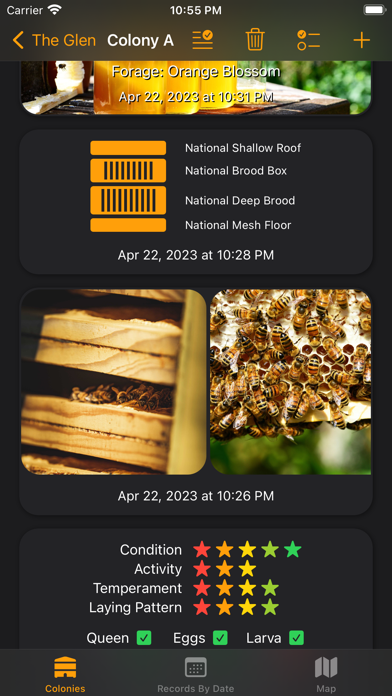
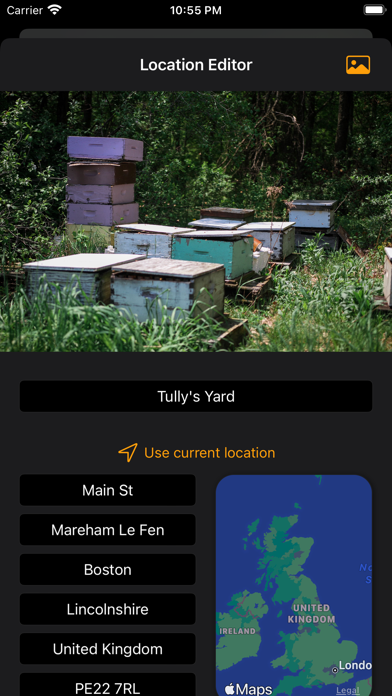
From the makers of the best selling BeePlus comes Bee Squared, an advanced beekeeping app for the modern beekeeper. Designed from the ground up to be powerful yet easy to use, let Bee² improve your record keeping, colony management and ultimately, the health and productivity of your hives. Main features at a glance • Unlimited hives & apiaries • Automatically sync data between devices • Perform inspections • Log honey harvests • Record feedings • Add photos • Monitor problems and treatments • Pin hives on map • QR codes for quick hive ID • iCloud backup • Plan tasks • Manage equipment • Log individual frames • Track consumables • Document products sold • Oversee finances • PDF hive reports By beekeepers, for beekeepers. Multiple record types for inspections, feedings, harvests and more so you can record the information you need. Add photos for a visual record too and have them stored within Bee² so they don't clutter up your Photos app. Auto sync records between devices associated with your Apple ID. Input data on your iPhone while at the apiary and have it sync automatically to your iPad and Mac with Apple silicon for later review or further editing. You can still input data if you have no connection and Bee² will sync when next online. Track colony splits or combine colonies together. Should the worst happen you can also track a colony perishing. Archived colonies retain their equipment records but as they are no longer in use allow them to be reassigned to where needed. Advanced inventory management. Equipment inventory to keep track of exactly where your hive components are being used so you always know what you have available. Consumables section to track items that get used up over time like sugar syrup, fondant or mite treatments etc. Add consumables to colony records to follow exactly when and where they were used and if you're running out. List the products your bees have kindly made for you and record sales. Add honey from a harvest for provenance or consumables like glass jars to see your costs. Add equipment, consumables and products to finance records to track sales and purchases. Existing BeePlus users. If you are a BeePlus user you can import their hives without manually adding all the details, simply export a transfer file from BeePlus and import to Bee², locations, hives and swarm traps will be automatically added. Inspections and other data are not compatible yet and won’t be imported. We think Bee² is great, and we're confident you will too so you can download and try Bee² for 3 months for free! After the free trial a subscription is required to create new records. We really hope you'll never want to, but if for some reason you do ever cancel your subscription you will still retain full access to your all data. End user license agreement (EULA) - https://www.apple.com/legal/internet-services/itunes/dev/stdeula/ Download Bee² now and experience the future of beekeeping.