
PC 용 Retouch: AI Object Remover
- 카테고리: Photo & Video
- 최근 업데이트: 2026-08-29
- 현재 버전: 5.4
- 파일 크기: 74.61 MB
- 개발자: Anthony Durbin
- 호환성: 필요 Windows XP, Windows Vista, Windows 7, Windows 8, Windows 8.1 and Windows 10, Windows 11




PC에서 Retouch: AI Object Remover 용 호환 APK 다운로드
| 다운로드 | 개발자 | 평점 | 점수 | 현재 버전 | 성인 랭킹 |
|---|---|---|---|---|---|
| ↓ PC용 APK 다운로드 | Anthony Durbin | 26 | 4.76923 | 5.4 | 4+ |
에뮬레이터의 중요성은 컴퓨터에서 안드로이드 환경을 흉내 내고 안드로이드 폰을 구입하지 않고도 안드로이드 앱을 설치하고 실행하는 것을 매우 쉽게 만들어주는 것입니다. 누가 당신이 두 세계를 즐길 수 없다고 말합니까? 우선 아래에있는 에뮬레이터 앱을 다운로드 할 수 있습니다.
A. Nox App . OR
B. Bluestacks App .
Bluestacks는 매우 대중적이므로 개인적으로 "B"옵션을 사용하는 것이 좋습니다. 문제가 발생하면 Google 또는 Naver.com에서 좋은 해결책을 찾을 수 있습니다.
Bluestacks.exe 또는 Nox.exe를 성공적으로 다운로드 한 경우 컴퓨터의 다운로드 폴더 또는 다운로드 한 파일을 일반적으로 저장하는 곳으로 이동하십시오.
찾으면 클릭하여 응용 프로그램을 설치하십시오. PC에서 설치 프로세스를 시작해야합니다.
다음을 클릭하여 EULA 라이센스 계약에 동의하십시오.
응용 프로그램을 설치하려면 화면 지시문을 따르십시오.
위 사항을 올바르게 수행하면 소프트웨어가 성공적으로 설치됩니다.
이제 설치 한 에뮬레이터 애플리케이션을 열고 검색 창을 찾으십시오. 지금 입력하십시오. - Retouch: AI Object Remover 앱을 쉽게 볼 수 있습니다. 그것을 클릭하십시오. 응용 프로그램 창이 열리고 에뮬레이터 소프트웨어에 응용 프로그램이 표시됩니다. 설치 버튼을 누르면 응용 프로그램이 다운로드되기 시작합니다. 이제 우리는 모두 끝났습니다.
그런 다음 "모든 앱"아이콘이 표시됩니다.
클릭하면 설치된 모든 응용 프로그램이 포함 된 페이지로 이동합니다.
당신은 Retouch: AI Object Remover 상. 그것을 클릭하고 응용 프로그램 사용을 시작하십시오.
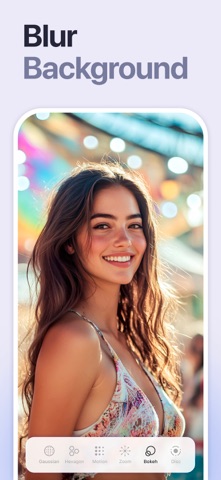
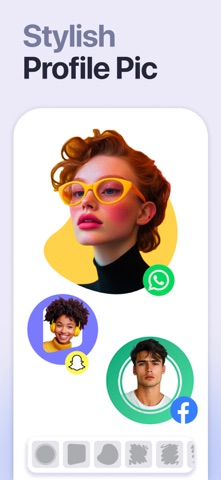
Remove objects & people from photos easily with this ai retouch app. Erase backgrounds of a photo and save as transparent with just one tap. Fix your blemishes also with advanced one-tap-retouch feature. Features Remove Object: Tap or brush away tourists, wires, or stains. Quick Mode erases with AI; Brush & Lasso gives precise control. Clone Stamp: Sample any clean patch and paint over distractions. Edge-aware blending matches texture, light, and perspective. AI Retouch: One swipe zaps blemishes, smooths skin, sharpens eyes, adds a natural glow, and whitens teeth while preserving pores. Replace Background: Auto-cut subjects and drop them onto built-in scenes, your own images, or transparent PNGs for pro-grade product shots. Background Blur: Pop subjects with DSLR-style depth—Gaussian, Motion, Bokeh, Hexagon, Disc, and more—and adjust focus and strength in real time. Photo Overlay & Double Exposure: Layer textures, designer frames, or a second image, then fine-tune opacity and blend modes for instant magazine vibes. Stylish Portrait: Soft-focus backgrounds, polish facial details, and apply studio color toning for a cover-ready finish. Sky Changer: Auto-detect the horizon and swap gray skies for golden sunsets, auroras, or storm clouds with natural color matching and crisp edges. Photo Blending: AI isolates your subject and fuses it with artistic overlays; refine with manual brush and eraser for cinematic double exposures. Dripping Portrait: Melt edges into flowing paint drips; pick preset shapes or draw your own, then adjust length, direction, and gradients. Spiral Effects: Wrap subjects in neon coils, glitter ribbons, or dotted trails. Tweak thickness, color, and rotation for instant 3-D pop. This app includes advertisement. To enjoy ad free experience and using all premium contents, we are offering a Premium subscription package. Retouch Premium Subscription information • Subscription Length: Weekly, Monthly. • Your payment will be charged to your Apple account as soon as you confirm your purchase. • You can manage your subscriptions and turn off auto-renewal from your Account Settings after the purchase. • Your subscription will renew automatically unless you turn off auto-renew at least 24 hours before the end of the current period. • The cost of renewal will be charged to your account 24 hours before the end of the current period. • When canceling a subscription, your subscription will stay active until the end of the period. Auto-renewal will be disabled, but the current subscription will not be refunded. • Any unused portion of a free trial period, if offered, will be forfeited when purchasing a subscription. Privacy policy: https://sites.google.com/view/anthonydurbins/privacy Terms of service: https://sites.google.com/view/anthonydurbins/terms Contact for support, reporting bug or improvement suggestions email: [email protected] You may also contact our support team through the app’s settings screen.


