
PC 용 EMF Analytics
- 카테고리: Utilities
- 최근 업데이트: 2022-06-11
- 현재 버전: 1.4
- 파일 크기: 28.39 MB
- 개발자: SpiritShack Ltd
- 호환성: 필요 Windows XP, Windows Vista, Windows 7, Windows 8, Windows 8.1 and Windows 10, Windows 11

PC에서 EMF Analytics 용 호환 APK 다운로드
| 다운로드 | 개발자 | 평점 | 점수 | 현재 버전 | 성인 랭킹 |
|---|---|---|---|---|---|
| ↓ PC용 APK 다운로드 | SpiritShack Ltd | 4 | 5 | 1.4 | 4+ |
에뮬레이터의 중요성은 컴퓨터에서 안드로이드 환경을 흉내 내고 안드로이드 폰을 구입하지 않고도 안드로이드 앱을 설치하고 실행하는 것을 매우 쉽게 만들어주는 것입니다. 누가 당신이 두 세계를 즐길 수 없다고 말합니까? 우선 아래에있는 에뮬레이터 앱을 다운로드 할 수 있습니다.
A. Nox App . OR
B. Bluestacks App .
Bluestacks는 매우 대중적이므로 개인적으로 "B"옵션을 사용하는 것이 좋습니다. 문제가 발생하면 Google 또는 Naver.com에서 좋은 해결책을 찾을 수 있습니다.
Bluestacks.exe 또는 Nox.exe를 성공적으로 다운로드 한 경우 컴퓨터의 다운로드 폴더 또는 다운로드 한 파일을 일반적으로 저장하는 곳으로 이동하십시오.
찾으면 클릭하여 응용 프로그램을 설치하십시오. PC에서 설치 프로세스를 시작해야합니다.
다음을 클릭하여 EULA 라이센스 계약에 동의하십시오.
응용 프로그램을 설치하려면 화면 지시문을 따르십시오.
위 사항을 올바르게 수행하면 소프트웨어가 성공적으로 설치됩니다.
이제 설치 한 에뮬레이터 애플리케이션을 열고 검색 창을 찾으십시오. 지금 입력하십시오. - EMF Analytics 앱을 쉽게 볼 수 있습니다. 그것을 클릭하십시오. 응용 프로그램 창이 열리고 에뮬레이터 소프트웨어에 응용 프로그램이 표시됩니다. 설치 버튼을 누르면 응용 프로그램이 다운로드되기 시작합니다. 이제 우리는 모두 끝났습니다.
그런 다음 "모든 앱"아이콘이 표시됩니다.
클릭하면 설치된 모든 응용 프로그램이 포함 된 페이지로 이동합니다.
당신은 EMF Analytics 상. 그것을 클릭하고 응용 프로그램 사용을 시작하십시오.
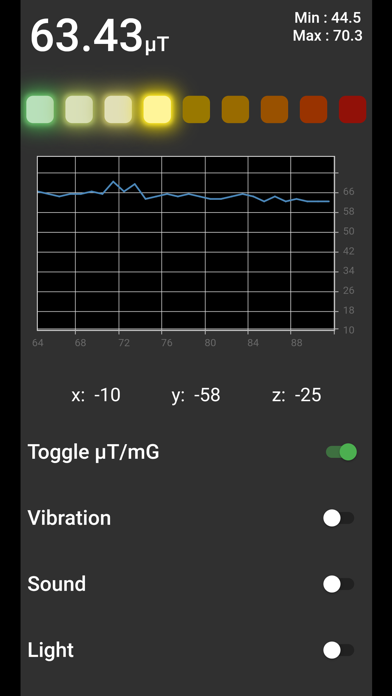
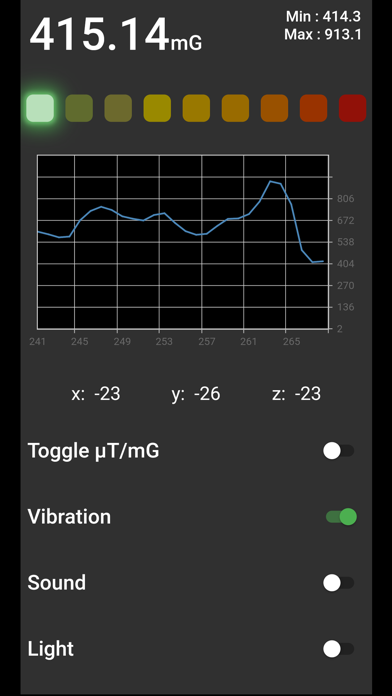
A simple yet effective EMF detector! The detector is as ACCURATE as the sensor of your device. You can use this simple application to detect EMF (Electromagnetic Fields). Which is given off by many electrical devices, power cables and even ghosts! Its suitable for paranormal investigators. And for detecting dangerous levels of EMF within your environment. Our EMF Analytics app offers more functionality and sensory data than most competitive apps. The live EMF reading is shown, as well as previous readings with the timelapse graph. You can switch between Mirotesla (uT) and Milligauss (mG) measurement units. The minimum and maximum readings or also kept on screen throughout your session on the app. The large bright LED's with different colours will show the strength level of the EMF. Sound and vibrations can be turned on and off so you don't miss any spikes. We have included a light option to turn your devices flashlight on and off. Which is ideal for paranormal investigations who wish to ghost hunt in the dark. X, Y, Z readings also help show the axis on which the strongest readings are being detected. Features - Current EMF reading displayed - Previous EMF readings are shown on the graph - The minimum and maximum readings are displayed - Toggle for Mirotesla (uT) and Milligauss (mG) - Flashlight can be turned on and off - Large coloured lights show EMF reading strength - Sound and vibration can be turned on and off - Screen will not lock whilst in use - Well-presented UI - X,Y,Z axis displayed This app uses the built-in magnetic sensor (compass) inside your device. And displays the live reading with a line of coloured LEDs, giving you a clear view of EMF levels. You can switch between units of measurement Mirotesla (uT) and Milligauss (mG) quickly and easily with a toggle button. You can use this application to quickly measure and magnetism and electromagnetism, earths geomagnetic field, ghosts and electrical devices. It can be used as a detector for EMF, magnets, metals, ghosts and paranormal entities. IMPORTANT: This app uses your devices built in magnetic sensor. If your phone or device does not have this sensor, the app will not display any measurements. If the readings are 0, it means that this app is not able to work on your device. Please avoid placing your phone near high voltage electrical devices like transformers, as you may damage it. Use the app at your own risk.


