
PC 용 Lono: Reels Maker & Pic Editor
- 카테고리: Photo & Video
- 최근 업데이트: 2026-10-30
- 현재 버전: 5.6.2
- 파일 크기: 484.97 MB
- 개발자: BLANK CANVAS DESIGNS PRIVATE LIMITED
- 호환성: 필요 Windows XP, Windows Vista, Windows 7, Windows 8, Windows 8.1 and Windows 10, Windows 11


PC에서 Lono: Reels Maker & Pic Editor 용 호환 APK 다운로드
| 다운로드 | 개발자 | 평점 | 점수 | 현재 버전 | 성인 랭킹 |
|---|---|---|---|---|---|
| ↓ PC용 APK 다운로드 | BLANK CANVAS DESIGNS PRIVATE LIMITED | 3 | 5 | 5.6.2 | 4+ |
에뮬레이터의 중요성은 컴퓨터에서 안드로이드 환경을 흉내 내고 안드로이드 폰을 구입하지 않고도 안드로이드 앱을 설치하고 실행하는 것을 매우 쉽게 만들어주는 것입니다. 누가 당신이 두 세계를 즐길 수 없다고 말합니까? 우선 아래에있는 에뮬레이터 앱을 다운로드 할 수 있습니다.
A. Nox App . OR
B. Bluestacks App .
Bluestacks는 매우 대중적이므로 개인적으로 "B"옵션을 사용하는 것이 좋습니다. 문제가 발생하면 Google 또는 Naver.com에서 좋은 해결책을 찾을 수 있습니다.
Bluestacks.exe 또는 Nox.exe를 성공적으로 다운로드 한 경우 컴퓨터의 다운로드 폴더 또는 다운로드 한 파일을 일반적으로 저장하는 곳으로 이동하십시오.
찾으면 클릭하여 응용 프로그램을 설치하십시오. PC에서 설치 프로세스를 시작해야합니다.
다음을 클릭하여 EULA 라이센스 계약에 동의하십시오.
응용 프로그램을 설치하려면 화면 지시문을 따르십시오.
위 사항을 올바르게 수행하면 소프트웨어가 성공적으로 설치됩니다.
이제 설치 한 에뮬레이터 애플리케이션을 열고 검색 창을 찾으십시오. 지금 입력하십시오. - Lono: Reels Maker & Pic Editor 앱을 쉽게 볼 수 있습니다. 그것을 클릭하십시오. 응용 프로그램 창이 열리고 에뮬레이터 소프트웨어에 응용 프로그램이 표시됩니다. 설치 버튼을 누르면 응용 프로그램이 다운로드되기 시작합니다. 이제 우리는 모두 끝났습니다.
그런 다음 "모든 앱"아이콘이 표시됩니다.
클릭하면 설치된 모든 응용 프로그램이 포함 된 페이지로 이동합니다.
당신은 Lono: Reels Maker & Pic Editor 상. 그것을 클릭하고 응용 프로그램 사용을 시작하십시오.
Mac OS 에서 Lono 다운로드
| 다운로드 | 개발자 | 점수 | 현재 버전 | 성인 랭킹 |
|---|---|---|---|---|
| 무료 - Mac 에서 다운로드 | BLANK CANVAS DESIGNS PRIVATE LIMITED | 5 |
5.6.2 | 4+ |
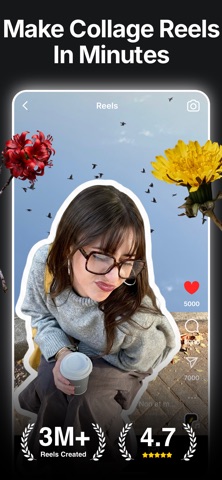
Create viral content for TikTok and Instagram in seconds with Lono. Lono removes the complexity of video editing, allowing you to generate professional-quality Reels and photo collages with a single tap. AI REELS AND TIKTOK CREATION - One-Tap Sync: Turn up to 20 photos into a synchronized video that matches the latest trending audio automatically. - AI Cutout Effects: Generate high-depth visuals by layering subjects and removing backgrounds instantly. - Batch Processing: Apply your favorite edits and filters across multiple clips or photos simultaneously to maintain a cohesive aesthetic. - Time-Saving Templates: Access a library of pre-made layouts designed specifically for rapid social media growth. ADVANCED COLLAGE AND STORY DESIGN - Text Behind Image: Use AI to automatically place typography behind subjects for a professional, layered look with zero manual masking. - Smart Grid Layouts: Select your media and let the AI find the optimal arrangement for your frame. - Dynamic Story Templates: Access a library of pre-designed layouts specifically optimized for Instagram Stories and TikTok. - Scroll-Stopping Graphics: Utilize design tools that turn static images into high-engagement social assets. QUICK VIDEO CLIP EDITING - Precision Cutter: Trim, split, and rearrange your video clips with an intuitive timeline designed for mobile efficiency. - Speed Control: Adjust the tempo of your videos with smooth slow-motion or fast-forward effects to highlight key moments. - Seamless Transitions: Connect your clips with professional-grade transitions that keep your audience engaged. -Clip Synchronization: Align your video segments perfectly with your chosen soundtrack for a polished, high-end feel. - High-Resolution Export: Save your edited clips in high definition, optimized for instant sharing to social platforms. PROFESSIONAL PRESETS AND FILTERS - 200+ Premium Looks: Transform your content with curated presets including 35mm film, Polaroid, Vintage, and Minimalist styles. - Efficient Workflow: Copy and paste editing settings between assets to save time and ensure visual consistency across your feed. - High-Fidelity Results: Achieve a professional aesthetic without needing advanced photography or editing skills. - Diverse Categories: Choose from Wedding, Boho, 35mm, and Retro film styles to match any mood or brand. INTEGRATED EDITING SUITE - Automatic Background Removal: Separate layers with precision using advanced AI segmentation for creative collage effects. - Manual Adjustments: Fine-tune your edits with granular controls for HSL, Gamma, Highlights, and Shadows. - Trending Assets: Stay ahead of social media trends with weekly updates to templates and preset collections. - User-Centric Interface: Navigate a streamlined workflow designed for both beginners and experienced creators. LONO PREMIUM Elevate your content with Lono Premium. Subscription includes unlimited access to all AI Reel templates, professional presets, and exclusive new feature releases. Terms of use: https://raveensasidharan.github.io/lono_privacy_policy.html Privacy policy: https://raveensasidharan.github.io/lono_terms_of_service.html Support and Feedback: [email protected]


