PC 용 Easy Release - Model Releases
- 카테고리: Photo & Video
- 최근 업데이트: 2023-11-27
- 현재 버전: 3.8.231127
- 파일 크기: 25.62 MB
- 개발자: ApplicationGap LLC
- 호환성: 필요 Windows XP, Windows Vista, Windows 7, Windows 8, Windows 8.1 and Windows 10, Windows 11


PC에서 Easy Release - Model Releases 용 호환 APK 다운로드
| 다운로드 | 개발자 | 평점 | 점수 | 현재 버전 | 성인 랭킹 |
|---|---|---|---|---|---|
| ↓ PC용 APK 다운로드 | ApplicationGap LLC | 4 | 4 | 3.8.231127 | 4+ |
에뮬레이터의 중요성은 컴퓨터에서 안드로이드 환경을 흉내 내고 안드로이드 폰을 구입하지 않고도 안드로이드 앱을 설치하고 실행하는 것을 매우 쉽게 만들어주는 것입니다. 누가 당신이 두 세계를 즐길 수 없다고 말합니까? 우선 아래에있는 에뮬레이터 앱을 다운로드 할 수 있습니다.
A. Nox App . OR
B. Bluestacks App .
Bluestacks는 매우 대중적이므로 개인적으로 "B"옵션을 사용하는 것이 좋습니다. 문제가 발생하면 Google 또는 Naver.com에서 좋은 해결책을 찾을 수 있습니다.
Bluestacks.exe 또는 Nox.exe를 성공적으로 다운로드 한 경우 컴퓨터의 다운로드 폴더 또는 다운로드 한 파일을 일반적으로 저장하는 곳으로 이동하십시오.
찾으면 클릭하여 응용 프로그램을 설치하십시오. PC에서 설치 프로세스를 시작해야합니다.
다음을 클릭하여 EULA 라이센스 계약에 동의하십시오.
응용 프로그램을 설치하려면 화면 지시문을 따르십시오.
위 사항을 올바르게 수행하면 소프트웨어가 성공적으로 설치됩니다.
이제 설치 한 에뮬레이터 애플리케이션을 열고 검색 창을 찾으십시오. 지금 입력하십시오. - Easy Release - Model Releases 앱을 쉽게 볼 수 있습니다. 그것을 클릭하십시오. 응용 프로그램 창이 열리고 에뮬레이터 소프트웨어에 응용 프로그램이 표시됩니다. 설치 버튼을 누르면 응용 프로그램이 다운로드되기 시작합니다. 이제 우리는 모두 끝났습니다.
그런 다음 "모든 앱"아이콘이 표시됩니다.
클릭하면 설치된 모든 응용 프로그램이 포함 된 페이지로 이동합니다.
당신은 Easy Release - Model Releases 상. 그것을 클릭하고 응용 프로그램 사용을 시작하십시오.
Mac OS 에서 Easy Release 다운로드
| 다운로드 | 개발자 | 점수 | 현재 버전 | 성인 랭킹 |
|---|---|---|---|---|
| ₩12,000 - Mac 에서 다운로드 | ApplicationGap LLC | 4 |
3.8.231127 | 4+ |
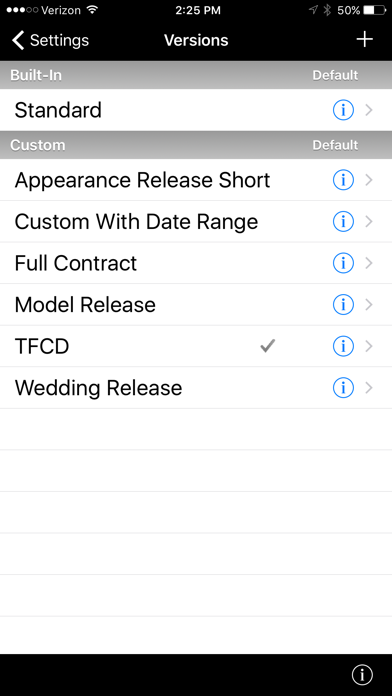
► NEW: Auto-Save PDF to Dropbox and/or Google Drive and/or OneDrive ◄ ► Multi-Page Releases - New In-App Purchase option allows user defined custom release legal text to span multiple pages of a PDF instead of being limited to a single page. ◄ Easy Release by ApplicationGap replaces inconvenient paper model release and property release forms with a slick, streamlined application designed by professional photographers for professional photographers. Fully supports iPad, iPhone and iPod-Touch. ►► Approved for use by Getty Images, iStockPhoto, Alamy, and Shutterstock among many others! ► Lets you collect all the data and signatures you need right on your iPhone, then mails a PDF and JPEG of the release right to you. ► Import model and witness information from your contacts. Get location data from a list of previously used. ► Comes pre-bundled with industry standard model and property releases in 13 languages that are currently in use by leading photo agencies like Getty Images, Alamy and others. ► Use the iPhone, iPad, or iPod-Touch camera to shoot and embed an ID photo right into the release PDF. ► Customizable “branding header” for logo image, company name, and contact info can be turned on/off per release or release type. ► Add your own TFCD, TFP, or any other kind of releases! ► Add as many custom model and property versions as you want. ► Custom releases may contain "field-placeholders" for inserting data into the body of your legal text. Simply prepare your custom releases in an email to yourself then copy/paste into Easy Release! ► Select legal text version to use on a per-release basis. ► For each release, you may specify an optional "Addendum" to legal text which prints below your text. ► User Interface Languages: Swedish, French, German, Spanish, Italian, Japanese ► Release languages included: English, French, Spanish, Italian, German, Swedish, Russian, Polish, Chinese (simplified and Taiwan), Portuguese (Brazilian and European), Japanese, Dutch, Norwegian, Finnish. ------------------------------------ ● OPTIONAL IN-APP PURCHASE ● ● Advanced Customization Pro-Pack ● The Advanced Customization Pro-Pack brings additional professional customization features to Easy Release. ► Multiple Brands You can define more than one brand, and easily select the brand you want on a per-template and per-release basis. ► Optional Fields You can turn off some of the old built-in fields, and/or turn on some new built-in fields. - You can choose to turn off Witness, Gender and/or Ethnicity. - You can turn on Shoot End Date, which allows your release to cover a range of dates, rather than just a single day. - You can turn on Other Names. This adds two fields to your release: Stage Name and All Other Names. Use this to help collect required 2257 information for your models and performers. - You can turn on Compensation. This adds two fields to your release: Amount and Tax ID. ► Custom Fields If the built-in fields are not enough, you can now add custom fields. - As many as you want - Three types: Text, Long Text, and Date - Specify a label and default value for each one - You can mark any custom field as 'required' ► Import/Export Custom Versions Share custom templates via email. Recipients just click on the link in the email to import your template.


