PC 용 Progressive Alarm Clock
- 카테고리: Health & Fitness
- 최근 업데이트: 2016-11-19
- 현재 버전: 5.2.1
- 파일 크기: 46.21 MB
- 개발자: Spotlight Six Software LLC
- 호환성: 필요 Windows XP, Windows Vista, Windows 7, Windows 8, Windows 8.1 and Windows 10, Windows 11

PC에서 Progressive Alarm Clock 용 호환 APK 다운로드
| 다운로드 | 개발자 | 평점 | 점수 | 현재 버전 | 성인 랭킹 |
|---|---|---|---|---|---|
| ↓ PC용 APK 다운로드 | Spotlight Six Software LLC | 1 | 4 | 5.2.1 | 4+ |
호환되는 PC 앱 또는 대안 확인
| 소프트웨어 | 다운로드 | 평점 | 개발자 |
|---|---|---|---|
| Progressive Alarm Clock |
PC 앱 받기 | 4/5 1 리뷰 4 |
Spotlight Six Software LLC |
에뮬레이터의 중요성은 컴퓨터에서 안드로이드 환경을 흉내 내고 안드로이드 폰을 구입하지 않고도 안드로이드 앱을 설치하고 실행하는 것을 매우 쉽게 만들어주는 것입니다. 누가 당신이 두 세계를 즐길 수 없다고 말합니까? 우선 아래에있는 에뮬레이터 앱을 다운로드 할 수 있습니다.
A. Nox App . OR
B. Bluestacks App .
Bluestacks는 매우 대중적이므로 개인적으로 "B"옵션을 사용하는 것이 좋습니다. 문제가 발생하면 Google 또는 Naver.com에서 좋은 해결책을 찾을 수 있습니다.
Bluestacks.exe 또는 Nox.exe를 성공적으로 다운로드 한 경우 컴퓨터의 다운로드 폴더 또는 다운로드 한 파일을 일반적으로 저장하는 곳으로 이동하십시오.
찾으면 클릭하여 응용 프로그램을 설치하십시오. PC에서 설치 프로세스를 시작해야합니다.
다음을 클릭하여 EULA 라이센스 계약에 동의하십시오.
응용 프로그램을 설치하려면 화면 지시문을 따르십시오.
위 사항을 올바르게 수행하면 소프트웨어가 성공적으로 설치됩니다.
이제 설치 한 에뮬레이터 애플리케이션을 열고 검색 창을 찾으십시오. 지금 입력하십시오. - Progressive Alarm Clock 앱을 쉽게 볼 수 있습니다. 그것을 클릭하십시오. 응용 프로그램 창이 열리고 에뮬레이터 소프트웨어에 응용 프로그램이 표시됩니다. 설치 버튼을 누르면 응용 프로그램이 다운로드되기 시작합니다. 이제 우리는 모두 끝났습니다.
그런 다음 "모든 앱"아이콘이 표시됩니다.
클릭하면 설치된 모든 응용 프로그램이 포함 된 페이지로 이동합니다.
당신은 Progressive Alarm Clock 상. 그것을 클릭하고 응용 프로그램 사용을 시작하십시오.
Mac OS 에서 Progressive Alarm Clock 다운로드
| 다운로드 | 개발자 | 점수 | 현재 버전 | 성인 랭킹 |
|---|---|---|---|---|
| ₩1,200 - Mac 에서 다운로드 | Spotlight Six Software LLC | 4 |
5.2.1 | 4+ |
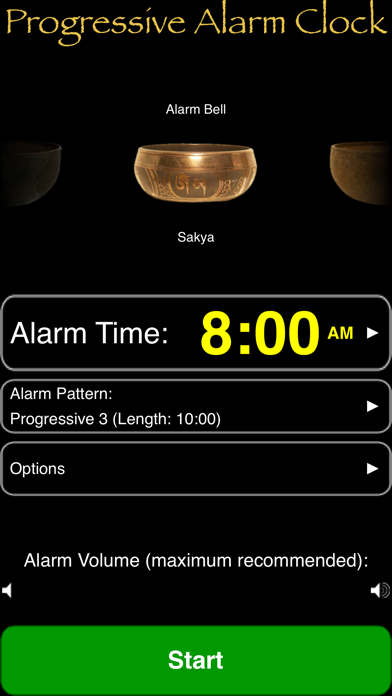
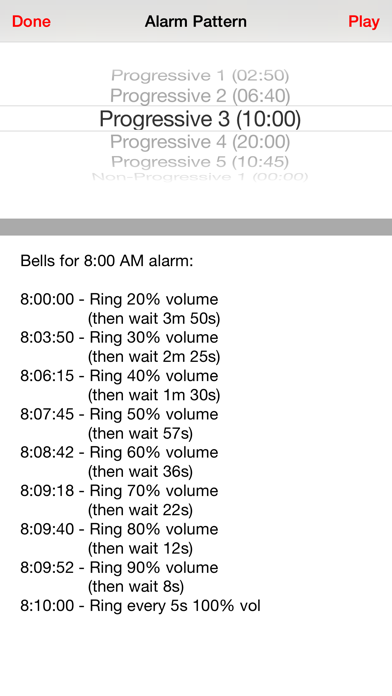
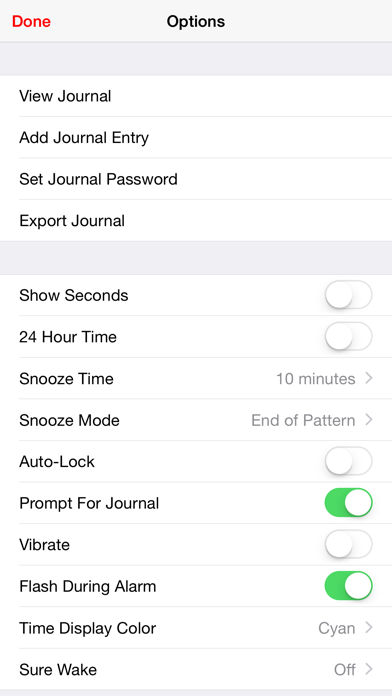
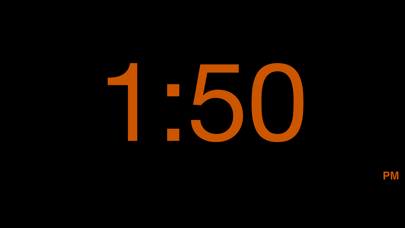
Progressive Alarm Clock will wake you up gently and gradually using the beautiful sounds of the Tibetan singing bowl. At the specified alarm time, the bells will begin to ring in a pre-defined pattern - starting out softly and slowly and gradually getting louder and more frequent. You'll come out of your slumber slowly and peacefully. No more being jolted awake. + After setting the alarm, the app can be put in the background - allowing you to use other apps. At the specified alarm time, the alarm pattern will begin. + Choose from five pre-defined patterns with varying bell schedules and escalation lengths. + Choose from six different bells of varying size and metal compositions - from bright and clean to deep and complex with lovely overtones. + You may enter journal notes upon awakening - great for recording your dreams before the memory fades. You can then go back and review your journal entries and you may export the journal via email. For privacy, you may set a password to prevent unauthorized access. + To save battery, you may lock your device's screen and the alarm will still work. Either start the alarm and press the lock (sleep) button, or turn on the "Auto-Lock" setting. + This app uses the same amazing bell sounds used in our Insight Timer meditation timer. Here are some app store comments pertaining to the bells: "Best sounding bells of any meditation app so far" - sibergrrl "The bell samples in this app are gorgeous" - LairBob "Several different bell sounds to choose from and they all feel 'live'" - VaderPi "Great Sound Quality" - KarlAgathon "The tones are stunning" - hellsleeve "Beautiful bell sounds" - Wolf94114 "Wonderful digital bell sounds" - zenji "The bell sounds are lovely" - pngwen Other Features: - Snooze from 1 minute to 30 minutes - Sure Wake: Optional LOUD backup sound - Seven colors available for time display - Optionally keep phone from sleeping - Huge landscape time display - App works even when phone is sleeping (locked)