PC 용 TimeClock Connect: Track Hours
- 카테고리: Business
- 최근 업데이트: 2020-03-30
- 현재 버전: 3.7.3
- 파일 크기: 10.53 MB
- 개발자: Spotlight Six Software LLC
- 호환성: 필요 Windows XP, Windows Vista, Windows 7, Windows 8, Windows 8.1 and Windows 10, Windows 11




PC에서 TimeClock Connect: Track Hours 용 호환 APK 다운로드
| 다운로드 | 개발자 | 평점 | 점수 | 현재 버전 | 성인 랭킹 |
|---|---|---|---|---|---|
| ↓ PC용 APK 다운로드 | Spotlight Six Software LLC | 0 | 0 | 3.7.3 | 4+ |
호환되는 PC 앱 또는 대안 확인
| 소프트웨어 | 다운로드 | 평점 | 개발자 |
|---|---|---|---|
| TimeClock Connect |
PC 앱 받기 | 0/5 0 리뷰 0 |
Spotlight Six Software LLC |
에뮬레이터의 중요성은 컴퓨터에서 안드로이드 환경을 흉내 내고 안드로이드 폰을 구입하지 않고도 안드로이드 앱을 설치하고 실행하는 것을 매우 쉽게 만들어주는 것입니다. 누가 당신이 두 세계를 즐길 수 없다고 말합니까? 우선 아래에있는 에뮬레이터 앱을 다운로드 할 수 있습니다.
A. Nox App . OR
B. Bluestacks App .
Bluestacks는 매우 대중적이므로 개인적으로 "B"옵션을 사용하는 것이 좋습니다. 문제가 발생하면 Google 또는 Naver.com에서 좋은 해결책을 찾을 수 있습니다.
Bluestacks.exe 또는 Nox.exe를 성공적으로 다운로드 한 경우 컴퓨터의 다운로드 폴더 또는 다운로드 한 파일을 일반적으로 저장하는 곳으로 이동하십시오.
찾으면 클릭하여 응용 프로그램을 설치하십시오. PC에서 설치 프로세스를 시작해야합니다.
다음을 클릭하여 EULA 라이센스 계약에 동의하십시오.
응용 프로그램을 설치하려면 화면 지시문을 따르십시오.
위 사항을 올바르게 수행하면 소프트웨어가 성공적으로 설치됩니다.
이제 설치 한 에뮬레이터 애플리케이션을 열고 검색 창을 찾으십시오. 지금 입력하십시오. - TimeClock Connect: Track Hours 앱을 쉽게 볼 수 있습니다. 그것을 클릭하십시오. 응용 프로그램 창이 열리고 에뮬레이터 소프트웨어에 응용 프로그램이 표시됩니다. 설치 버튼을 누르면 응용 프로그램이 다운로드되기 시작합니다. 이제 우리는 모두 끝났습니다.
그런 다음 "모든 앱"아이콘이 표시됩니다.
클릭하면 설치된 모든 응용 프로그램이 포함 된 페이지로 이동합니다.
당신은 TimeClock Connect: Track Hours 상. 그것을 클릭하고 응용 프로그램 사용을 시작하십시오.
Mac OS 에서 TimeClock Connect 다운로드
| 다운로드 | 개발자 | 점수 | 현재 버전 | 성인 랭킹 |
|---|---|---|---|---|
| 무료 - Mac 에서 다운로드 | Spotlight Six Software LLC | 0 |
3.7.3 | 4+ |
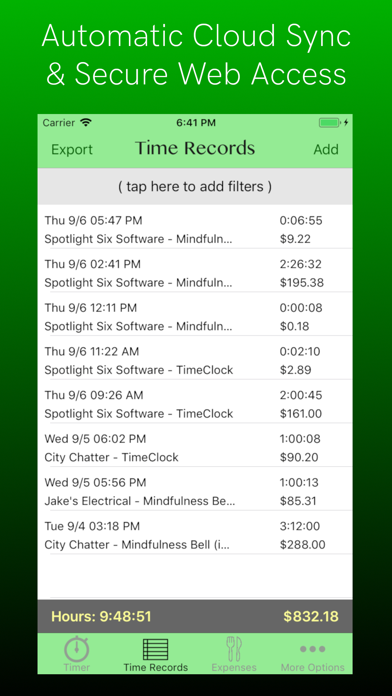
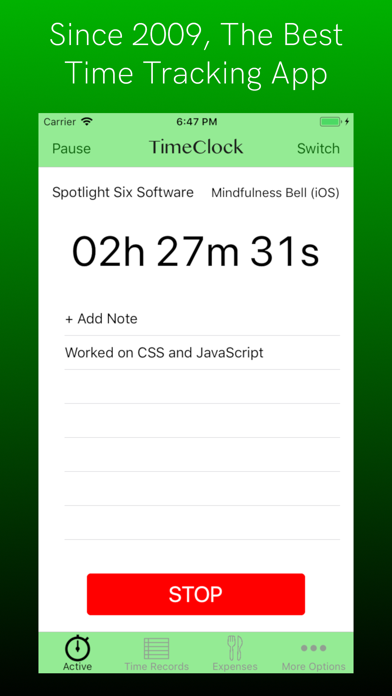
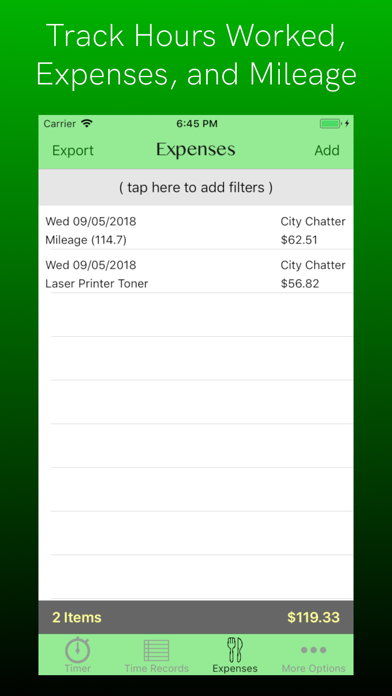
TimeClock Connect makes it easy to track your billable hours and expenses - and then use this data to generate invoices or spreadsheets. It's perfect for freelancers, contractors, attorneys or anyone who bills clients by the hour. TimeClock Connect is: * Simple and intuitive: you'll be tracking your billable hours and expenses within minutes of installing the app. * Safe and dependable: available since 2009, TimeClock Connect is rock solid and trusted by thousands of users around the world. With your TimeClock Connect cloud account, you get: * Instant, automatic back-up for peace of mind: no matter what happens your phone, your data is always safe and accessible online. * Instant syncing across multiple devices - switch seamlessly between your phones and tablets. * Secure web access from any laptop or desktop computer. * Optional invoice system: the easiest way to create and manage professional looking invoices directly from your TimeClock Connect data - no more spreadsheets! The invoice system is free for one month - afterwards there is a small monthly fee. App Features: * Set your hourly rate for each client and TimeClock Connect will calculate your earnings. * Round your work times by specifying an optional billing increment for each client - from one minute up to one hour. * Flat fee activities are supported where the client is charged a fixed amount for a job regardless of the time worked. * Track your time as you're working by clocking in and clocking out - or manually enter complete time records in the past or future. * Powerful note entry/management capabilities. * Track expenses along with your billable hours. Set up predefined expenses for recurring expense items. Manage and export your expenses from the app or from your TimeClock Connect account. * Track Mileage Expenses by providing a mileage reimbursement allowance and then entering the distance traveled OR providing starting and ending odometer readings. * View and edit all time records within the app. You can go back and change the start and end times, billing rate, notes - any field can be edited. * Customize your spreadsheet export: you pick which data columns are exported, the order of the columns and the type of summary information. * Each time record contains: client, notes and a secondary data field that defaults to "Project", but you can change this to whatever suits your business: Location, Task, Job etc. * While working, you may quit the app or even turn off the phone - the time will be tracked until you restart the app and stop the timer. * Note: TimeClock Connect does not automatically calculate overtime nor does it support multiple simultaneous timers. - - - - - - - You can use TimeClock Connect for free, but if you want to unlock all the features of the app and use the cloud-sync feature for automatic backups and web access, you have the option of purchasing one of our optional subscription products. We offer both monthly and yearly subscriptions for sync access as well as invoice + sync access. The prices may vary per country and may change without notice. Prices are clearly displayed on the app. * Payment will be charged to your iTunes account at confirmation of purchase. * Your subscription will automatically renew unless auto-renew is turned off at least 24-hours before the end of the current subscription period. * Your account will be charged for renewal within 24-hours prior to the end of the current subscription period. Automatic renewals will cost the same price you were originally charged for the subscription. * You can manage your subscriptions and turn off auto-renewal by going to your Account Settings on the App Store after purchase. * Please read our terms of service and privacy policy for more information. https://timeclockconnect.com/privacy https://timeclockconnect.com/terms