PC 용 The Photographer's Ephemeris
- 카테고리: Photo & Video
- 최근 업데이트: 2026-07-24
- 현재 버전: 4.16
- 파일 크기: 58.04 MB
- 개발자: Crookneck Consulting LLC
- 호환성: 필요 Windows XP, Windows Vista, Windows 7, Windows 8, Windows 8.1 and Windows 10, Windows 11



PC에서 The Photographer's Ephemeris 용 호환 APK 다운로드
| 다운로드 | 개발자 | 평점 | 점수 | 현재 버전 | 성인 랭킹 |
|---|---|---|---|---|---|
| ↓ PC용 APK 다운로드 | Crookneck Consulting LLC | 17 | 4.58824 | 4.16 | 4+ |
호환되는 PC 앱 또는 대안 확인
| 소프트웨어 | 다운로드 | 평점 | 개발자 |
|---|---|---|---|
| The Photographer's Ephemeris |
PC 앱 받기 | 4.58824/5 17 리뷰 4.58824 |
Crookneck Consulting LLC |
에뮬레이터의 중요성은 컴퓨터에서 안드로이드 환경을 흉내 내고 안드로이드 폰을 구입하지 않고도 안드로이드 앱을 설치하고 실행하는 것을 매우 쉽게 만들어주는 것입니다. 누가 당신이 두 세계를 즐길 수 없다고 말합니까? 우선 아래에있는 에뮬레이터 앱을 다운로드 할 수 있습니다.
A. Nox App . OR
B. Bluestacks App .
Bluestacks는 매우 대중적이므로 개인적으로 "B"옵션을 사용하는 것이 좋습니다. 문제가 발생하면 Google 또는 Naver.com에서 좋은 해결책을 찾을 수 있습니다.
Bluestacks.exe 또는 Nox.exe를 성공적으로 다운로드 한 경우 컴퓨터의 다운로드 폴더 또는 다운로드 한 파일을 일반적으로 저장하는 곳으로 이동하십시오.
찾으면 클릭하여 응용 프로그램을 설치하십시오. PC에서 설치 프로세스를 시작해야합니다.
다음을 클릭하여 EULA 라이센스 계약에 동의하십시오.
응용 프로그램을 설치하려면 화면 지시문을 따르십시오.
위 사항을 올바르게 수행하면 소프트웨어가 성공적으로 설치됩니다.
이제 설치 한 에뮬레이터 애플리케이션을 열고 검색 창을 찾으십시오. 지금 입력하십시오. - The Photographer's Ephemeris 앱을 쉽게 볼 수 있습니다. 그것을 클릭하십시오. 응용 프로그램 창이 열리고 에뮬레이터 소프트웨어에 응용 프로그램이 표시됩니다. 설치 버튼을 누르면 응용 프로그램이 다운로드되기 시작합니다. 이제 우리는 모두 끝났습니다.
그런 다음 "모든 앱"아이콘이 표시됩니다.
클릭하면 설치된 모든 응용 프로그램이 포함 된 페이지로 이동합니다.
당신은 The Photographer's Ephemeris 상. 그것을 클릭하고 응용 프로그램 사용을 시작하십시오.
Mac OS 에서 The Photographer's Ephemeris 다운로드
| 다운로드 | 개발자 | 점수 | 현재 버전 | 성인 랭킹 |
|---|---|---|---|---|
| ₩12,000 - Mac 에서 다운로드 | Crookneck Consulting LLC | 4.58824 |
4.16 | 4+ |
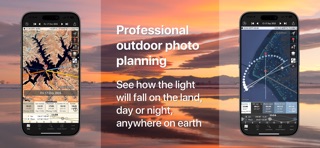
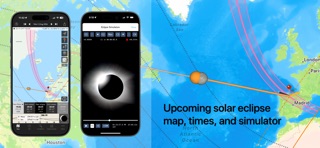
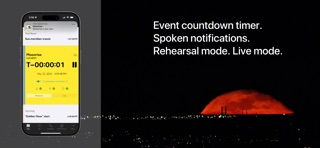
"Head and shoulders above the crowd is The Photographer’s Ephemeris. Odd name, great app." - National Geographic "One of the most useful apps for any nature photographer" - Outdoor Photographer Magazine "It worked perfectly. The program was dead on…" - National Geographic "One of the most powerful photography applications that I've seen, one that you'll be using for years and years." - AdoramaTV The Photographer's Ephemeris (TPE) helps plan outdoor photography shoots in natural light, particularly landscape and urban scenes. It's a map-centric Sun, Moon and Milky Way calculator: see how the light will fall on the land, day or night, for any location on earth. Whether you need at-a-glance information on today's sun, moon and Milky Way data for your current location, or need to plan a precise alignment of the full moon for a future shoot, TPE has the tools you need. The combination of augmented reality, line-of-sight analysis and visual search supports the most sophisticated photo planning needs. Night mode features a 3D representation of the Milky Way, pole stars and major constellations directly over the map, so you can easily visualize exactly how to align your shot. Research and save your own list of favorite photographic locations, using 7 different map types (including 2 offline maps) and save them in your locations list. Favorite locations are always displayed right on the map. Advanced features including visual sun and moon search, automatic time zone and elevation detection, correction for atmospheric refraction and height above the horizon, ensuring that you have the best possible information for planning your shoot. You can even determine when the sun or moon will rise from behind nearby hills and mountains. Key features: - Time/direction of sun, moon, and galactic center rise/set - View azimuth and altitude of sun/moon and the galactic center for any time of day/night - Milky Way, stars and asterisms visualization via 3D map overlay - Moon phase and % illumination - Civil, nautical and astronomical twilight - 2 topographic maps - 2 offline map types - Movable map pins: drag and drop the pin exactly where you need it - Map autorotation using the compass (on compatible devices) - Shadow lengths displayed to scale on map - Save any location you want: no fixed lists - Celestial events including moon phases, apogee, perigee, solstice, equinox - Solar eclipse details for August 12, 2026 and beyond: maps, simulator, times - Network connection not required for rise/set time, azimuths and sun/moon position Advanced features: - Augmented reality view for on location scouting - Saved location synchronization between devices and the free TPE web app - Automatic time zone detection - Elevation above sea level - Distance, bearing and elevation angle between any two points - Location import/export from KML - Magnetic north option - Configurable timeline display - Sun/moon transit times - 'Golden hour' time/duration - Light pollution overlay - Event countdown and notifications Geek features: - Line of sight analysis - Find when the sun/moon will appear from behind a hill or ridge - Advanced visual sun and moon search - Azimuth or altitude search priority - New crescent moon visibility - Distance to the visible horizon Available map types include: - Standard, Satellite/Hybrid, Terrain - OpenCycleMap Topographic - OpenStreetMap Sunrise/sunset color forecasts are available (covering lower 48, southern Canada and Europe) with an optional subscription to the Skyfire service, available via in-app purchase. Note: - Maps and elevation-based calculations require a data connection, except for offline map tiles previously downloaded and stored on your device - Topographic map data is available only between 60°N and 47°S - Availability of map types is subject to change, due to 3rd party map service availability, terms or conditions