PC 용 Photo Theater
- 카테고리: Video
- 최근 업데이트: 2022-05-02
- 현재 버전: 4.0.3
- 파일 크기: 35.09 MB
- 개발자: Boniten, Inc.
- 호환성: 필요 Windows XP, Windows Vista, Windows 7, Windows 8, Windows 8.1 and Windows 10, Windows 11



PC에서 Photo Theater 용 호환 APK 다운로드
| 다운로드 | 개발자 | 평점 | 점수 | 현재 버전 | 성인 랭킹 |
|---|---|---|---|---|---|
| ↓ PC용 APK 다운로드 | Boniten, Inc. | 0 | 0 | 4.0.3 | 4+ |
에뮬레이터의 중요성은 컴퓨터에서 안드로이드 환경을 흉내 내고 안드로이드 폰을 구입하지 않고도 안드로이드 앱을 설치하고 실행하는 것을 매우 쉽게 만들어주는 것입니다. 누가 당신이 두 세계를 즐길 수 없다고 말합니까? 우선 아래에있는 에뮬레이터 앱을 다운로드 할 수 있습니다.
A. Nox App . OR
B. Bluestacks App .
Bluestacks는 매우 대중적이므로 개인적으로 "B"옵션을 사용하는 것이 좋습니다. 문제가 발생하면 Google 또는 Naver.com에서 좋은 해결책을 찾을 수 있습니다.
Bluestacks.exe 또는 Nox.exe를 성공적으로 다운로드 한 경우 컴퓨터의 다운로드 폴더 또는 다운로드 한 파일을 일반적으로 저장하는 곳으로 이동하십시오.
찾으면 클릭하여 응용 프로그램을 설치하십시오. PC에서 설치 프로세스를 시작해야합니다.
다음을 클릭하여 EULA 라이센스 계약에 동의하십시오.
응용 프로그램을 설치하려면 화면 지시문을 따르십시오.
위 사항을 올바르게 수행하면 소프트웨어가 성공적으로 설치됩니다.
이제 설치 한 에뮬레이터 애플리케이션을 열고 검색 창을 찾으십시오. 지금 입력하십시오. - Photo Theater 앱을 쉽게 볼 수 있습니다. 그것을 클릭하십시오. 응용 프로그램 창이 열리고 에뮬레이터 소프트웨어에 응용 프로그램이 표시됩니다. 설치 버튼을 누르면 응용 프로그램이 다운로드되기 시작합니다. 이제 우리는 모두 끝났습니다.
그런 다음 "모든 앱"아이콘이 표시됩니다.
클릭하면 설치된 모든 응용 프로그램이 포함 된 페이지로 이동합니다.
당신은 Photo Theater 상. 그것을 클릭하고 응용 프로그램 사용을 시작하십시오.
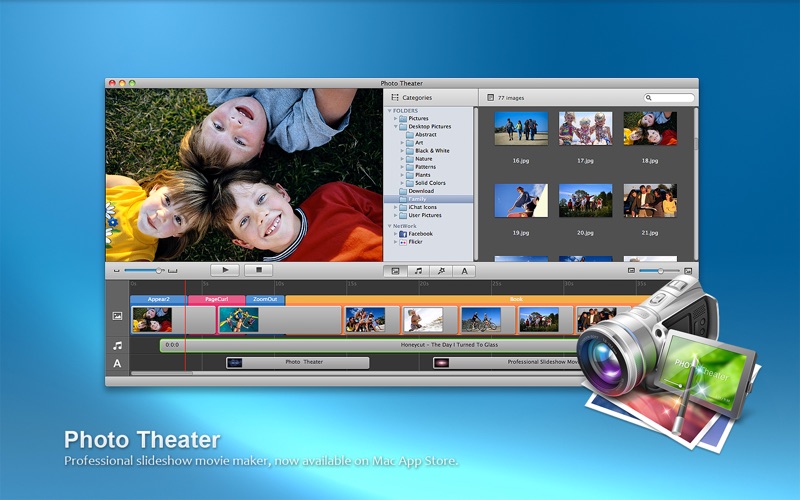
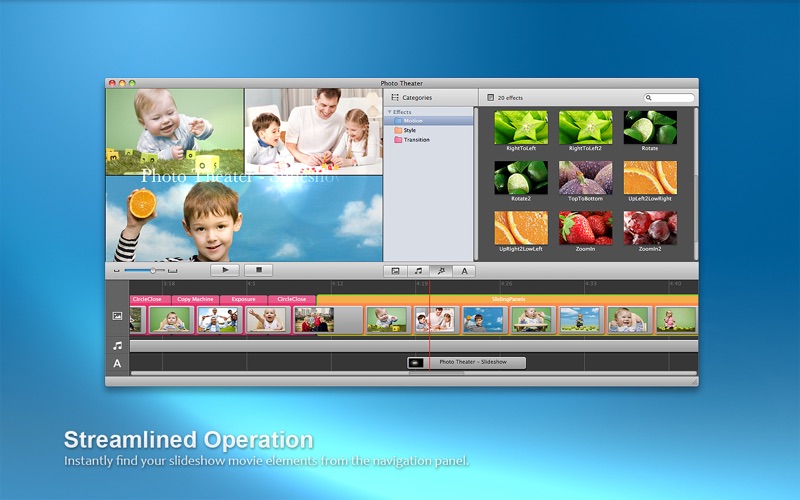
Photo Theater - Slideshow Movie Maker helps you turn your photos and music into stunning home movies. There are hundreds of built-in effects including themes and transitions to make the movies look dazzling. You can add as many background music and subtitles as you like for your personalized home movies and share home movies on Apple TV, YouTube, iPhone, etc. ● Simple to use, as easy as 1-2-3: - Drag-n-drop your favorite photos & music into Timeline - Randomly set transition effects for photo/video when added - One click to publish your movie ● Make stunning home movies - Choose from 25 themes effects with matching motion, transitions, layout & background - Come with 48 transition effects to make hollywood-style movies - Customize your own Ken Burns effect to make your movies vividly - Nearly 50 types of subtitle styles available for you to choose from - Crop your images to focus on the part you like - Trim the audio to remove the portions you don’t like - Adjust the sound volume of your audio for output ● Support various media file formats & popular devices - Add images from Photos & local Pictures folder - Import photos from facebook/Flickr online & your iPad/iPhone devices - Import music from iTunes if you share iTunes Library xml with other application in iTunes Preferences. - Support image files with extension as .JPG, .BMP, .PNG, .GIF, .PSD, .TIFF and more - Support audio files with extension as .MP3, .M4A, .WAV, .AIFF, .AMR and more ● Share online, on the go and at home with family & friends - Upload movies directly to YouTube to share online - Export movies to Apple TV to watch on the big-screen TV with family - Publish movies to iPhone/iPad to watch on the go * Fully compatible with the latest Mac OS X 10.9 and later App Support: We cannot respond to your comments and feedback on the Mac App Store. If you have got any questions or suggestions for Photo Theater - Slideshow Movie Maker, just feel free to let us know via [email protected]. We will get back to you ASAP.