PC 용 SendToX
- 카테고리: Video
- 최근 업데이트: 2026-07-18
- 현재 버전: 1.2.10
- 파일 크기: 6.39 MB
- 개발자: Intelligent Assistance Software, Inc
- 호환성: 필요 Windows XP, Windows Vista, Windows 7, Windows 8, Windows 8.1 and Windows 10, Windows 11

PC에서 SendToX 용 호환 APK 다운로드
| 다운로드 | 개발자 | 평점 | 점수 | 현재 버전 | 성인 랭킹 |
|---|---|---|---|---|---|
| ↓ PC용 APK 다운로드 | Intelligent Assistance Software, Inc | 0 | 0 | 1.2.10 | 4+ |
호환되는 PC 앱 또는 대안 확인
| 소프트웨어 | 다운로드 | 평점 | 개발자 |
|---|---|---|---|
| SendToX |
PC 앱 받기 | 0/5 0 리뷰 0 |
Intelligent Assistance Software, Inc |
에뮬레이터의 중요성은 컴퓨터에서 안드로이드 환경을 흉내 내고 안드로이드 폰을 구입하지 않고도 안드로이드 앱을 설치하고 실행하는 것을 매우 쉽게 만들어주는 것입니다. 누가 당신이 두 세계를 즐길 수 없다고 말합니까? 우선 아래에있는 에뮬레이터 앱을 다운로드 할 수 있습니다.
A. Nox App . OR
B. Bluestacks App .
Bluestacks는 매우 대중적이므로 개인적으로 "B"옵션을 사용하는 것이 좋습니다. 문제가 발생하면 Google 또는 Naver.com에서 좋은 해결책을 찾을 수 있습니다.
Bluestacks.exe 또는 Nox.exe를 성공적으로 다운로드 한 경우 컴퓨터의 다운로드 폴더 또는 다운로드 한 파일을 일반적으로 저장하는 곳으로 이동하십시오.
찾으면 클릭하여 응용 프로그램을 설치하십시오. PC에서 설치 프로세스를 시작해야합니다.
다음을 클릭하여 EULA 라이센스 계약에 동의하십시오.
응용 프로그램을 설치하려면 화면 지시문을 따르십시오.
위 사항을 올바르게 수행하면 소프트웨어가 성공적으로 설치됩니다.
이제 설치 한 에뮬레이터 애플리케이션을 열고 검색 창을 찾으십시오. 지금 입력하십시오. - SendToX 앱을 쉽게 볼 수 있습니다. 그것을 클릭하십시오. 응용 프로그램 창이 열리고 에뮬레이터 소프트웨어에 응용 프로그램이 표시됩니다. 설치 버튼을 누르면 응용 프로그램이 다운로드되기 시작합니다. 이제 우리는 모두 끝났습니다.
그런 다음 "모든 앱"아이콘이 표시됩니다.
클릭하면 설치된 모든 응용 프로그램이 포함 된 페이지로 이동합니다.
당신은 SendToX 상. 그것을 클릭하고 응용 프로그램 사용을 시작하십시오.
Mac OS 에서 SendToX 다운로드
| 다운로드 | 개발자 | 점수 | 현재 버전 | 성인 랭킹 |
|---|---|---|---|---|
| ₩25,000 - Mac 에서 다운로드 | Intelligent Assistance Software, Inc | 0 |
1.2.10 | 4+ |
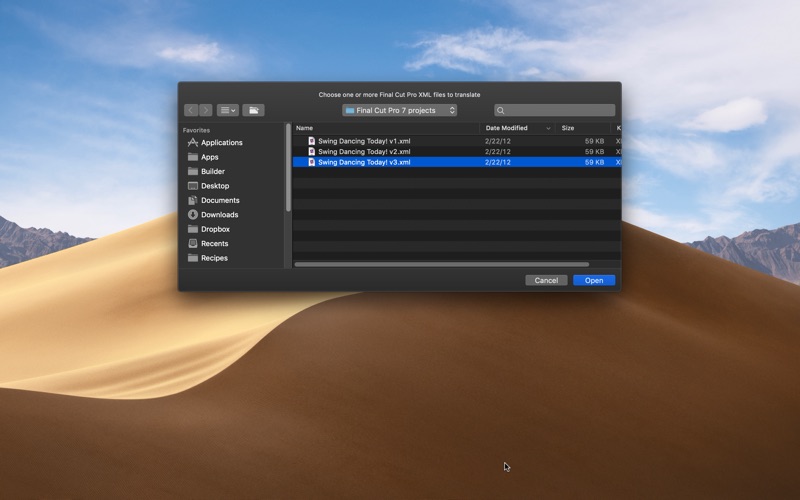
SendToX (previously called 7toX) brings your Premiere Pro or Final Cut Pro 7 or 6 XML into Final Cut Pro X so you can use Apple’s powerful new professional editing tools to update or finish your older projects. The lightweight application is simple to use, with drag-and-drop support and progress information. SendToX translates important metadata from your Project XML — including bins, clips, subclips and sequences — to a new Event in Final Cut Pro X with the highest fidelity of any translation application for Final Cut Pro. In addition, the application provides clear, detailed reporting after every translation. Requirements: • Final Cut Pro version 10.0.6 or later • An application that exports Final Cut Pro XML (such as Premiere Pro CC, Final Cut Pro 7 or 6 , DaVinci Resolve, etc.) IMPORTANT: Final Cut Pro 7 will not run on macOS High Sierra 10.13 or later! Simplicity Choose from three simple methods to translate Final Cut Pro 7 XML to Final Cut Pro X XML: • Run SendToX and use the Open dialog to locate your exported XML file • Drag-and-drop the XML file onto the SendToX application icon • Right-click on the XML file in the Finder and choose Open With > SendToX SendToX displays a progress bar during XML translation and, when completed, adds the new Event to the Event Library. The Event contains clips for each media file and Compound Clips for each sequence. SendToX supports both Final Cut Pro X and the Final Cut Pro X Trial. Fidelity SendToX produces the highest fidelity translation of your Final Cut Pro Project, including the following conversions: • Bins become Keyword Collections, complete with original Log Notes and comments • Sequences become Compound Clips and are tagged with a “Sequences” keyword to make them easy to find • Multicam Clips are fully supported • Original track structures are represented by Roles • PICT files are automatically converted to TIFF files • 31 transitions are translated to matching transitions • 72 video FxPlug and FxScript filters are translated to matching video filters • 32 audio filters are translated to matching audio filters • Layered Photoshop files are accurately translated to Layered Photoshop files in Final Cut Pro X • Motion Tab settings (Scale, Rotation, Center, Crop, Distort and Opacity) are translated to Transform settings (Scale, Rotation, Position, Crop, Distort and Compositing Opacity) • Composite Modes are translated to matching Compositing Blend Modes • Constant speed changes are translated Transparency SendToX adds red to-do markers to items that have been changed or substituted during translation. You can easily view these markers in the Timeline Index in Final Cut Pro X, and quickly jump to a specific marker to review any change in context in the timeline. Frequently Asked Questions: • Does it work with .fcp project files? - The Final Cut Pro project file is a binary format proprietary to Apple. The XML must be exported from FCP 6 or 7. • Does it work with Final Cut Pro 6 or 5? - User testing shows that SendToX does work with XML from FCP 6 and 5. We have a concern with speed changes as that changed with version 7. • Does it work with Final Cut Express? - Unfortunately Final Cut Express does not export XML, which is what SendToX translates. It is possible, if you have an accommodating friend, to import your project (with media) into Final Cut Pro and then export Final Cut Pro 7 (or 6) XML.